Who is this relevant to?

Watching from the side of the sofa

If colours or contrast look less good from where you sit, you’ll want to know whether the TV’s viewing angle is to blame. RTINGS.com explains how the picture changes when you’re not sitting directly in front of the TV; the Consumentenbond also considers viewing angle when advising on TV choice.

Using an older TV interface

Your screen still works, but you want access to a particular streaming app or controls that better suit the way you use it. Check that the service and the series you want are available on the exact version of the streamer.

Looking to watch in 4K or HDR

You want to watch nature programmes in a higher picture quality where available. Netflix outlines the requirements for picture quality, so check the title, subscription, HDMI connection, screen and network connection too.

What should you look for when choosing?

First, assess the TV and where you sit

When: if the same picture looks better when you’re sitting directly in front of the TV than from the side of the sofa.

Trade-off: rearranging your setup may mean you don’t need a new device; if you replace the TV, you may need to weigh up viewing angle and contrast.

Add a streamer

When: if the TV gives you a good enough picture from where you sit, but you’re missing an app, control option or supported picture format you want.

Trade-off: a streamer can add to the TV interface, but it won’t change the screen’s viewing angle. Check the connections and installation requirements too.

What to consider What should you check? Who is this important to?
Picture from the side of the sofa Watch your TV from your usual seat and, if replacing it, compare the viewing angle and reflections on the exact model. When I watch from the side of the sofa, I want to know whether the screen itself changes the colours or contrast. Around 36% of consumers say viewing angle is their main buying concern.
Access to the series and controls Check that the service and title are available, and that the app or controls suit the exact version. I want to be able to start the series I want easily using an available app or controls. Around 29% of consumers prioritise access or ease of use.
4K and HDR Check the title’s picture quality, your subscription, and support from the TV, streamer and HDMI port. If I want to watch nature programmes in 4K or HDR, the whole setup needs to support it. Around 21% of consumers say picture format is their main consideration.
Network and installation Check the Wi-Fi where you watch, a free HDMI port, power and any cables included or required. I want to know in advance whether it’s practical to connect and set up the device where I watch. For around 14% of consumers, network or installation requirements matter most.

Common buying mistakes

  • Buying a streamer to fix a limited viewing angle

    The viewing angle is a feature of the TV screen. Connecting a new device won’t change how the panel performs.

    Watch the same picture from your usual seat and directly in front of the TV before deciding which device to replace.

  • Assuming 4K or Dolby Vision support is a guarantee

    Support for a format on the streamer isn’t enough: the title, service, subscription, TV, HDMI connection and network all matter too.

    For the chosen title and playback quality, Netflix lists requirements for your subscription, TV, connection and settings. Check the requirements for your entire setup.

  • Mixing up generations and versions

    According to Apple, only the 128 GB version of the Apple TV 4K (3rd generation) has Ethernet; the 64 GB model uses Wi-Fi. Apple says an HDMI cable is sold separately. The announced 4th generation has different specifications.

    Check the full model name, generation, version and box contents before ordering.

  • Assuming a product listing with a similar name is the same version

    A matching product name doesn’t automatically mean the generation, variant and connections are the same.

    Compare the full model number and version, and check that the listed connections suit your setup.

Brands to consider

Google

The Google TV Streamer (4K) is designed for use with Google TV and casting from compatible apps.

  • Google lists 4K HDR, Dolby Vision and 32 GB of storage for the Google TV Streamer (4K).
  • Google lists a separately purchased HDMI cable and a compatible mobile device among the installation requirements. These features won’t change your TV’s viewing angle.

Apple

The Apple TV 4K (3rd generation) is available as a Wi-Fi model and as a Wi-Fi and Ethernet model.

  • Apple lists 64 GB for the Wi-Fi model and 128 GB plus Gigabit Ethernet for the Wi-Fi and Ethernet version.
  • An HDMI cable is sold separately for this generation. Apple gives 13 November as the release date for the announced 4th generation; don’t confuse it with the 3rd generation.

STRONG

The LEAP-S3+V2 is a Google TV box for anyone looking for features such as Ethernet or number buttons on the remote control.

  • For this V2 version, STRONG lists Ethernet, 16 GB of storage and support for 4K and HDR formats.
  • These specifications apply to the V2 version mentioned and, in themselves, tell you nothing about your TV’s viewing angle.

Products for streaming and viewing

This selection includes TVs with built-in streaming features and a projector with built-in apps. These are screen options for watching content without a separate streamer; if you choose a TV, always check the picture from where you sit.

Hisense 43A6S 43-inch 4K UHD smart TV

Hisense 43A6S 43-inch 4K UHD smart TV

An option if you want to use streaming apps directly on a 4K TV.

The product listing mentions VIDAA, 4K UHD, Dolby Vision and a 178° viewing angle. This is a stated product specification; assess the picture from where you sit too.

View at Joybuy

Projector with built-in apps, Play Store and Wi-Fi 6

Projector with built-in apps and Play Store

An option if you want to use streaming apps through a projector and adjust the projection direction.

The product name lists Wi-Fi 6, automatic screen correction, 180° rotation, HDMI and a stated screen size of 50–200 inches. Don’t look directly into the lens.

View at Joybuy

METZ 50MUF7000Z 50-inch 4K UHD smart TV

METZ 50MUF7000Z 50-inch 4K UHD smart TV

An option if you want Google TV and streaming apps on a 4K TV.

The product name lists 4K UHD, HDR10 and Dolby Vision. The product description mentions Google TV and Ethernet.

View at Joybuy

METZ 32MQF7030Z 32-inch HD smart TV

METZ 32MQF7030Z 32-inch HD smart TV

An option if you want streaming apps and casting on a compact TV.

The product name lists HD, HDR10, Google TV and Google Cast. This model is listed as HD, not 4K.

View at Joybuy
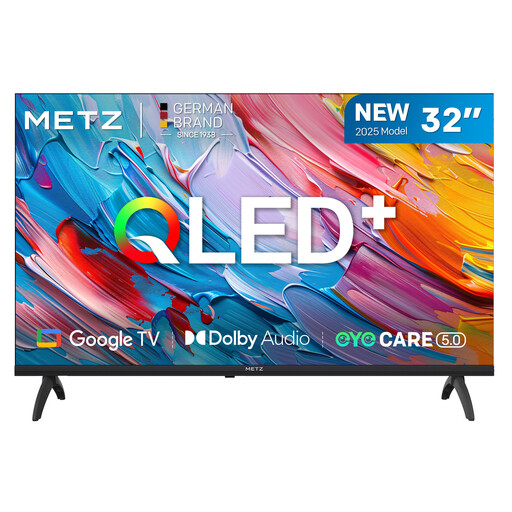
METZ 32MQF7000Z 32-inch QLED HD Google TV

METZ 32MQF7000Z 32-inch QLED HD Google TV

An option if you’re looking for built-in Google TV apps and casting on a 32-inch TV.

The product name lists QLED, HD, HDR10/HLG and Google Cast. The resolution is listed as HD, not 4K.

View at Joybuy

Frequently asked questions

Will a 4K streamer make the picture look less washed out from the side of the sofa?

Not if the TV panel’s limited viewing angle is the cause. Compare the same picture directly in front of the screen and from the side of the sofa; if you’re considering replacing the TV, check the viewing angle of the exact model.

What do I need to watch Netflix in 4K through a Google TV Streamer?

Your setup must meet the requirements of both Netflix and Google. Netflix lists, among other things, a suitable 4K subscription, a compatible 4K TV with an HDCP 2.2-compatible HDMI port, a stable connection of at least 15 Mbps, and the playback setting set to High or Auto. Google lists a connection of at least 20 Mbps as a device requirement for 4K on its streaming devices; also check that the title you want is available in your chosen quality.

Which connections and accessories should I check in advance?

Check that you have a free HDMI port, a power supply and the installation requirements for the exact model. Google says an HDMI cable for the Google TV Streamer is sold separately; Apple says the same for the Apple TV 4K (3rd generation).

What are my rights when buying online or if a product is faulty?

For online distance purchases from a business, the Dutch government says you’ll generally have a 14-day cooling-off period, subject to applicable exceptions. ACM ConsuWijzer explains that if a product is faulty, you’re entitled to a product that, under normal use, does what you could reasonably expect; there isn’t one fixed guarantee period for every device.

Can I watch the same nature series on any streamer?

Not necessarily: check that the streaming service you want is available on the exact version and that the service offers the series. An app being available on a device doesn’t, by itself, confirm that you can access a particular title.
