
Creator with a few regular recording actions
You film most of the tutorial in one setup and want to start and stop recording or mute the audio without having to reach for your recording computer each time.


Choose a compact panel with dedicated buttons if you mainly want to control recording, stopping and muting. More buttons are handy if you switch between several scenes while explaining. Rotary dials are particularly useful if you also want to adjust audio using configured controls. Before buying, check the software integration and make a test recording: a stream controller doesn’t replace your camera or other video sources.
You film most of the tutorial in one setup and want to start and stop recording or mute the audio without having to reach for your recording computer each time.
You switch between footage of the controller, a screen recording and other preconfigured scenes as you explain.
You want to use configured audio controls while recording, so you’re comparing buttons with rotary dials.
Start with the actions you actually want to control during your tutorial. When recording in a spare room, the number of scene buttons you need, audio controls and the connection to your computer will help determine which panel layout is the best fit.
| What to consider | What to look for | Who is this most important for? |
|---|---|---|
| Regular recording actions | Make a note of the actions you need and decide how many buttons you want readily available. Elgato documents recording and stopping via its OBS integration; the Stream Deck Mini has six LCD buttons. | If I’m filming from one fixed setup, I want to record and mute the audio without reaching for the computer. Around 36% of consumers give regular recording actions top priority. |
| Switching between views | First, set up your scenes and video sources in your recording software. Then compare how many actions you want to see at once; the Stream Deck MK.2 and Razer Stream Controller X each have fifteen buttons. | When I switch between the controller and a screen view during the tutorial, I want to bring up those scenes at the touch of a button. Around 29% of consumers put switching between views first. |
| Controlling audio | Decide which audio source you want to mute or adjust, and check that the configured software action supports it. The Stream Deck + has four rotary dials; the Loupedeck Live S has two. | If I want to adjust audio levels while recording, I’m looking for a panel with controls configured for that purpose. Around 21% of consumers say audio controls are their main need. |
| Software and connection | Check the model’s connection and the software versions required for your computer and recording actions. Elgato specifies Stream Deck 5.3 and OBS Studio 27.0 as the minimum versions for its OBS integration; Loupedeck describes an OBS setup using OBS Studio 28.0 or later and Loupedeck 5.3. | If my choice mainly depends on the recording computer and software I already use, I want to check they’re compatible first. Around 14% of consumers give software and connection compatibility top priority. |
A panel controls configured actions; you set up the camera and other video sources separately in your recording software.
Check that the video and audio you need are already set up as sources. Then make a short test recording.
Models vary in the number of readily available buttons and rotary dials. A dial is only useful for a configured function that the software supports.
Write down the actions you’ll actually use during one recording, then compare the panel layouts.
On 19 August 2026, Loupedeck reversed its earlier plan to end support for Razer devices. Loupedeck had already stopped selling its own products in March 2025.
Check the software version and support for the exact model. If you’re considering a Loupedeck Live S, also check who’s selling it.
The Stream Deck Mini, MK.2 and Stream Deck + have six buttons, fifteen buttons, and eight buttons plus four rotary dials, respectively.
The Stream Controller X has fifteen buttons and, according to Razer, works with Loupedeck software and an OBS plug-in.
The Live S combines fifteen touch buttons with two rotary dials and can be configured to work with OBS using Loupedeck software.
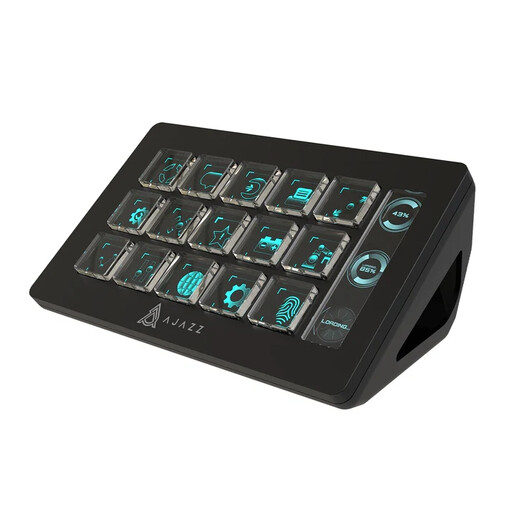
This selection focuses on a control panel with several direct buttons for preconfigured actions during a tutorial recording.
 No image available
An option for controlling several preconfigured actions at the touch of a button while recording.
15 macro buttons; the product name specifies PC/Mac.
No. OBS Studio can also record locally without livestreaming. Set up your video and audio, then make a short test recording first.
No. Set up the camera or other video source separately in your recording software. You can then use the control panel to trigger configured recording actions and switch scenes.
First, check that OBS Studio is running and that the software and plug-in are compatible with your panel. If the OBS connection is lost, Loupedeck recommends starting OBS and, if the problem persists, restarting the Loupedeck software.
When you buy from a business online, you generally have 14 days to change your mind, although there are exceptions. Buying from a private seller isn’t automatically covered by the same rules. You’re also entitled to a repair, replacement or other remedy if a product doesn’t meet the standards you’re entitled to expect when used normally. This is separate from any manufacturer’s guarantee.
Not necessarily. The Information Commissioner’s Office distinguishes between strictly personal use and sharing more widely or for business purposes. If people are identifiable and you publish the footage, data protection law may apply and you’ll need an appropriate lawful basis. Consider the circumstances before sharing the footage.