A dedicated stream controller isn’t essential: for a few timer and OBS actions, you can start with keyboard shortcuts or a phone. A physical keypad is most useful if you want several actions visible at once; choose dials only if you want to adjust supported audio settings while presenting. Test your timer, OBS, computer and connection in advance: a controller can’t stop a housemate being heard or seen.
Who can benefit from a stream controller?
Speedrunner controlling their own timer
If you want to control splits and reset without taking your attention away from the game, check whether your timer supports the configured keyboard shortcuts on your platform. LiveSplit documents global hotkeys, but how they work depends on the platform.
Presenter in a shared room
If you switch between explaining and gameplay, or want to mute a microphone source quickly, set up the right OBS scenes and audio sources, then check what can actually be heard and seen. The Dutch Data Protection Authority notes that the GDPR may apply to images made available online to an unlimited audience.
Student with limited desk space
If you want to keep things compact, first check whether your existing keyboard or phone can handle the actions you need. Elgato Stream Deck Mobile requires the desktop app and a working connection over the same local network.
What should you look for when choosing one?
First, count the timer, scene and mute actions you want to control during a run. Then try the simplest option that meets your needs: keyboard shortcuts, mobile control or a physical keypad. Dials are a separate option for supported audio controls.
| Consideration |
What to look for |
Who it matters most to |
| Timer control |
Check that your timer’s shortcuts work with your chosen controller and don’t conflict with the game. Test start, split and reset separately; LiveSplit notes that global hotkey functionality depends on the platform. |
If I want to split or reset during a run without interrupting the game, reliable timer control is my priority. Around 28% of consumers rank timer actions as their top purchasing priority. |
| Scenes and explanations |
Make a note of which scenes need to be accessible at the same time, then test in OBS whether an action selects the preview or actually switches the live output. Elgato documents OBS actions for scenes and audio sources; you’ll need to configure the actions you want. |
If I want to switch between gameplay and explanations during a presentation, I want to be able to select the right scene without searching through OBS windows. Around 22% of consumers give scene switching top priority. |
| Audio and privacy |
Check which microphone and camera sources OBS is using and which source is affected by a mute or scene action. Make a test recording and agree with housemates when they might appear or be heard. |
If I stream from a shared room, I want to be able to check what can be heard or seen of my housemates. Around 22% of consumers prioritise room privacy and quick muting. |
| Space and control |
Count the actions you want visible at once, measure the space available and check the connection on the exact device. Elgato notes that the Stream Deck Mini’s connection changed from USB-A to USB-C in 2026. |
If my desk is short on space, I want to know whether keyboard shortcuts or my phone will do before adding a keypad. Around 17% of consumers prioritise saving space or avoiding an unnecessary device. |
| Audio adjustment |
Distinguish between a mute action and a dial: check whether you can assign the control you want to the dial for each audio source. Elgato lists four dials on the Stream Deck +, but check that the specific software action is supported. |
If I want to adjust several audio levels while explaining something, I want to know whether my software supports that control. Around 11% of consumers rank live audio adjustment above other purchasing factors. |
Things to consider before you buy
-
Assuming an OBS button also controls your speedrun timer
OBS actions and timer shortcuts are separate controls. Setting up an OBS action doesn’t mean your timer will be controlled automatically.
Set up the timer shortcuts separately and test split and reset with the game open.
-
Comparing only the number of buttons
More keys can make more actions visible at a glance, but dials are designed for a different type of control. Mobile control also depends on the app and your local connection.
Count fixed actions and adjustable audio sources separately before comparing compact, larger, mobile or dial-based options.
-
Assuming one mute or pause scene will shield the room
A mute action only changes the selected audio source; a scene action only changes the image it’s configured to show. Other sources may still capture sound or video.
Check the full picture and audio with a test recording, and agree on arrangements with your housemates.
-
Assuming an older model or software guide is still up to date
In 2026, Elgato noted a change to the Stream Deck Mini’s connection. Loupedeck ended support for legacy software 5.8 and its associated marketplace on 30 March 2026.
Check the connection on the device being offered and the software version you plan to use.
Brands to compare
Elgato
Elgato offers physical Stream Deck models with different numbers of keys, as well as a mobile control option.
- Elgato documents OBS actions for scenes and audio sources. The Mini has six customisable LCD keys, the Neo has eight and the MK.2 has fifteen.
- Check the current software, the connection on the exact model and whether you can configure the timer action you want separately.
Razer
The Stream Controller X is a keypad with fifteen customisable keys, configured using Loupedeck software according to Razer.
- Razer lists OBS plug-ins and macros as configuration options.
- On 19 August 2026, Loupedeck said that support for the Stream Controller X would continue. If you run into problems, check your software version and the plug-in you want to use.
Logitech
The MX Creative Console combines a customisable keypad with a separate dialpad, and may be worth considering if you also use creative software.
- Logitech documents shortcuts and keypad pages through Logi Options+.
- Check separately whether you can assign the OBS or LiveSplit action you want to a key or dial. The console consists of two control units.
Loupedeck
According to Loupedeck, the Live S combines touch controls with dials. This model may be worth considering when comparing existing stock.
- Loupedeck said that technical support and warranty handling would continue after sales of the product range ended on 28 March 2025.
- Support for legacy software 5.8 and its associated marketplace ended on 30 March 2026. Don’t assume that older software instructions are still current without checking.
Joybuy product selection
This selection focuses on a larger physical keypad for several fixed streaming actions.
 No image available
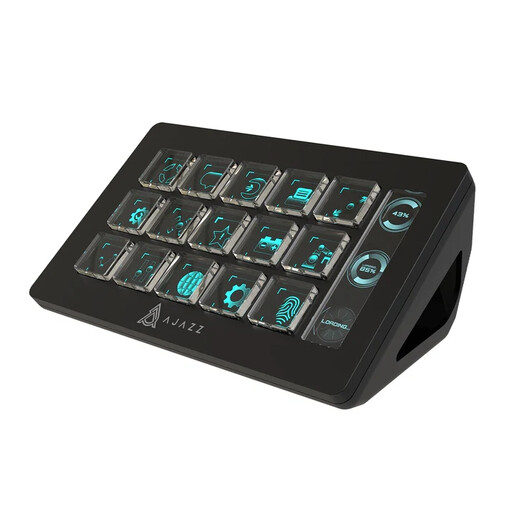
AJAZZ AKP153 Studio Controller (Black)
Suitable if you want to assign several fixed streaming actions to a physical keypad; the product description also lists an action for muting the microphone.
15 customisable LCD keys.
The product description lists chained actions and compatibility with PC and Mac. Check that your timer and the OBS actions you want work with the configuration.
Joybuy
Frequently asked questions
Will a stream controller automatically work with LiveSplit splits?
No. Set up and test the timer action separately. LiveSplit documents global hotkeys, which work differently depending on the platform; Elgato documents a configurable hotkey action. A general OBS integration doesn’t confirm a specific link with LiveSplit.
Why doesn’t my chosen scene appear in the stream straight away?
Check whether OBS is in Studio Mode. In this mode, the preview and live output are separate, so you still need to switch the prepared scene to the live output. Test both steps before presenting.
Can I use my phone as a controller without a computer or shared network?
Not with the Stream Deck Mobile setup covered here: Elgato requires the desktop app on a computer and a connection over the same local network. The free mobile version offers six customisable keys.
What if the device or software doesn’t work properly after an online purchase in the Netherlands?
For a consumer purchase, the seller is responsible for the statutory guarantee if a product is faulty, according to the Netherlands Authority for Consumers and Markets. ACM ConsuWijzer states that online purchases usually come with a cooling-off period of up to 14 days after delivery; statutory exceptions may apply. Check the terms that apply to your purchase.
Can I show a recognisable image of a housemate during a public livestream?
Don’t automatically assume that a livestream for an unlimited audience counts as use solely within the household. The Dutch Data Protection Authority says the GDPR may apply to images made available online to an unlimited number of people, and gives the consent of people being filmed as an example. Discuss recording and publication beforehand, and position the camera so others don’t appear unintentionally; the legal position depends on the circumstances.


