
Streamer with limited desk space
Wants to control a few essential streaming actions directly without giving up much space beside the mouse and keyboard.


A stream controller isn't essential: keyboard shortcuts may be enough for a few OBS actions, while a compact panel can be useful if you want to control scenes and mute actions directly. Choose more keys if you want to keep lots of actions visible, and rotary dials only if you regularly adjust individual audio sources while streaming. A controller doesn't process donations; check your fundraising service and test alerts separately.
Wants to control a few essential streaming actions directly without giving up much space beside the mouse and keyboard.
Wants to assign game, break and other prepared scenes and sources to individually labelled keys.
Wants to adjust the balance between voice, game audio and other configured audio sources more often while playing.
Best for: If you only need a few actions and would rather not have a separate control panel on your desk.
Trade-off: You won't have a separate, labelled button panel beside your keyboard.
Best for: If you want to control a limited number of scenes, mute actions or alerts directly; the Elgato Stream Deck Mini has six keys and the Neo has eight.
Trade-off: With fewer keys, you'll need to spread actions across multiple pages sooner. Check the dimensions and your setup, including the cable and stand, against Elgato's specifications.
Best for: If you want to control multiple scenes, sources and streaming actions individually, with each easy to recognise; the Elgato Stream Deck MK.2 has fifteen LCD keys.
Trade-off: Elgato's stated dimensions of 118 × 84 × 25 mm are without the stand; allow for the space taken up by the complete setup.
Best for: If you regularly adjust configured audio sources while streaming; the Elgato Stream Deck + combines eight LCD keys with four rotary dials.
Trade-off: Elgato lists this model's dimensions as 140 × 138 × 110 mm; measure your workspace to check it will fit.
For a charity stream, treat scene and audio controls separately from the service that processes donations and displays alerts.
| What to consider | What to look for | Who it's important for |
|---|---|---|
| Desk space and accessibility | Measure the available space, allowing for the stand and cable routing; decide how many actions you want to access without switching pages. | I want to use my mouse and keyboard freely while keeping a few regular actions close at hand; around 36% of consumers rank desk space as their top priority. |
| Scenes and mute actions | Check which OBS actions work with your chosen setup and how many keys need to be visible at once. | If I want to switch between several scenes while gaming, I want to recognise actions quickly; around 29% of consumers prioritise direct scene control. |
| Live audio control | Decide whether you want to adjust volume levels or separate monitoring and audience mixes, and check that your software supports those sources. | What matters to me is being able to adjust configured audio sources during the broadcast, not just mute my microphone; an estimated 21% of consumers prioritise audio control. |
| Donation alerts and privacy | Check the fundraising service's terms and test OBS alerts in advance without including identifiable personal information. Twitch says its Charity Tool is available only to Affiliates and Partners; the Dutch Data Protection Authority says you must not simply publish other people's personal data online. | I want to share information about the charity and display alerts carefully, without mistaking a controller for a donation-processing tool; around 14% of consumers prioritise fundraising activities. |
Six keys may be enough for a few regular actions, but with lots of scenes you may find yourself switching between pages more often. A larger panel takes up more space.
Write down the actions you need, then compare how many keys are visible at once and the dimensions of the complete setup.
A model page listing older hardware requirements doesn't automatically mean that the latest software will work on an older operating system. Elgato lists Windows 11 (64-bit) or macOS 13 for current Stream Deck software, and directs users of older systems to older software versions.
Before buying, check your operating system and the software version you want to use.
Routing audio, switching OBS scenes and processing donations are separate functions. Twitch also has conditions for using the Charity Tool.
Check which programme handles each action you need, and set up the donation service separately.
Loupedeck stopped selling the product range itself on 28 March 2025. Support for the old software and marketplace version 5.8 ended on 30 March 2026.
Before buying, check which software version and plugins are available for the functions you need.
The Stream Deck range includes compact models, panels with more keys and a model with rotary dials.
The Stream Controller X is a fifteen-button option for anyone who wants to control multiple actions directly.
According to Loupedeck, Live S combines touch controls with rotary dials for streaming.
The MX Creative Console combines an LCD keypad with a separate dialpad, and may also be useful for creative shortcuts.
According to the manufacturer, BEACN Mix Create is designed for audio mixing and routing.
Below are stream controllers with customisable keys for preselected streaming actions.
 Image unavailable
The 15 macro keys are a good fit if you want to control several preselected streaming actions.
The product name lists 15 macro keys and a side screen.
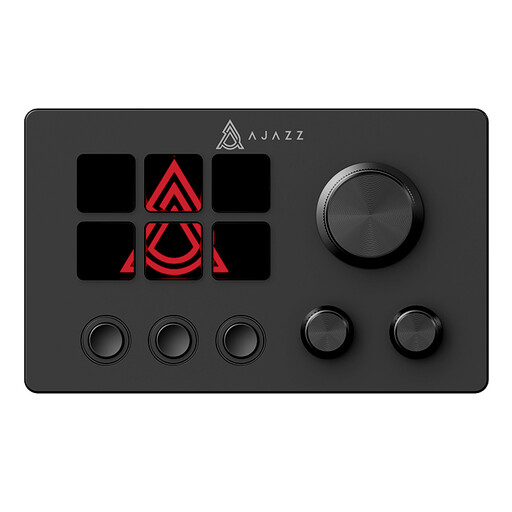 Image unavailable
The customisable buttons may suit anyone who wants to control frequently used streaming actions with a single press.
The product name lists an LCD display, customisable buttons and one-key control.
No, OBS has keyboard shortcuts. Test them with your own game to see if they do the job and don't cause conflicts before choosing a separate panel.
First, create scenes and sources in OBS, then assign the actions you need and make a short test recording or test stream. OBS recommends testing for a few minutes beforehand.
No. Twitch says the Charity Tool is available only to Affiliates and Partners. Also check that your chosen charity is listed in the tool; a controller doesn't change those requirements.
Not without first checking the relevant legal basis for using their personal data. The Dutch Data Protection Authority says you must not simply publish other people's personal data online; what is allowed depends on the circumstances. If possible, test alerts without including identifiable personal information.
No, don't assume a donation is tax-deductible because it was made during a stream or using a particular controller. The Dutch Tax and Customs Administration says donations to an ANBI may be deductible under certain conditions; check whether the organisation is an ANBI and which conditions apply to your donation.