Start with OBS hotkeys if a few fixed actions are all you need. Choose a compact panel for a small number of actions you want to see at a glance, more keys if you want to view lots of actions at once, or dials if you want to adjust supported audio during your showcase. OBS Project documents hotkeys, and Elgato describes OBS actions for Stream Deck. Also base your choice on the desk space available, the connection on the exact version you’re buying and the software versions required.
Who is this for?
Showcase creator with limited desk space
You want to control gameplay and explanations while keeping your keyboard and mouse within easy reach. Compare the number of actions you want to see at a glance with the dimensions and layout of a compact panel.
Presenter using multiple scenes
You switch between pre-set OBS scenes or sources as you explain things, and want to find important actions straight away.
Creator who adjusts audio live
You want to do more than mute audio during the demonstration: you also want to adjust set sound levels. Check whether your software lets you assign the action you need to a dial.
What should you look for when choosing?
First, decide which actions you need to access quickly during the showcase. Then choose how many visible keys or dials will suit your needs.
OBS hotkeys
Best for: using just a few fixed actions and working out which controls you’re missing before buying anything else.
Trade-off: you don’t need a separate panel, but you also won’t have dedicated controls with clearly labelled actions.
Compact panel with six or eight keys
Best for: controlling a small number of presentation actions directly, when space is limited.
Trade-off: if you need more actions than will fit at once, you’ll need to use folders or switch between pages.
Panel with fifteen direct actions
Best for: keeping a range of scene and source actions visible at once, alongside controls such as recording and microphone functions.
Trade-off: a larger grid of keys needs its own space on your desk. Also check the software required for your integration.
Panel with dials
Best for: regularly adjusting set audio sources during your presentation, rather than just muting them.
Trade-off: the level adjustment you need must be available in your software and assigned to the dial in advance.
| What to consider |
What should you check? |
Who should consider this? |
| Scenes and sources |
Make a note of the OBS actions you want to perform directly, and check that you can set them up with your OBS version and controller integration. Elgato documents scene and source actions, among others. |
I want to switch between gameplay and explanations during a showcase without having to search for an action. Around 36% of consumers prioritise direct control of scenes and sources. |
| Desk space |
Measure the space available, including room for the cable and any stand. Elgato lists the Stream Deck Mini as measuring 84 × 60 × 58 mm and the Neo as 107 × 26 × 78 mm; compare these dimensions with your exact setup. |
I want to reach the panel without losing space for my keyboard and mouse. Around 29% of consumers prioritise finding a suitable spot on their desk. |
| Microphone and audio |
Decide which audio source you want to control, then test whether the assigned key or dial affects that source. Elgato documents OBS audio mixer actions; Loupedeck describes assigning actions to keys or dials. |
When explaining things aloud, I want to be able to mute or adjust a sound level without taking my attention away from the demonstration. Around 21% of consumers prioritise live audio control. |
| Setup and connection |
Check the connection on the exact version you’re buying and the software versions required. For its documented OBS integration, Elgato lists Stream Deck 5.3 or later and OBS Studio 27.0 or later. |
I want to minimise extra setup and connection issues for my presentation. Around 14% of consumers prioritise an easy setup. |
Common mistakes
-
Counting only the total number of assignable actions
Folders and pages can make more actions available, but they won’t all be visible at once. During a spoken demonstration, the layout affects how quickly you can find the right control.
First, count the actions you want to see at a glance. Compare that number with the visible keys, and plan to put any remaining actions on another page.
-
Assuming a dial guarantees audio control
Having a dial doesn’t prove that the OBS or audio action you need is available in your software or assigned to it.
Check the specific integration and test the audio source you want to use before presenting your showcase.
-
Assuming an old connection specification applies to every Stream Deck Mini
Elgato’s device comparison from January 2026 lists USB-A for the Mini; Elgato’s technical documentation says the connection changed to USB-C in 2026.
Check the connection on the version being offered and the available ports on your computer.
-
Assuming a product page proves the manufacturer is still selling the product
On 28 March 2025, Loupedeck announced that it was ending sales of its product line, while technical support and warranty services would continue.
For a specific Live S listing, check who is selling it, the condition of the device and what support is available.
Relevant brands to consider
Elgato
Elgato’s Stream Deck range includes compact models with six or eight keys, as well as models with fifteen keys or dials. Elgato documents the features and dimensions of its different models.
- Elgato documents OBS actions for scenes, sources, recording and the audio mixer.
- Elgato says the Mini’s connection changed in 2026; check which connection the version being offered has.
Razer
Razer describes the Stream Controller X as a model with fifteen buttons; Loupedeck explains how to set up OBS actions using its software.
- On 19 August 2026, Loupedeck said that support for this Razer model would continue.
- Loupedeck recommends version 6.4.1 or later as a troubleshooting step if the device isn’t recognised; this doesn’t guarantee that every existing installation will work without issues.
Loupedeck
Loupedeck describes the Live S as a panel with fifteen touch buttons and two dials, for anyone who wants to control scenes and adjust audio.
- Loupedeck explains how to assign actions to keys and dials for use with OBS.
- Loupedeck ended sales of its product line on 28 March 2025, but said that technical support and warranty services would continue. Check the terms for the specific listing.
Joybuy products for controlling your showcase
These Joybuy products are desktop controllers with programmable buttons or macro controls; the AKP03E also has dials, while the AKP153 has fifteen macro buttons.
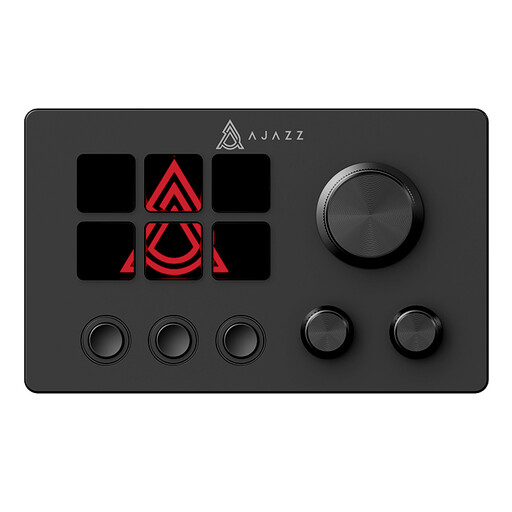 Image unavailable
AJAZZ AKP03E LCD multimedia controller
Suited to anyone who wants to include dials and assignable macro keys in their setup.
The product information lists an LCD display, customisable buttons, macro keys and dials.
View at Joybuy
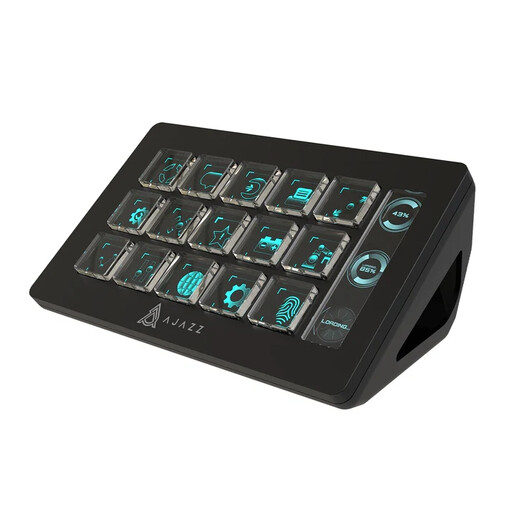 Image unavailable
AJAZZ AKP153 Studio Controller, 15 macro buttons
Suited to anyone who wants to trigger multiple macro actions directly during a showcase.
The product information lists 15 macro buttons, custom button icons and a side screen. OBS is mentioned among the software controls; check that the setup described is compatible with your configuration.
View at Joybuy
Frequently asked questions
Do I need to buy a stream controller to switch things during my mod showcase?
No, you can start by setting up hotkeys in OBS and making a test recording. A separate panel is mainly useful if you want controls that are easy to reach and recognise.
How do I set up a panel for my presentation?
First, create the scenes and sources you need in OBS, then assign the corresponding actions in your controller software. Before your presentation, test that switching scenes and muting audio control the right scene or audio source. Elgato documents OBS actions; Loupedeck explains how to assign actions to a key or dial.
What if a panel I bought online isn’t suitable?
For eligible distance purchases in the Netherlands, consumers generally have a 14-day cooling-off period, according to the Dutch government. Check who the seller is and what returns information is provided with the specific listing. Purchases from private individuals are not covered by the same distance-selling rules, according to the government guidance cited.
Which product safety rule applies to an electronic control panel?
The Dutch government states that electronic devices offered for sale in the EU must have a CE marking. This general requirement doesn’t confirm that a specific model or item being offered meets all applicable requirements; check the information provided with the product.


