
Creator recording with a flatmate
You want to control recording and your microphone quickly, while also taking other voices and a shared space into account. A controller won’t soundproof the room.


Start with the actions you want to control while recording: a compact panel may suit recording, muting and a few scene changes, while a controller with dials is another option if you want to adjust audio sources. Check OBS compatibility and make a test recording. A controller operates functions, but it won’t remove other people’s voices from a shared room.
You want to control recording and your microphone quickly, while also taking other voices and a shared space into account. A controller won’t soundproof the room.
You switch between gameplay and other OBS scenes while explaining something, and want those actions to be easy to find.
For example, you want to control your microphone and game audio separately while recording, so you’re considering dials as well as buttons.
First, count the actions you genuinely miss during a test recording. Then decide how many actions you want to see at once, and whether you want to adjust audio while recording.
| Consideration | What to look for | Who is this important for? |
|---|---|---|
| Microphone and shared room | Check whether the software can mute the right microphone source, and test a recording with typical room noise. | If I want to mute my microphone quickly when my flatmate can be heard, I want to know which source the button controls. Around 36% of consumers prioritise microphone control. |
| Switching scenes | Count the scenes and other actions you use, then check how many buttons are visible at once. | If I switch between gameplay and other scenes while explaining something, I want those options to be easy to find. Around 29% of consumers prioritise scene changes. |
| Starting out with a compact setup | Make a short recording first and see which controls you miss. Also check the connection and operating system requirements for the model. | If I share a desk or have a small one, I only want to make room for actions I actually use. Around 21% of consumers prioritise starting with a compact, simple setup. |
| Adjusting audio sources | Decide which sources you want to adjust while recording, and check whether the relevant plug-in supports dial controls. | If I want to adjust several audio sources while recording, I want to know whether the controls will work with my software. Around 14% of consumers prioritise adjusting audio sources. |
A mute action switches off the selected audio source, so that source won’t be recorded while it’s muted. OBS describes noise suppression as most useful for mild background noise, and notes that it has limitations in a noisy room.
Test your microphone with typical sounds in the shared room before choosing a controller to solve this problem.
Models vary in the number of buttons and the controls they offer. You can also start a recording directly in OBS, without a separate panel.
During a test recording, note which actions you actually miss. Only then decide how many actions you want to see at once.
Loupedeck ended support for the old software version 5.8 on 30 March 2026. On 19 August 2026, the company confirmed that support for the Razer device would continue.
Check the current software and plug-in instructions for your specific model rather than relying solely on an older guide.
Switching over may take time, including migration and setting everything up again.
The Stream Deck range includes everything from a compact panel to models with dials. Elgato documents OBS actions for recording, scenes and audio sources.
The Stream Controller X has fifteen buttons, works with Loupedeck software and is described by Razer as compatible with OBS.
According to Loupedeck, Live S combines fifteen touch buttons and two dials for tasks including scene and audio control.
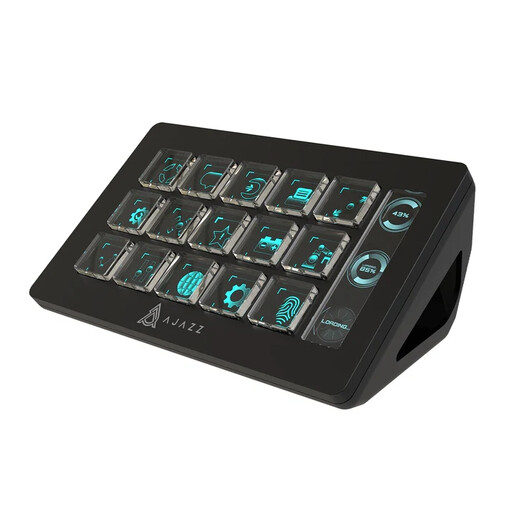
AJAZZ describes the AKP153 as a customisable control panel with fifteen buttons and actions that can be set up in software.
This Joybuy selection is suited to anyone who wants to control several actions directly from a multi-button panel while recording in OBS.
 No image available
Worth considering if you want several actions within easy reach while recording.
The product name specifies 15 macro buttons and the black finish.
A controller won’t remove other people’s voices from a shared room; test your microphone and recording separately.
No, a control button won’t remove background noise. You can use an OBS action to mute an audio source, but that source won’t be recorded while it’s muted. OBS describes noise suppression as most useful for mild background noise, and notes that it has limitations in a noisy room. So, make a test recording.
First, create your scenes in OBS and check in the audio mixer that the right microphone is being recorded. Then assign supported recording, scene and mute actions, and test everything for a few minutes. The software versions required vary depending on the integration.
First, check that OBS is running and that the software versions are compatible with the integration. If an OBS plug-in isn’t connected, Loupedeck recommends restarting the software; Elgato lists its own version requirements for OBS integration.
For online consumer purchases covered by the statutory cooling-off period, you generally have 14 days from delivery. Your statutory guarantee is separate from any manufacturer’s warranty: if a product doesn’t meet your reasonable expectations when used normally, contact the seller.
That depends on the specific recording and how it’s published. According to the Dutch Data Protection Authority, the exception for personal or household use doesn’t apply when footage is shared more widely; a legal basis under the GDPR is then needed to process recognisable images. The applicable legal basis depends on the circumstances.