Start with the OBS actions you need to perform during your presentation, such as switching between wide shots, close-ups and camera views. Choose enough buttons for these actions, and add dials only if you want to adjust supported audio sources regularly. Check the software version and compatibility with your computer in advance, then test the picture and sound in a recording.
Who is a stream controller suitable for?
Presenters who switch between views
When showing, for example, wide and close-up views of a mod, you can use OBS scenes and sources to choose what appears in your presentation. OBS Project explains how to build scenes using games, webcams and other media.
Presenters who need to adjust audio
If you speak during your demonstration, it can be useful to mute the microphone or another audio source, or adjust its level. Elgato documents OBS actions for muting audio sources; check which action suits your setup for each control.
Presenters with limited desk space
If you only use a few actions regularly, count them before choosing a larger panel. The Elgato Stream Deck Mini has six buttons, while the Stream Deck MK.2 has fifteen.
What should you look for when choosing one?
First, count the scenes and source actions you want to control directly during your presentation. Then decide whether you only need buttons, or whether you also want to adjust the level of individual audio sources regularly.
| What to consider |
What should you look for? |
Who is it important for? |
| Scenes and views |
Count how many scenes and source actions you want to select directly at the same time; check which OBS actions are supported. |
If I often switch between, for example, a wide shot and close-ups while presenting, I want to select those views quickly. Around 31% of consumers say instant view switching is their main need. |
| Hiding picture and muting sound |
Check which button hides or mutes the right camera or audio source, then test it with a recording. |
If I want to temporarily remove a camera or microphone from the picture or sound, I want to be able to control the right source deliberately. For around 31% of consumers, hiding picture or muting sound is the priority. |
| Audio controls |
Check whether the controls can adjust the level of your individual audio sources; muting and adjusting the level are different actions. |
If I want to adjust the level of a specific audio source while speaking, I check for the relevant software action. Audio adjustment is the main reason for around 23% of consumers. |
| Size and compatibility |
First count the actions you need, then compare the system requirements for both the device and the software version you want to use. |
If I only need a few controls and want to use as little desk space as possible, I look for a compact controller that works with my computer. A small, compatible setup is the main need for around 15% of consumers. |
The percentages give a broad breakdown of consumers by their main need for this type of presentation; each need is a separate category.
What to consider before buying
-
Confusing a mute button with noise cancellation
A mute action switches off a selected audio source, but it won’t remove background noise while that source is active. OBS Project says noise suppression is generally ineffective when there is a lot of background noise.
Test the microphone and the room with a recording. Choose audio controls based on the sources you actually use.
-
Assuming compatibility from the device specifications alone
The published system requirements for a device may differ from those for its current companion software.
Check the exact device, operating system, software version and required plug-ins as one complete setup.
-
Taking an old product page as proof that it is still on sale
Loupedeck said sales of its own product line ended on 28 March 2025, even though the product page still describes features of the Live S.
For this model, check current availability, the condition of the product and the software support available separately.
Brands to compare
Elgato
The Stream Deck range includes compact and larger button panels, as well as a model with buttons and dials.
- Elgato documents OBS actions for scenes, source visibility and audio.
- Check the current software requirements separately from the device specifications.
Razer
According to Razer, the Stream Controller X has fifteen customisable buttons and uses Loupedeck software.
- Razer lists an OBS plug-in via Loupedeck.
- On 19 August 2026, Loupedeck said that support for Razer devices would continue. Still, check the software version and specific plug-ins required for your workflow.
Ulanzi
According to Ulanzi, the D200X combines fourteen customisable LCD buttons, three dials and an integrated hub.
- Ulanzi lists OBS among the applications that work with hotkeys.
- Check that the OBS audio action you want works with the specific dial and suits your workflow.
Loupedeck
According to Loupedeck, the Live S has fifteen touch buttons and two dials for tasks including streaming and audio control.
- The combination of buttons and dials supports a range of different control actions.
- Loupedeck said sales of its own product line ended on 28 March 2025. Don’t assume that the manufacturer is still selling it directly.
Joybuy product selection
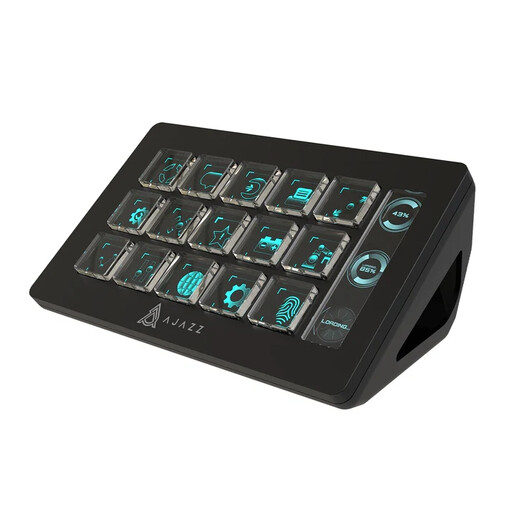
This Joybuy selection focuses on a larger button panel for several presentation actions you want to control directly, with OBS control listed as one of its uses.
 No image available
AJAZZ AKP153 Studio Controller, 15 Macro Buttons (Black)
A panel with 15 macro buttons could be a good fit if you want to control several actions directly during a presentation; OBS is listed as one of its uses.
The product name specifies 15 macro buttons and PC/Mac compatibility. Check the required software and test how the OBS actions you want work on your computer.
Joybuy
Frequently asked questions
How do I set up a controller for my mod presentation?
First, create scenes and sources in OBS for the views you actually want to show. Then assign only the actions you need during the presentation to buttons. Use a recording to test scene selection, source visibility, recording and the correct audio source.
Do I need dials to mute my microphone?
No, you don’t need dials to mute an audio source. Elgato documents an OBS mute action for an audio source; dials are mainly useful if you want to adjust supported levels during your presentation.
Will an older operating system work if it’s listed in the device specifications?
Not necessarily with the current software. Elgato lists Windows 11 (64-bit) or macOS 13 or later for the current Stream Deck software, while the published requirements for models such as the MK.2 also mention older systems. Check both sets of requirements before buying or installing.
Can I show someone who is recognisable on camera in a public mod stream without asking?
Don’t automatically assume that the exception for personal or household use applies. The Dutch Data Protection Authority says this exception doesn’t apply when recognisable footage is shared with a wider group. Consider the circumstances and the applicable privacy rules before publishing.


