Which set-up is right for you?

Seller of stamps with fine details

You want to assess small features and a stamp’s condition. Pay particular attention to the magnification offered by the exact camera and lens combination, and to sharpness across the stamp. Canon and OM Digital Solutions publish relevant magnification and close-up information for specific models.

Seller adding lots of new listings

You want to capture overview and detail shots in the same place every time. A repeatable set-up with minimal changes can be important; a fixed support and lighting are practical considerations.

Seller of colour-sensitive stamps

You want to avoid unintentionally changing the colour with lighting or white balance, and make sure gloss or surface texture remains visible. Canon explains that RAW images allow you to adjust the white balance afterwards.

What should you look for when choosing?

Your existing smartphone with a fixed set-up

Choose this if: you want to test whether your current device can capture a complete stamp and its important details in sharp focus.

Bear in mind: macro suitability varies between phones; a fixed position and suitable lighting are still important.

Compact camera with close-up mode

Choose this if: you want to take close-up shots without changing lenses. OM Digital Solutions states that the TG-7 can focus at distances of up to 1 cm.

Bear in mind: the lens isn’t interchangeable. Take a test shot to check that both the whole stamp and the detail you want are clearly in frame.

Mirrorless camera with a suitable lens

Choose this if: you want to match your lens to both overview shots and small details. Canon lists 0.5× maximum magnification for the separate RF 35mm F1.8 MACRO IS STM.

Bear in mind: a kit lens and a separate macro lens aren’t the same thing. Check the exact lens and mount, and factor in any additional equipment when making your choice.

Flatbed scanner for flat stamps

Choose this if: your stamps can lie flat and you want to try a repeatable image without setting up a camera.

Bear in mind: a scan won’t show the item from another angle. Test a sample to see how colour, gloss, paper texture and relief come across.

What to consider What to look for when buying Who should pay particular attention?
Small details and sharp edges Compare an image of a complete stamp with a close-up, and check the maximum magnification of the exact lens. If I want to show fine features, the edges must also be sharp enough to assess the condition. Around 33% of consumers prioritise detail.
Repeatable photos Take several shots from the same position and consider how many steps are needed to capture an overview and a detail image. If I’m listing lots of stamps in a row, I want to be able to repeat the framing, lighting and focus easily. Around 25% of consumers prioritise workflow and repeatability.
Colour and visible condition Compare shots taken in the same lighting, check the white balance and assess any automatic image corrections. If colour and condition are key to my listing, I want to make sure the lighting or editing doesn’t make the stamp look different. Around 25% of consumers prioritise this.
Complete set-up Compare the complete set of equipment needed to take your test shots, including the exact lens and any support or lighting. If I want to keep my spending within budget, I compare the complete usable set-up rather than just a camera body. Around 17% of consumers start by looking at the total cost of the set.

Common buying mistakes

  • Comparing only the camera body or kit

    A kit lens doesn’t automatically offer the same magnification as a separate macro lens. The Canon EOS R50 kit includes an RF-S 18-45mm lens; the RF 35mm F1.8 MACRO IS STM is a separate lens.

    Check exactly what’s included in the kit and compare the set-up you’ll need to take both overview and detail shots.

    A separate macro lens, and possibly lighting or support, may add to the cost of your set-up.

  • Looking only at the minimum focusing distance

    Being able to focus up close doesn’t tell you how much of the frame the stamp will fill or how much room you’ll have for lighting.

    Compare the maximum magnification and framing with your own stamp sizes, and check that you can position the lighting practically.

  • Using automatic colour or dust correction without checking

    White balance affects the colour captured, while correction software can change the scanned image. This may matter when the image needs to show the stamp’s condition.

    Keep an unedited version and compare the final image with the original item.

    Allow time to check the edited image and, if necessary, take another photo or scan.

Brands to compare

OM SYSTEM

The TG-7 is a compact camera with a built-in microscope mode, for anyone who wants to try close-ups without an interchangeable lens.

  • OM Digital Solutions lists focusing at distances of up to 1 cm and a 12 MP sensor for the TG-7. These specifications aren’t an independent assessment of stamp photos.
  • According to OM Digital Solutions, the published support period for the named firmware and apps ended on 30 September 2026. Check current support if transferring images via an app is important to you.

Canon

The EOS R50 is worth comparing as a mirrorless camera, where the body, mount and chosen lens all determine the set-up.

  • Canon specifies 24.2 effective megapixels for the EOS R50 and up to 0.5× magnification for the separate RF 35mm F1.8 MACRO IS STM.
  • According to Canon, the RF-S 18-45mm kit lens offers up to 0.26× magnification at 45 mm with manual focusing. So check exactly which lens is included in the set.

Nikon

The Nikon Z system is an option to compare if you want to put together a camera set-up with a separate macro lens.

  • Nikon specifies a 1:1 reproduction ratio for the NIKKOR Z MC 50mm f/2.8.
  • This specification applies to the lens and isn’t a tested photo of a stamp. Check the camera body, mount and exact bundle contents.

Sony

Sony’s APS-C E-mount gives you the option of comparing a separate macro lens with a compatible camera.

  • Sony describes the E 30mm F3.5 Macro SEL30M35 as a 1:1 lens for compatible E-mount cameras.
  • Sony lists a minimum focusing distance of 9.5 cm. This isn’t the same as the working distance in front of the lens, so allow room for lighting too.

Epson

The Perfection V39II is a flatbed scanner to compare with cameras if your stamps can be scanned flat.

  • Epson lists an A4 scanning bed, 4800 dpi and software that includes dust and colour correction.
  • The stated resolution alone doesn’t prove that the gloss, relief or colour of a particular stamp will be reproduced accurately. Try a test scan.

Cameras and bundles at Joybuy

These cameras and bundles are models to compare for this purpose. Before buying, check whether the exact version is suitable for stamp close-ups and what’s included in the bundle.

DJI Pocket 3 Camera with Ulanzi storage case

DJI Pocket 3 Camera with Ulanzi storage case

Take a test shot to check whether this model can capture a complete stamp and its small details in sharp focus.

The product name lists a Ulanzi storage case.

View at Joybuy
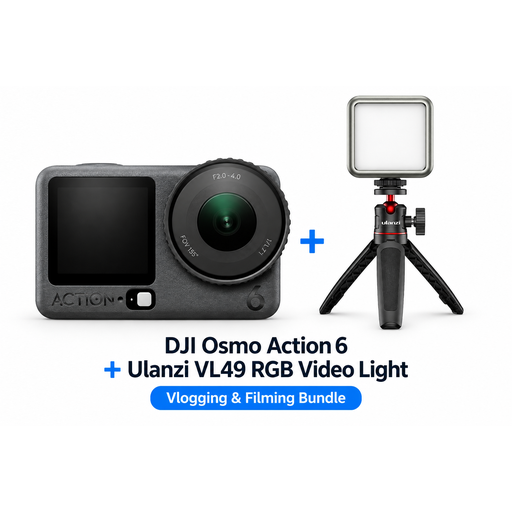
DJI Osmo Action 6 Adventure Combo with Ulanzi VL49 RGB LED light

DJI Osmo Action 6 Adventure Combo with Ulanzi VL49 RGB LED light

Before choosing, check whether this exact camera can take close-ups of your stamps; the bundle name alone doesn’t indicate that it’s suitable for macro photography.

The product name lists an Adventure Combo and a Ulanzi VL49 RGB LED light.

View at Joybuy

DJI Osmo Pocket 3 Creator Combo with Ulanzi VL49 RGB LED light

DJI Osmo Pocket 3 Creator Combo with Ulanzi VL49 RGB LED light

Take a test shot to check whether the camera can capture the complete stamp and the details you want to show in sharp focus.

The product name lists a Creator Combo and a Ulanzi VL49 RGB LED light.

View at Joybuy
DJI Osmo Pocket 3 with Ulanzi VL49 RGB LED light

DJI Osmo Pocket 3 with Ulanzi VL49 RGB LED light

Take a test shot first to see whether this model offers the magnification and sharpness your stamps need.

The product name lists a Ulanzi VL49 RGB LED light.

View at Joybuy

DJI Osmo Pocket 3 Creator Combo with 1-inch CMOS sensor and microphone

DJI Osmo Pocket 3 Creator Combo

Check whether this exact version can take the close-ups and cropped images you need to show the condition of your stamps.

The product name lists a 1-inch CMOS sensor, 4K/120fps video, 3-axis stabilisation, face and object tracking, fast focusing and an included microphone.

View at Joybuy

Frequently asked questions

How do I get started with repeatable stamp photos?

Lay the stamp flat, keep the camera and lighting in the same position, and take both a full image and a detail shot. Check the sharpness along the edges and the white balance; precise focusing is important for close-ups.

Is the kit lens supplied with a mirrorless camera automatically a macro lens?

No. Canon lists a maximum magnification of 0.26× for the RF-S 18-45mm at 45 mm with manual focusing; the separate RF 35mm F1.8 MACRO IS STM is specified at 0.5×. So compare the exact lens supplied with the detail shot you want to take.

What should I check about the warranty or servicing of a camera for my online shop?

Before buying, check whether you’re purchasing as a consumer or a business, and read the applicable terms. The Netherlands Authority for Consumers and Markets explains the legal guarantee for sales to consumers; this guidance doesn’t necessarily apply to business purchases. If you rely on app transfers with the TG-7, check current support too: OM Digital Solutions gave 30 September 2026 as the end date of the published support period for the relevant apps and firmware.

What rules should I know about when using photos in my online shop?

Make sure your images represent the product and its condition accurately. The Netherlands Authority for Consumers and Markets warns that incorrect or omitted essential information in sales to consumers can give a misleading impression of what’s on offer. The Netherlands Chamber of Commerce explains that other people’s photos may be protected by copyright; don’t use them without the necessary permission.
