
Animator who uses keyboard shortcuts
You often switch between tools and frames while animating, and want to access keys directly or use your own layout. Aseprite describes customisable keyboard shortcuts and frame navigation using the arrow keys.


Choose a keyboard based on the shortcuts your sprite editor uses and the space you need beside your mouse or graphics tablet. Two screens don’t, in themselves, mean you need two keyboards. A compact, configurable model may suit repeated editing tasks, while a split or wave-shaped model addresses a different priority: your preferred typing position. For a dual-screen workstation, the Sectorinstituut Transport en Logistiek’s Health and Safety Catalogue recommends using one keyboard and one mouse wherever possible. Also check each keyboard’s physical layout, connection and whether any accompanying software works with your computer.
You often switch between tools and frames while animating, and want to access keys directly or use your own layout. Aseprite describes customisable keyboard shortcuts and frame navigation using the arrow keys.
You spend a long time working at a screen and want to consider where your keyboard and other input devices are positioned. Arboportaal outlines requirements for employees who work at a screen for more than two hours a day, including using a separate keyboard or screen when working on a laptop.
You share your desk with two screens and a mouse or graphics tablet, and want to free up space without making important editing keys hard to reach. For a dual-screen setup, the Sectorinstituut Transport en Logistiek’s Health and Safety Catalogue recommends using one keyboard and one mouse wherever possible.
Start by checking how easily you can reach your most important editor commands. Aseprite lets you customise keyboard shortcuts, but key positions and how you use them depend on the keyboard layout you choose.
| What to consider | What should you check? | Who should pay particular attention? |
|---|---|---|
| Keyboard shortcuts and custom layouts | Check that your most frequently used commands are easy to reach, and that your editor and any configuration software work with your computer. | If I switch between tools and frames often, I want to access my most important commands quickly. Around 36% of consumers in this buying context put keyboard shortcuts and custom layouts first. |
| Working posture | Compare the position of the keyboard and mouse, and see whether a split layout or wave-shaped model suits your preferences. | If I work at a screen for long periods, I want to consider the position of my hands and input devices without assuming a particular health outcome. Around 29% of consumers say working posture is their top priority when choosing. |
| Space for a mouse or graphics tablet | Measure the available space and check that the arrow keys and other frequently used keys remain easy to reach. | If I share my desk with a mouse or graphics tablet, I want to free up space without losing access to essential keys. Around 21% of consumers give available desk space top priority. |
| Keyboard layout and connection | Check the exact physical layout of the model and make sure its connection is compatible with your computer. | If I’m used to fixed key positions or need a specific connection, I want to know which version I’m choosing before I buy. Around 14% of consumers put layout and connection first. |
Aseprite uses the arrow keys for tasks such as navigating between frames. On a compact layout, some keys may be in different positions or accessed using an Fn layer.
Make a note of your most frequently used commands and check where their keys are, or whether you can customise them, on the exact model.
A design or product description is no proof that an individual health problem will go away.
Compare the hand position and the space available for your mouse, and consider the keyboard as part of your overall workstation.
ANSI and ISO models, as well as regional variants, may have different physical key positions.
Before buying, check the full model name, keyboard layout and connection.
The MX Keys S is a full-size keyboard with configurable keys, while the Wave Keys has a wave-shaped layout.
The V1 Max is a compact mechanical option for those who want to customise their keys in more detail.
The Split Break v2 has two keyboard halves that can be positioned separately.
The KC 6000 SLIM is a low-profile, full-size keyboard with a scissor mechanism.
This selection includes keyboards in a range of sizes with different connections. Focus on comparing the keyboard layout, how easy it is to reach your editor commands and how much space you’ll have left for your mouse or graphics tablet.
 No image available
Could suit you if you’re looking for a wired keyboard with 94 keys.
Mechanical; full metal casing; phone holder and wrist rest.
 No image available
Could suit you if you’re looking for a compact model with programmable keys and macro recording. Check that the US QWERTY layout works for you.
60% size; USB-C connection; up to six profiles according to the product description.
 No image available
Could suit you if you’re looking for a wired keyboard with 108 keys.
Mechanical; wired; 108 keys; replaceable switches.
 No image available
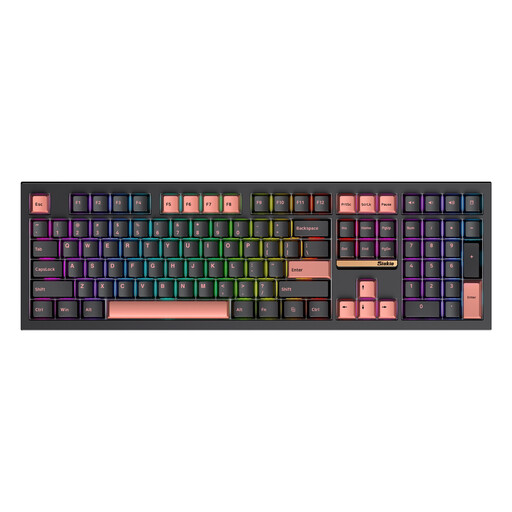
Could suit you if you’re looking for a 108-key keyboard with several connection options.
Mechanical; 108 keys; replaceable switches; 3MODE connectivity; RGB.
 No image available
Could suit you if you’re looking for a compact, foldable model. Check that the layout and connection work with your computer.
64 keys; Bluetooth; Windows support according to the product description.
No, not just because you have two screens. For a dual-screen workstation, the Sectorinstituut Transport en Logistiek’s Health and Safety Catalogue recommends using one keyboard and one mouse wherever possible. Position them to suit your main task.
It depends on your editor. Aseprite lets you customise keyboard shortcuts, so check the options in your software before choosing extra hardware features.
Check that the arrow keys, modifier keys and other commands you use remain easy to reach. Also see whether keys are available directly or accessed using an Fn layer.
No, a product name or design cannot guarantee an individual health benefit. Compare the layout and hand position with your own workstation, and consider where your mouse is positioned too.
Check the full model name and physical layout, not just the QWERTY label. Also make sure the connection and any configuration software work with your computer.