What should you consider when choosing?
Nintendo UK and Nintendo Support describe different controller requirements for each game and sport. Microsoft lists the Xbox Wireless Controller as compatible with Xbox and Windows, but if you’re choosing a standard gamepad, check that the game you want to play supports it too.
| Buying consideration |
What to check |
Who is it for? |
| Space to play |
Check the controls for the exact game and make sure there’s enough room to move around your chair, table and fellow players. |
When I play from a small seating area, I mainly want to be able to play without swinging my arms. Around 36% of consumers put playing within the available space first. |
| Game compatibility |
Check the console, full game title, sport you want to play and the corresponding controller requirements. |
When I want to play a specific game and sport, I want to know that the controller is suitable. Around 29% of consumers prioritise compatibility with the exact game. |
| Playing together |
Check the number of players and controllers needed for each sport, and count the controllers you already have. |
When we play together locally, I want to know in advance how many controllers the chosen sport requires. Around 21% of consumers prioritise playing together. |
| Power and running costs |
Check how the exact model is powered and whether online play requires a separate subscription. |
When I choose a controller, I also want to know how it’s powered and whether the online mode I want to play has any additional requirements. Around 14% of consumers prioritise power and additional running costs. |
Joybuy products
This selection includes standard gamepads for supported sports games on platforms such as PC and Xbox, as well as a Joy-Con 2 pair for motion-controlled sports on Switch 2. Always check that the exact game and sport support the controller you choose.
 No image available
NAXSIR wireless gamepad with phone holder
A gamepad option for supported games you play seated with buttons; check compatibility with the exact game and device.
The product title mentions Bluetooth 5.2, 2.4 GHz wireless, dual vibration and turbo. Listed platforms include Android, iOS, PC, Smart TV, PS3 and Switch.
View at Joybuy
 No image available
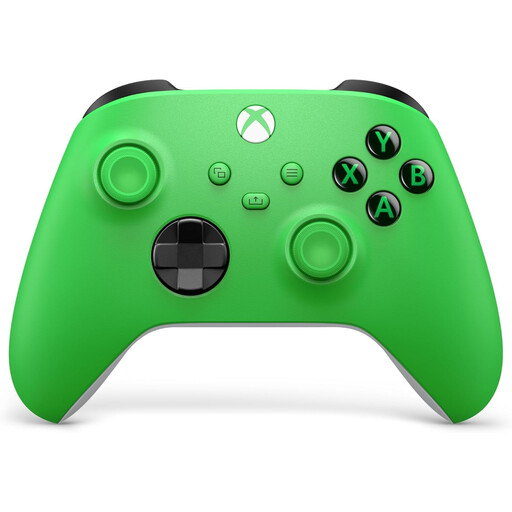
Xbox Wireless Controller Velocity Green Series X/S & Xbox One
An option for seated play in games that support standard gamepad controls; check support for the exact sports game.
The product title mentions Xbox Series X/S and Xbox One. Microsoft also lists the Xbox Wireless Controller for supported Windows PCs.
View at Joybuy
 No image available
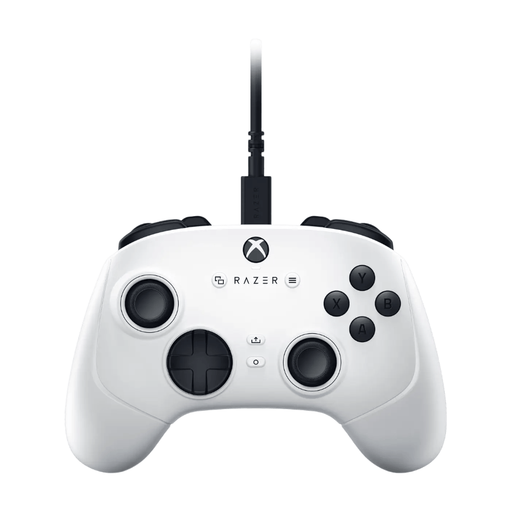
Razer Wolverine V3 Tournament Edition White
A gamepad option for seated play if the game you choose supports these controls; check compatibility with your game.
The product title mentions USB, PC and Xbox Series S/X.
View at Joybuy
 No image available
Thrustmaster H.E.A.R.T. Black, White USB gamepad
A gamepad option for sports games that support button controls; check that the game and device you choose are compatible.
The product title mentions USB, PC, Xbox One, Xbox One S and Xbox One X.
View at Joybuy
 No image available
Nintendo Switch 2 Joy-Con 2 pair, Light Blue/Light Red
For motion-controlled sports on Switch 2 when the sport you choose supports Joy-Con 2. Nintendo states that Joy-Con 2 is required for skateboarding in Nintendo Switch Sports Resort.
Nintendo supports Joy-Con and Joy-Con 2 for most sports in Nintendo Switch Sports Resort. When using motion controls, leave enough space around you and attach and wear the wrist straps when playing wirelessly.
View at Joybuy
Frequently asked questions
Can I play Nintendo Switch Sports with a Pro Controller or in handheld mode?
No. Nintendo UK states that Nintendo Switch Sports doesn’t support a Nintendo Switch Pro Controller or Nintendo Switch 2 Pro Controller, and can’t be played in handheld mode.
Do I need Joy-Con 2 for Nintendo Switch Sports Resort?
Not for every sport: according to Nintendo Support, Joy-Con and Joy-Con 2 work for most sports, but skateboarding requires Joy-Con 2. The game is for Switch 2, so check the controller requirements for the sport you want to play.
How can I use Joy-Con safely when space is limited?
Attach and wear the wrist straps when playing wirelessly, and leave enough clear space around you, as Nintendo UK advises. A wrist strap won’t make a playing area that’s too cramped suitable for swinging movements.
Does a controller include online play and a subscription?
No. According to Nintendo UK, you need an active Nintendo Switch Online membership to play Nintendo Switch Sports online; this is separate from the controller.
What are my rights when buying a controller online in the Netherlands?
For a standard online purchase, ACM ConsuWijzer says you have a statutory cooling-off period of up to 14 days after the product has been delivered; check which exceptions apply. If a product breaks too soon during normal use, the retailer must resolve the issue free of charge under the statutory guarantee.


