
Motion-sports player
You want to play games such as Nintendo Switch Sports and are looking for controllers suited to your chosen sport and Switch system. You’ll also need enough clear space to move around, as Nintendo recommends.


Choose a controller based on the game and platform: Nintendo Switch Sports requires a compatible Joy-Con configuration, while button-based sports arcade games can be played with a traditional gamepad on supported platforms. If you can’t clear enough space in your living room to move around safely, a button-based game is a better fit; also check how many controllers your chosen game mode needs.
You want to play games such as Nintendo Switch Sports and are looking for controllers suited to your chosen sport and Switch system. You’ll also need enough clear space to move around, as Nintendo recommends.
You want to play button-based sports arcade games and need a gamepad that works with your game and platform. Microsoft lists Xbox consoles and Windows PCs as supported devices for the Xbox Wireless Controller; check that your specific game supports it.
You want to play together locally and check in advance how many individual controllers your chosen game and game mode require. Nintendo says Joy-Con controllers can be used individually, but the required configuration depends on the sport.
First, check that the game and platform support the controller. Then make sure you have enough room to move, and finally check how many controllers and accessories your chosen game mode requires.
| What to consider | What should you check? | Who is this important for? |
|---|---|---|
| Game and platform compatibility | Check the exact game title, console, game mode and controller configuration. | I want to know in advance whether my game and console support the controller; around 29% of consumers put compatibility first. |
| Room to move | Make sure you can move freely without hitting furniture or other people; use the wrist strap when playing wirelessly with Joy-Con. | If I need to swing or kick, I want to do it safely without hitting anything. Around 29% of consumers prioritise having enough room to move. |
| Playing together | Check the number of players and controller requirements for each game mode; count the controllers you already own. | When I’m playing with guests, I want to know how many controllers we need before buying anything extra. This is the main concern for around 24% of consumers. |
| Accessories and additional costs | Check what’s in the box, how the controller charges and whether your chosen game mode requires extra accessories or a service. | I only want to pay for accessories and additional services that suit the way I play. Around 18% of consumers put these extra costs first. |
Nintendo Switch Sports doesn’t support every controller: Nintendo says the Switch Pro Controller and Switch 2 Pro Controller aren’t compatible.
Before you buy, check that the exact game and sport you want to play are compatible.
If you already own an unsuitable controller, you may still need to buy a compatible one.
Nintendo lists the supported configuration for each sport. Joy-Con 2 isn’t compatible with the Leg Strap.
Check the number of players and controller requirements for your chosen game mode before choosing a set.
Depending on the game mode, you may need an extra controller or accessory.
Nintendo says standard Joy-Con controllers can be used wirelessly with Switch 2, but can’t be attached to the console to charge.
Check in advance how you’ll charge the controllers in your setup.
You may need a separate compatible charging option.
The Dutch government says there is no fixed statutory guarantee period in the Netherlands, and that the seller must provide a solution if a product is faulty.
Compare any additional cover with your statutory rights and check exactly what it offers.
Paid additional cover comes at an extra cost; check whether its terms offer anything useful for your situation.
Joy-Con and Joy-Con 2 are worth considering for motion-sports games on compatible Switch systems, including Nintendo Switch Sports.
The Xbox Wireless Controller is a traditional gamepad for supported Xbox and Windows PC games.
Sony positions DualSense for PS5 and lists PC use for the Dutch product variant.
The Ultimate 2C Wireless is an option for supported button-based games on Windows and Android.
This selection includes an Xbox gamepad for button-based sports arcade games and Joy-Con 2 options for motion-sports games on Switch 2. Choose according to the game, platform and controller configuration supported by your chosen game mode.
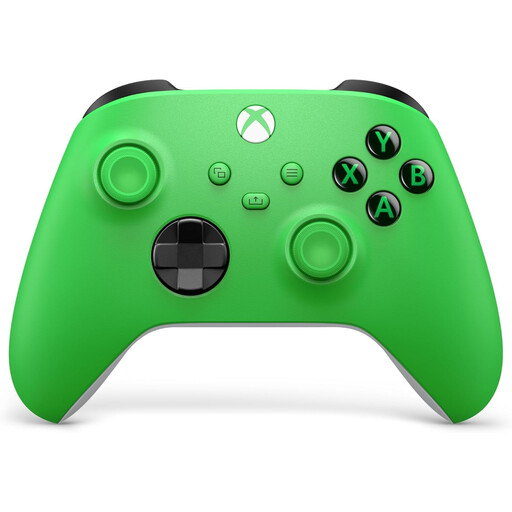 No image available
A good fit for button-based games if you’re playing a supported Xbox game or Windows PC game.
The product description lists Xbox One, Xbox Series X|S and Windows PCs as compatible platforms.
The description mentions a hybrid D-pad, textured grip and USB-C connection.
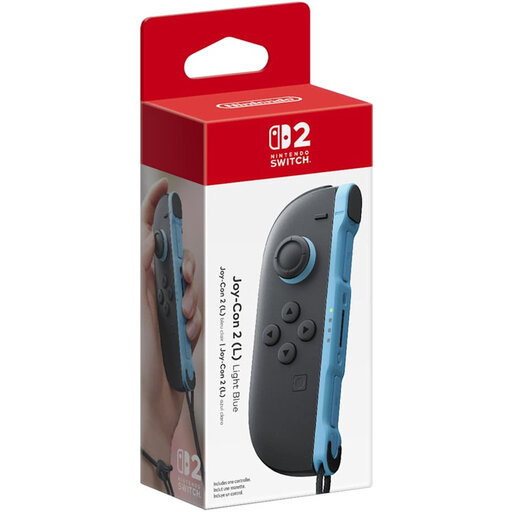 No image available
A single left Joy-Con 2 for a supported Switch 2 game mode; check the configuration required for your chosen sport.
The product description lists a wrist strap as included. Nintendo says Joy-Con 2 isn’t compatible with the Leg Strap.
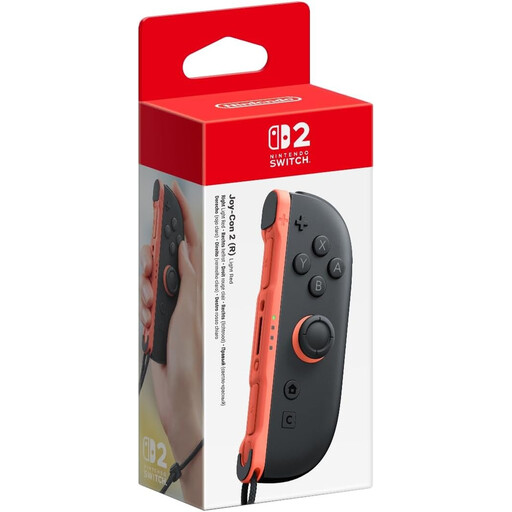 No image available
A single right Joy-Con 2 for an extra player in a supported Switch 2 game mode; check what your chosen sport requires.
The product description lists wireless pairing with the console. Nintendo says Joy-Con 2 isn’t compatible with the Leg Strap.
 No image available
A left and right controller for a supported Switch 2 game mode; check how many controllers your sport and player count require.
The product description lists two wrist straps and motion controls. Nintendo says Joy-Con 2 isn’t compatible with the Leg Strap.
No. Nintendo says the Nintendo Switch Pro Controller and Nintendo Switch 2 Pro Controller aren’t compatible with Nintendo Switch Sports. The supported Joy-Con configuration varies by sport.
Clear enough space around you and stay aware of your surroundings while playing, as Nintendo recommends. Use the wrist strap when playing wirelessly with standard Joy-Con. If you can’t clear the space you need, choose a game mode that doesn’t involve swinging or kicking.
Nintendo says standard Joy-Con controllers can be synced wirelessly with Switch 2, but can’t be attached to the system to charge. Check what charging options are available for your setup.
For online distance purchases from a business, you generally have a 14-day cooling-off period, subject to exceptions explained by the Dutch government. You’re also entitled to a product that meets the required standard; the Netherlands has no fixed statutory guarantee period. If a product is faulty, contact the seller.