
Playing motion-controlled sports together
You want to play a motion-controlled sports game with housemates or guests. Check which Joy-Con version and setup suit the game and activity, as described by Nintendo.


For Nintendo Switch Sports, choose a Joy-Con setup to suit the sport you want to play: Nintendo states that Switch and Switch 2 Pro Controllers aren’t compatible. Nintendo Switch Sports Resort is a separate game for Switch 2, with motion controls using Joy-Con 2. For sports games on Xbox, PlayStation or PC, check whether the specific game and local play mode support standard gamepads. Also consider the controllers included and the space you’ll need to move around.
You want to play a motion-controlled sports game with housemates or guests. Check which Joy-Con version and setup suit the game and activity, as described by Nintendo.
You already have a console and want to know whether the controllers included are enough for the local play mode you want. Nintendo specifies which Joy-Con setups are supported for each sport.
You play on an existing Xbox, PlayStation or PC and want to use a standard gamepad. Check whether the platform and local play mode support that controller for each game.
Start with the combination of console, exact game and play mode you want. Then choose the number of controllers you need. For motion controls, also check the accessories and how much clear space you’ll need.
| What to consider | What should you check? | Who is this important for? |
|---|---|---|
| Game and console compatibility | Check the exact title, console and supported controller types; Nintendo Switch Sports does not support Pro Controllers. | If I’m buying a controller for one specific sports game, I want to be sure the combination will work. Around 36% of consumers see game and console compatibility as their main consideration. |
| Number of players | Check how many players the activity supports, which setup it requires and which controllers are already included with the console. | If someone else wants to join in, I want to know whether we’ll need an extra controller. Around 29% of consumers focus mainly on the number of players and the controllers needed. |
| Room to move and wrist straps | Clear some space around the players and, when playing wirelessly, attach the appropriate Joy-Con 2 wrist straps according to Nintendo’s instructions. | If we’re moving around in a shared space, I want enough room and to hold the controllers as instructed. Around 21% of consumers prioritise setting up their space for motion-controlled play. |
| Power and accessories | Check how the specific controller is powered and whether you’ll need a leg strap, charger or another accessory. | If I’m choosing an extra controller, I want to know in advance how it’s powered and which accessories my setup requires. Around 14% of consumers focus mainly on power and additional accessories. |
Nintendo Switch Sports does not support Pro Controllers. Motion sensors in another gamepad don’t, on their own, prove that the game supports that controller.
Check the controller requirements for the exact sports game before you buy.
A Switch 2 comes with one left Joy-Con 2, one right Joy-Con 2 and two wrist straps. Whether that’s enough depends on the activity and the group size you want.
Compare the requirements for your chosen play mode and number of players with what you already have.
Joy-Con 2 isn’t compatible with the leg strap for Nintendo Switch Sports. Original Joy-Con controllers can be paired wirelessly with Switch 2, but you’ll need a suitable way to charge them.
Check the controller generation, the accessory you need and the charging method together.
Microsoft states that the standard Xbox wireless controller uses AA batteries or suitable rechargeable batteries.
Check how the version you’ve chosen is powered and what’s included in the box.
Joy-Con and Joy-Con 2 are relevant for Nintendo sports games with motion controls. The right combination depends on the game, system and sport.
A standard wireless gamepad for supported Xbox consoles and Windows PCs, when the game supports standard gamepad controls.
A DualSense gamepad for supported PS5 sports games with local multiplayer. Check the play mode you want for each title.
The Ultimate 2C Wireless and Ultimate 2C Bluetooth models reviewed are different versions, with different platform support.
An alternative wireless Switch gamepad for games that don’t require separate Joy-Con controls.
This selection includes Joy-Con controllers for Nintendo sports games and standard gamepads for PS5 and Xbox. Check which controllers and local play modes each game supports.
 No image available
A good fit for standard gamepad controls in supported PS5 sports games; check the local play mode for the title you’ve chosen.
The product description lists haptic feedback, adaptive triggers, motion sensors and a built-in rechargeable battery.
 No image available
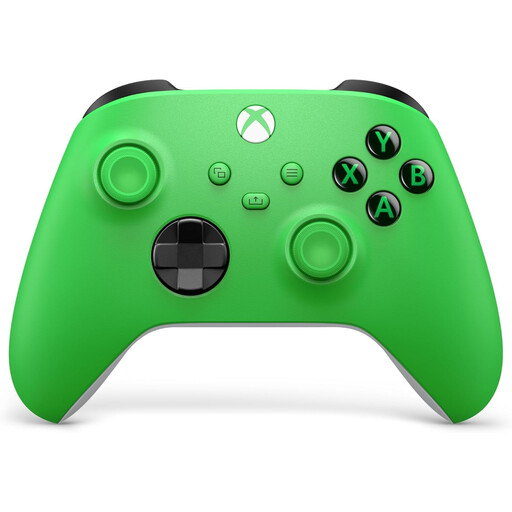
A good fit for standard gamepad controls in a supported sports game on Xbox; check that it supports the local play mode you want.
The product description also lists Windows PCs. AA batteries are specified for wireless use with a console.
 No image available
Suitable for supported Nintendo Switch Sports setups; the controls required vary by sport.
On Switch 2, original Joy-Con controllers pair wirelessly. To charge them, you’ll need an original Switch or a suitable licensed accessory.
 No image available
Suitable for motion controls in Nintendo Switch Sports Resort on Switch 2.
The product description lists two wrist straps; Nintendo instructs you to attach them when playing wirelessly. Joy-Con 2 isn’t compatible with the leg strap for Nintendo Switch Sports. Switch 2 already comes with one left Joy-Con 2, one right Joy-Con 2 and two wrist straps.
No. Nintendo states that neither the Nintendo Switch Pro Controller nor the Nintendo Switch 2 Pro Controller is compatible with Nintendo Switch Sports. Check which Joy-Con setup you need for each sport.
No. Nintendo states that Joy-Con 2 isn’t compatible with the leg strap. On Switch 2, you can pair an original Joy-Con wirelessly for this purpose; you’ll also need a suitable way to charge it.
When playing wirelessly, attach the appropriate Joy-Con 2 wrist strap and tighten it with the lock so it won’t slip off your wrist, as Nintendo instructs. Clear the space around the players before using motion controls, too.
Check whether you already have enough controllers and whether you’ll need batteries, a charger or an accessory. ACM ConsuWijzer states that online consumer purchases come with a statutory 14-day cooling-off period, starting after delivery. If a product doesn’t meet what you could reasonably expect under normal use, the seller is responsible for the statutory guarantee.
Take a discarded electrical controller to an appropriate collection point. The Dutch Government also describes a take-back scheme when you buy a similar appliance. Used loose batteries should go to a battery collection point, not in the bin.