
Nintendo Switch Sports players
If you want to play using motion controls, check the Joy-Con generation, the sport you want to play and whether a leg strap is required. Nintendo outlines compatibility and exceptions for each system.


Choose based on your console and the controls supported by your sports game. Nintendo confirms that Nintendo Switch Sports is played with the appropriate Joy-Con, but not with a Switch Pro Controller. Treat daylight issues separately: reflections can affect how well you see the screen, while Nintendo specifically notes that sunlight can interfere with a Wii sensor bar.
If you want to play using motion controls, check the Joy-Con generation, the sport you want to play and whether a leg strap is required. Nintendo outlines compatibility and exceptions for each system.
If you play during the day near large windows, you can distinguish screen reflections from motion-tracking issues. Samsung describes anti-reflection technology as a way to reduce glare on specific screens.
If you play sports games on Wii, Xbox or PlayStation, check the controller and accessory requirements for your game. The fact that a controller connects to your console does not, by itself, prove it is compatible.
First check the game and console, then work out whether your daytime issue is with the screen or motion tracking. This helps you avoid choosing a controller to solve a problem that needs a different solution.
| What to consider | What to check | Who is this important for? |
|---|---|---|
| Game and console | Check the exact game, console version, supported controller and play style. | If I want to be sure my controller works with the game, I check that combination before buying. Compatibility is the top priority for around 36% of consumers. |
| Visibility and daylight | Check for reflections from windows at the time you usually play; if you use a Wii, check the sensor bar too. | If I play during the day, I want to know whether I can see the screen clearly and whether sunlight affects my Wii pointer. Visibility and daylight tracking are the top priority for around 29% of consumers. |
| Moving safely | Check the controller layout and whether wrist straps are needed; make room to move. | If I’m moving or swinging my arms with other people, I want enough space and the right straps for my controller. Around 21% of consumers prioritise moving safely and playing together. |
| Everything you need | Check what you already own and whether your play style requires an accessory, camera or service. | If I want to keep extra costs down, I check which items are actually needed for my chosen game and play style. Around 14% of consumers prioritise the total cost. |
Nintendo says the game does not support a Nintendo Switch Pro Controller or Switch 2 Pro Controller. So, a controller that connects to the console is not automatically suitable for this sports game.
Check the controller requirements for the specific sport before you buy.
Screen reflections and motion tracking are separate issues. Nintendo warns that sunlight may interfere with the Wii sensor bar; this warning does not automatically apply to Joy-Con.
First, check the screen in the light coming through your window. If you use a Wii, also check whether sunlight is affecting the pointer.
Joy-Con 2 does not work with the original Switch and does not fit the leg strap for Nintendo Switch Sports. Original Joy-Con controllers cannot be attached to the Switch 2 console.
Before choosing a set, note your console, controller generation, preferred sport and existing charging options.
The Dutch government distinguishes between an additional warranty and the legal protection you have if a product does not meet the terms of the agreement.
Keep your proof of purchase and check what any additional warranty covers.
Nintendo describes Joy-Con and Joy-Con 2 as motion controllers for Nintendo Switch Sports, with differences depending on the console and sport.
The Xbox Wireless Controller is designed for games with standard gamepad controls on a supported Xbox console or Windows PC.
PlayStation Move is relevant for existing games that explicitly support this motion controller.
This selection includes Joy-Con controllers for supported Switch sports and standard gamepads for games that support button controls. Always check the requirements for your game and console.
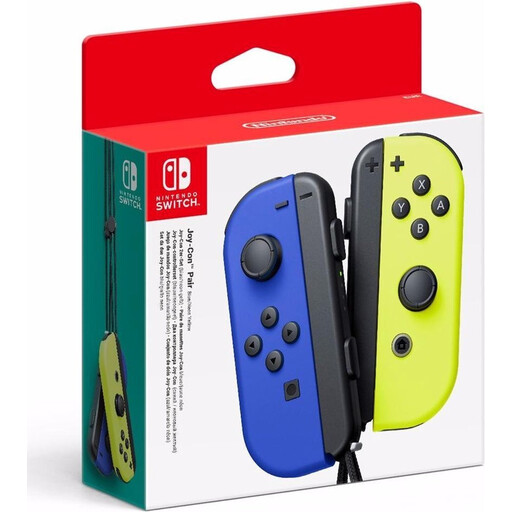 Image unavailable
A pair of Joy-Con controllers for supported Switch sports with motion controls.
The description lists motion sensors, a gyroscope and two wrist straps. Attach the straps when playing wirelessly; on Switch 2, original Joy-Con controllers connect wirelessly and may require a separate charging solution.
 Image unavailable
A pair of Joy-Con 2 controllers for supported Switch 2 sports with motion controls, without using the leg strap.
The description lists motion controls and included wrist straps. Joy-Con 2 works only with Nintendo Switch 2 and does not fit the leg strap for Nintendo Switch Sports.
 Image unavailable
A standard gamepad for sports games with button controls on a supported Xbox system or Windows PC; check the game’s requirements.
The product description lists a hybrid D-pad and textured grip. This is not a replacement for the motion controls in Nintendo Switch Sports.
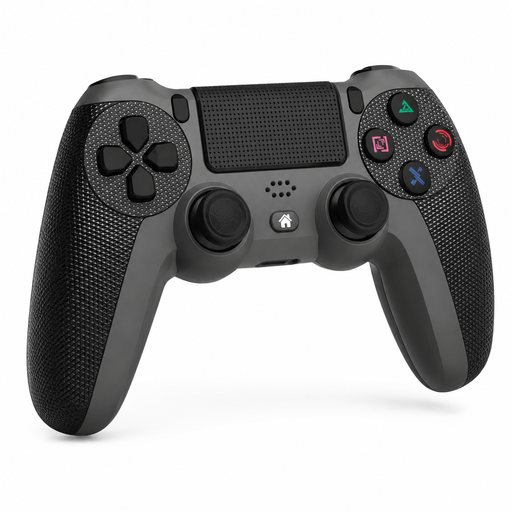 Image unavailable
A wireless controller for PS4, PS4 Slim and PS4 Pro, according to the product description; check whether your sports game supports a standard PS4 controller.
The description lists a touchpad and a 6-axis gyroscope. These features do not automatically make the controller suitable as a motion controller for a specific game.
No. Nintendo excludes both the Nintendo Switch Pro Controller and the Switch 2 Pro Controller from this game. Choose a supported Joy-Con option for your console and the sport you want to play.
No. According to Nintendo, the leg strap for Nintendo Switch Sports works on Switch 2 with an original Joy-Con connected wirelessly, not with Joy-Con 2. Also check whether the sport you want to play uses the leg strap.
The available product information does not indicate that it does. Nintendo mentions sunlight as a possible source of infrared interference for the Wii sensor bar. Screen reflections are a separate visibility issue; the Wii warning does not prove that sunlight interferes with Joy-Con.
For Switch, Nintendo provides a calibration procedure under System Settings, Controllers and Sensors, then Calibrate Motion Controls. Follow the instructions for your system and check the game’s requirements too.
Games that require camera tracking need a PlayStation Camera. On PS5, this camera requires an adapter; the PS5 HD Camera is not compatible with Move.
For online purchases from a business, you generally have a 14-day cooling-off period, according to the Dutch government; exceptions may apply. The Dutch government also states that the Netherlands has no fixed statutory warranty period. If a product is faulty, the retailer remains responsible for providing an appropriate solution under the law.