What should you look for when choosing?
Start by choosing a controller that suits the game and its controls, then consider whether your seating position could affect how you play.
Joy-Con for Nintendo Switch Sports
Choose this option: if you’re playing Nintendo Switch Sports and want to use the motion controls for your chosen sport.
Bear in mind: Nintendo specifies which Joy-Con combination is suitable for each sport. Switch Pro Controllers aren’t compatible with this game.
Joy-Con 2 for Nintendo Switch Sports Resort
Choose this option: if you’re playing Nintendo Switch Sports Resort on a Switch 2.
Bear in mind: Nintendo describes Joy-Con 2 as the controller for the game’s movements. Check how many controllers you need for each sport.
Wii Remote Plus for Wii Sports Resort
Choose this option: if you’re playing Wii Sports Resort on a Wii or compatible Wii U.
Bear in mind: if you’re having trouble with the pointer, Nintendo Support recommends sitting directly in front of the TV. If you always sit at an angle, you may need to check your setup more carefully.
Traditional gamepad
Choose this option: if your sports game supports button and stick controls and you don’t want to use motion gestures.
Bear in mind: a gamepad that works with Xbox, Windows or a Switch system won’t necessarily work with Nintendo’s motion-controlled sports games.
| What to consider |
What to look for |
Who should pay particular attention? |
| Sitting at an angle |
Check whether the game uses pointing, motion controls or buttons. For Wii pointer problems, Nintendo Support also recommends checking the sensor bar’s position and where you’re sitting. |
If I’m sitting at an angle to the TV, I want to know whether my game needs a pointer or uses motion controls. Around 33% of consumers say how well the game works from their seat is their main concern when buying. |
| Game and console |
Make a note of the exact game title and console, then check which controllers and play styles the game supports. |
If I already know which game and system I’m using, I don’t want to buy a controller that works with the console but not the game. Around 27% of consumers put game compatibility first. |
| Number of players |
Check which controller combination each sport needs, and count the controllers and wrist straps you already have. |
If we’re playing together locally, I want to know how many individual controllers our chosen sport needs before buying another set. Around 20% of consumers say playing together is their main concern when buying. |
| Playing while seated and extra requirements |
Check whether the game supports button controls and whether your preferred way to play requires any accessories or an online service. |
If I’d rather sit and use buttons, I want to know whether my game supports those controls and what else I’ll need. Around 20% of consumers focus mainly on comfort and extra requirements. |
Joybuy products for motion-controlled sports
These Joybuy products are Joy-Con sets for Nintendo Switch Sports and Nintendo Switch Sports Resort. Check which controller combination is supported for each game and sport.
 No image available
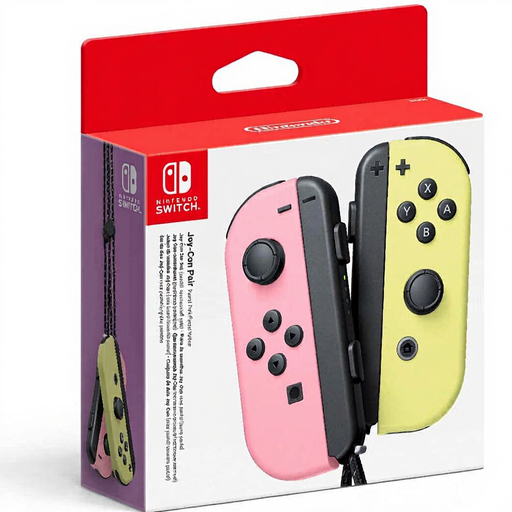
Nintendo Switch Joy-Con pair – Pastel Pink/Pastel Yellow
A pair of Joy-Con for Nintendo Switch Sports on a supported Switch system. Check which combination is used for each sport.
View at Joybuy
 No image available
Nintendo Switch 2 Joy-Con 2 pair – Light Blue/Light Red
For Nintendo Switch Sports Resort on Switch 2. Nintendo describes Joy-Con 2 as the controls for movements in the game, among other things.
View at Joybuy
Frequently asked questions
Can I play Nintendo Switch Sports with a Pro Controller?
No. Nintendo Netherlands says that both the Switch Pro Controller and the Switch 2 Pro Controller are incompatible with Nintendo Switch Sports. Check which Joy-Con setup is supported for each sport.
Will a new Wii Remote fix a pointer that doesn’t work properly from the side?
Not necessarily. For a Wii pointer that isn’t behaving as expected, Nintendo Support recommends checking the sensor bar’s position, possible light interference and whether you’re sitting directly in front of the TV. A different remote isn’t a proven fix if you always sit at an angle.
Does Nintendo Switch Sports Resort work on the original Nintendo Switch?
No. Nintendo Netherlands lists Nintendo Switch 2 as the system for Nintendo Switch Sports Resort and describes Joy-Con 2 as the controls for the game’s movements.
Do I need to buy an extra Joy-Con set straight away to play together?
Not before checking the sport and number of players. Nintendo specifies which Joy-Con combination is supported for each sport. Also check which controllers and wrist straps are already included with your console or set.
What extra costs or rights should I consider when buying online?
Nintendo says you need an active Nintendo Switch Online membership to play worldwide in Nintendo Switch Sports. For a faulty product, the seller must offer a solution under Dutch government rules; there is no fixed statutory warranty period. When you buy a physical controller online, you generally have 14 days from delivery to change your mind, subject to legal exceptions, according to the Netherlands Authority for Consumers and Markets’ ACM ConsuWijzer service.


