
Players of motion-controlled sports games
If you want to swing, throw or hit in front of the TV, first check which Joy-Con version is compatible with your game and console. Nintendo lists the supported controllers for each game.


Start by checking the exact game and console: Nintendo Switch Sports supports Joy-Con, while Nintendo Switch Sports Resort on Switch 2 uses Joy-Con 2. For sports games with traditional button controls, choose a controller that suits your platform and game. A wireless connection doesn’t guarantee that it’ll work at any distance, so test your set-up where you play.
If you want to swing, throw or hit in front of the TV, first check which Joy-Con version is compatible with your game and console. Nintendo lists the supported controllers for each game.
If you play from a seat or a dedicated gaming area at a distance, it’s important to position your console in the open and have a stable wireless connection. Nintendo Netherlands advises moving closer and avoiding obstacles if your Joy-Con connection stutters.
If you mainly use sticks and buttons, choose a gamepad that works with your console or PC and the game you want to play. Controller features vary by platform and game.
First, check that the game supports the controls you want. Then see whether the wireless connection works in your gaming space.
| What to consider | What should you check? | Who is this important for? |
|---|---|---|
| Game and motion compatibility | Check the exact game title, console, supported controller and play style. Nintendo Switch Sports and Nintendo Switch Sports Resort use different generations of Joy-Con. | If I’m playing a motion-controlled sports game, I want to know whether the controller works with both the game and my console; around 36% of consumers say compatibility is their top priority. |
| Connection at a distance | Test the controller where you actually play. Place the console in the open, not behind the TV or in a metal cabinet. | If you play further away, from a seat or gaming area, you’ll want to avoid interruptions; around 29% of consumers prioritise a stable connection at a distance. |
| Traditional controls | Check that the controller and connection method work with your platform and the specific game. | If I’m playing a sports game with sticks and buttons, I want a gamepad that suits my console or PC; around 21% of consumers say traditional controls are their main deciding factor. |
| Playing together | Count the players and check the requirements for the game mode, which controllers you already own and what’s included in an extra set. | If I want to play with more people, I don’t want to buy a pair of controllers I already own; around 14% of consumers focus on having enough controllers without buying unnecessary extras. |
Nintendo says that Switch and Switch 2 Pro Controllers aren’t compatible with Nintendo Switch Sports. So a controller with motion features isn’t automatically suitable for this game.
Before you buy, check which controllers are supported by the exact game and the sport you want to play.
Nintendo lists distance and obstacles, such as a TV or metal, as possible causes of Joy-Con connection problems. A wireless label on the packaging won’t tell you how the controller will perform in your room.
Test it from where you actually play. If the controls stutter, try moving the console to a more open spot and, if needed, reduce the distance.
Joy-Con 2 is for Switch 2; Nintendo says Joy-Con 2 wrist straps don’t fit the original Joy-Con.
Check your console version, game and what’s included in the set before buying individual accessories.
A relevant choice for supported Switch games with Joy-Con and Switch 2 games with Joy-Con 2.
An option for supported Xbox and Windows games with traditional controller controls.
DualSense is a relevant option for supported PS5 sports games with traditional gamepad controls.
The Ultimate 2 Bluetooth Controller is a possible gamepad for supported Switch and Windows games.
This selection includes traditional gamepads for PS5, Xbox and PC, plus Joy-Con 2 for motion games on Switch 2. Connection methods and game support vary by model.
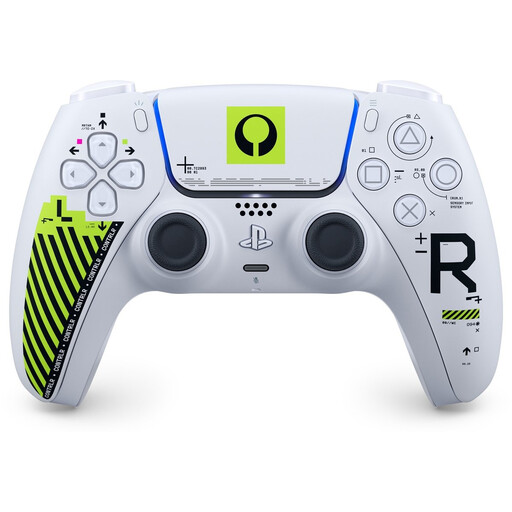 Image unavailable
For a PS5 sports game that supports standard DualSense controls; this model is wireless.
 Image unavailable
For supported Xbox games with traditional button controls; the product name identifies it as a wireless controller.
 Image unavailable
For playing wirelessly on PC or using a wired connection on Xbox.
The product name describes a wired connection for Xbox and wireless controls for PC and mobile.
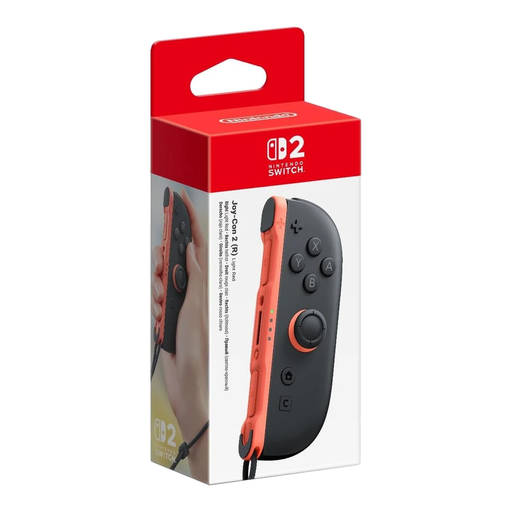 Image unavailable
A single right Joy-Con 2 for a supported motion-controlled sport on Switch 2; check how many controllers your chosen sport requires.
 Image unavailable
For motion-controlled sports on Switch 2 that support Joy-Con 2; check the requirements for your chosen sport and game mode.
The product name identifies a pair of Joy-Con 2 controllers.
No. Nintendo says that Switch and Switch 2 Pro Controllers aren’t compatible with Nintendo Switch Sports. Check which Joy-Con and any accessories are needed for your chosen sport.
Nintendo advises moving closer to the console and placing it in the open. Don’t put it behind the TV or in or under metal; this advice applies to Joy-Con and isn’t a guaranteed range for all controllers.
Not always: Nintendo says that Switch 2 comes with one left and one right Joy-Con 2, plus two wrist straps. Then check the requirements for the specific sport and local game mode.
Nintendo advises attaching the matching wrist straps when using Joy-Con 2 wirelessly and holding the controllers firmly. Use the wrist strap supplied with the original Joy-Con; the two types aren’t interchangeable.
The Digital Infrastructure Inspectorate says that electrical, electronic and radio equipment placed on the market in Europe must meet the applicable requirements and carry the CE marking. Check the marking on the product you receive; a mention on a product page doesn’t by itself confirm that an individual item meets those requirements.