Start with your records’ speeds: a player that supports 33⅓ and 45 rpm won’t be enough if you also want to play 78 rpm records. For 78 rpm records, you’ll also need to check which stylus is suitable for the specific record material. Then consider the controls, connections and a stable spot with a speaker set-up that suits your loft.
Who is this choice relevant to?
Listeners with old 78 rpm records
If you want to play historical spoken-word recordings, you’ll need to check both the speed and the right stylus for your records. For example, Audio-Technica describes a separate stylus for compatible VM95 cartridges.
Listeners in a loft prone to echo
If you want to follow spoken word clearly, consider the speaker set-up, reflections in the room and a stable place for the player. The Acoustical Society of America discusses how reflections and background noise can affect speech intelligibility.
Convenience-focused and archive-minded listeners
If you want to start a record with minimal fuss, you may look for different controls than someone who wants to digitise recordings. Audio-Technica and Denon describe different ways to record via USB.
What should you look for when choosing?
| What to consider |
What should you check? |
Who is this important for? |
| Record and stylus compatibility |
Check the record type and required speed. For 78 rpm records, also check which stylus is suitable. |
If I want to play old 78 rpm records, I want to match both the speed and stylus correctly. An estimated 33% of consumers put record and stylus compatibility first. |
| Speech clarity and positioning |
Assess your listening spot and speaker connections, and check whether the player can stand on a stable surface with minimal vibration. |
If I want to follow spoken word in my loft, I consider the set-up and acoustics around my listening spot. An estimated 27% of consumers prioritise speech clarity and positioning. |
| Ease of use |
Once you’ve checked that the speeds suit your records, decide whether you want automatic operation or prefer to operate the tonearm yourself. |
If I want to start a record regularly without positioning the tonearm myself, I look for controls that make this possible. An estimated 20% of consumers make ease of use their main consideration. |
| Saving recordings |
Decide whether you want to record via a computer or directly to a USB stick, and check which connections you’ll need. |
If I want to save spoken-word records digitally, I choose the recording method that suits my equipment. An estimated 20% of consumers prioritise digitisation. |
Common buying mistakes
-
Assuming 78 rpm means full compatibility with old records
The correct speed alone doesn’t tell you whether the fitted stylus is suitable for a specific historical record.
Identify your records first, then check both the supported speed and the right stylus.
Some combinations may need a separate stylus, which means extra research and set-up.
-
Looking only at the record player for clear speech
Changing the player model won’t automatically fix reflections in the room or a surface that is prone to vibration.
Assess your listening spot and speaker set-up, and place the player somewhere stable. The Acoustical Society of America notes that reflections and background noise can affect speech intelligibility.
Changing the player’s position or adjusting the speaker set-up may take extra time. Any measures to reduce reflections or vibration will depend on your loft.
-
Assuming all USB connections work the same way
Connecting via USB to a computer is a different recording method from recording directly to a USB stick.
First decide where you want to save your recordings. Audio-Technica describes connecting to a computer, while Denon describes recording to a USB stick with the DP-450USB.
Computer recording also requires a computer and a recording process that suits your chosen set-up.
Brands to consider
Audio-Technica
Audio-Technica describes the AT-LP120XUSB as a fully manual player with 33⅓, 45 and 78 rpm speeds and a USB connection to a computer.
- The listed speeds and computer USB connection are relevant if you want to play different record formats or record to a computer.
- 78 rpm support alone doesn’t confirm that the fitted stylus is suitable for every old record; check that it’s right for your own records.
Denon
Denon describes the DP-450USB as supporting 33⅓, 45 and 78 rpm, with an automatic tonearm lift and recording to a USB stick in MP3 or WAV format.
- This combination is relevant if you’re looking for 78 rpm support and direct recording to a USB stick.
- The described ability to play old records doesn’t confirm that the supplied stylus suits every 78 rpm record.
Sony
Sony describes the PS-LX3BT as an automatic player for 33⅓ and 45 rpm, with a Bluetooth transmitter and switchable phono or line output.
- Automatic operation may suit you if you want to start records at these speeds with ease.
- According to Sony, this model doesn’t have 78 rpm, USB or a detachable headshell.
Pro-Ject
Pro-Ject describes the Debut RecordMaster II as having computer USB and a switchable phono preamp.
- The model offers a way to record to a computer and, according to Pro-Ject, supports 78 rpm after manually moving the belt.
- Switching to 78 rpm requires a manual adjustment, and the supplied cartridge doesn’t automatically confirm suitability for a specific historical record.
Lenco
Lenco describes the L-3808 White as a manual, direct-drive player with computer USB and a switchable preamp.
- The connections may be useful if you want to record 33⅓ and 45 rpm records to a computer.
- The product specifications for the L-3808 White list 33 and 45 rpm, not 78.
Record players on Joybuy
These product picks are aimed at spoken-word records at 33⅓ or 45 rpm, and set-ups with built-in speakers. Before buying, check that the speed and connections suit your records and listening spot.
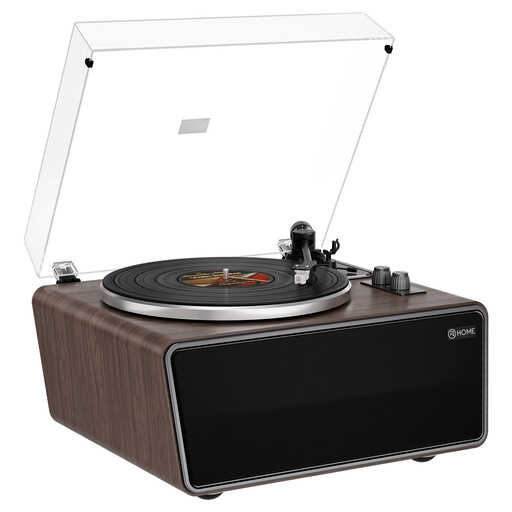 Image unavailable
XJ-HOME XJ-H01 Vintage All-in-One Record Player
An option if you want to play spoken-word records at 33⅓ or 45 rpm and are looking for built-in speakers.
This model has four built-in speakers, a phono preamp and an AT-3600L (MM) cartridge.
View on Joybuy
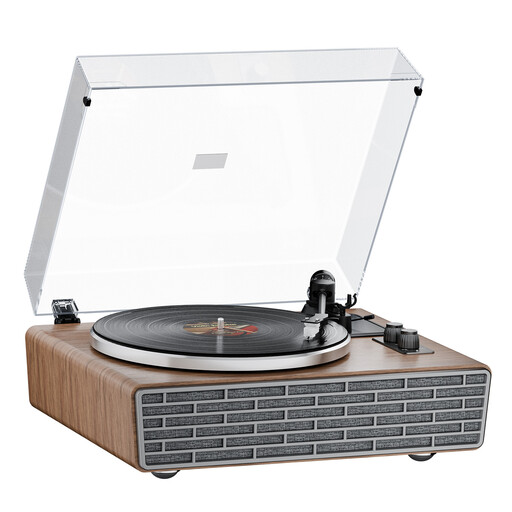 Image unavailable
XJ-HOME XJ-H02 Retro Walnut Bluetooth Turntable
An option if you want to play spoken-word records at 33⅓ or 45 rpm and are looking for built-in speakers.
This model has four built-in speakers, a transparent dust cover, belt drive and an AT cartridge.
View on Joybuy
Frequently asked questions
Is 78 rpm enough to play an old spoken-word record?
No. Check the type of record you have and which stylus is suitable for it. Audio-Technica describes the 3-mil AT-VMN95SP as suitable for a range of 78 rpm records and interchangeable within the VM95 series; this doesn’t guarantee that the stylus suits every historical recording.
Where should I put the player and speakers in a converted loft?
Start with a stable spot where the player isn’t noticeably affected by vibration, then assess the sound from your listening position. Reflections can affect speech intelligibility; whether your loft needs any adjustments depends on the room and the set-up.
What’s the best way to handle and store old records?
Hold grooved records by the edge and label, and avoid touching the playing surface. The Library of Congress recommends storing records upright in a clean, stable environment.
What returns and warranty rights apply when buying from a Dutch online shop?
For many consumer purchases made online, you have a 14-day cooling-off period; check whether your purchase falls under an exception. According to the Government of the Netherlands, there’s no fixed statutory warranty period in the Netherlands: you’re entitled to a product that works as it should, while normal wear and tear and damage caused by the buyer are assessed differently.
What safety rules apply to an electric record player?
In the Netherlands, sellers must ensure that electrical and electronic equipment complies with the applicable European rules, as Business.gov.nl explains. CE marking is required when the product falls within a relevant product category; check the correct version and documentation for the specific item.


