
Groups of three or four racers
If you want to race together on one screen, check how many players can join in at the same time on your chosen game and console. Nintendo and the Gran Turismo manual set out the options for each game and setup.


Start by choosing your racing game and deciding how many people need to play on one console at the same time. Mario Kart World on Switch 2 and Gran Turismo 7 on PS5 support up to four local players, while Hot Wheels Unleashed 2 describes split-screen play for two. Then check that everyone can see their part of the shared screen, that the console will fit safely, and which controllers and game version you need.
If you want to race together on one screen, check how many players can join in at the same time on your chosen game and console. Nintendo and the Gran Turismo manual set out the options for each game and setup.
If you want to play side by side, check that both parts of the screen are easy to see from your seats, and decide where the screen and console can go. Nintendo describes different ways to play on Switch 2, while Sony advises on the clearance needed around a PS5.
Let your preferred racing game guide your choice, and check that it supports local split-screen play. Nintendo describes the Mario Kart options, while the Gran Turismo manual covers split-screen races in Gran Turismo 7.
Choose your game and the number of local players first. Then consider how well everyone can see the screen from their seats, where the console will go, and what you’ll need in terms of controllers and games.
| What to consider | What should you check? | Who should pay particular attention? |
|---|---|---|
| Number of racers on one screen | Check how many players can join on one system for the exact game, console and game mode you want. Nintendo lists four players for Mario Kart World on Switch 2 and four players on a split screen for Mario Kart 8 Deluxe. | If I want to race with three or four people on one console, I need to know how many players the chosen game supports in split-screen mode. Around 36% of consumers prioritise the number of racers on one screen. |
| Visibility and setup space | Check the view from every seat and measure the space for the screen, console and cables. Nintendo describes TV, tabletop and handheld modes for Switch 2; Sony recommends leaving at least 10 cm of clearance around the PS5. | When space is limited in my living room, I want everyone to be able to see the shared screen and the console to fit safely. Around 29% of consumers prioritise visibility and placement. |
| Racing game and controllers | Choose the game and platform version first, then check its local play mode. The Gran Turismo manual says each split-screen player needs their own controller; Milestone describes split-screen duels in Hot Wheels Unleashed 2. | If a particular racing game or control setup matters to me, I want to make sure it works on my chosen console. Around 21% of consumers prioritise their preferred game and its controls. |
| Purchases and game format | Check how many controllers are included in the specific bundle, which game version you need and whether the console plays discs. Microsoft describes Xbox Series S as all-digital; the PS5 Digital Edition has no disc drive. | Before I choose, I want to know whether I’ll need another game or more controllers, and whether my games are digital or on disc. Around 14% of consumers prioritise game format and any additional purchases. |
Nintendo distinguishes between up to eight players via local wireless play and four players on a split screen in Mario Kart 8 Deluxe.
Check the player limit for the exact game mode and setup you want.
In split-screen mode, each player gets part of the screen. So a built-in screen or tabletop setup won’t necessarily be easy to see from every seat.
Before buying, consider where everyone will sit and whether they’ll be able to see the shared screen clearly from there.
Nintendo states that Switch Lite does not support TV mode.
If playing together on the TV is part of your plan, choose a model that supports TV mode.
Gran Turismo 7 requires each local player to have their own controller. Xbox Series S and PS5 Digital Edition do not have a disc drive.
Check what’s included in the specific bundle, which controllers you already own, and whether your chosen game is available digitally for your console.
A good fit if playing Mario Kart World or Mario Kart 8 Deluxe together is your priority.
A good fit if you want to play Gran Turismo 7 with several players on one TV.
A good fit if you want to play a compatible racing game side by side with another player.
This product pick is aimed at playing Mario Kart World on Nintendo Switch 2.
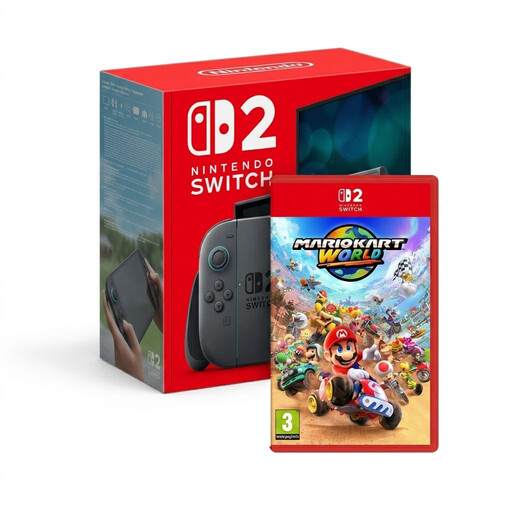 Image unavailable
This bundle is for anyone who wants to play Mario Kart World on Switch 2; Nintendo lists up to four players on the same system.
Nintendo describes TV, tabletop and handheld modes for Switch 2. Check that your chosen setup and screen work well with your seating arrangement.
No. Nintendo distinguishes between up to eight players via local wireless play and four players on a split screen in TV or tabletop mode.
No. Nintendo states that Switch Lite does not support TV mode. If you choose a console that does, check that the connections and accessories you need will work with your setup.
Sony recommends keeping the ventilation openings clear and leaving at least 10 cm of space around the console. When measuring your cabinet, make sure you allow for this clearance.
That depends on the game, the bundle and the controllers you already own. The Gran Turismo manual requires each split-screen player to have their own controller, so check how many compatible controllers are included.
Faulty products are covered by the statutory guarantee; according to the Dutch government, there is no fixed statutory guarantee period in the Netherlands. For distance purchases from a business, you generally have a 14-day cooling-off period, with some exceptions. If the product is faulty, contact the seller.