
Racers short on space
You want to play with others on one screen without controllers and cables taking up too much room. Nintendo UK confirms that Mario Kart 8 Deluxe supports split-screen play for up to four players in TV or tabletop mode.


Start with your console and your racing game's local multiplayer mode: an extra controller won't make a game suitable for split-screen play if it doesn't support local multiplayer. For Mario Kart on a Switch, separate Joy-Con can save space; choose a gamepad if you'd rather hold two grips, and check that the game and controller set-up are compatible with your console.
You want to play with others on one screen without controllers and cables taking up too much room. Nintendo UK confirms that Mario Kart 8 Deluxe supports split-screen play for up to four players in TV or tabletop mode.
You already have a console and a racing game, and want to let another player join in. First, check your console model, the local multiplayer mode and how many controllers you already have.
You might find a single Joy-Con too small, or you may play for longer sessions. Compare the shape, button layout and features of the exact gamepad you're considering.
First, check that your console and racing game support local multiplayer, and find out how many players can join in on one system. Then choose between separate Joy-Con and a gamepad with two grips, depending on the space you have and how you prefer to play.
Nintendo UK lists up to four players on one system for both Mario Kart 8 Deluxe and Mario Kart World. The game mode and controller set-up determine how many controllers you'll need.
| What to consider | What should you check? | Who is this most relevant to? |
|---|---|---|
| Console and game mode | Check the exact game, console version, local player limit and supported controller set-up. | If I want to use my existing console and racing game, I first check that they support local multiplayer together. Around 33% of consumers say compatibility and game mode are their main buying concerns. |
| Space around the seats | Check whether players can use a separate Joy-Con in the game you've chosen, and whether the shared set-up is practical. | If there's little room for larger controllers, I'll look for a compact set-up for several players. Around 27% of consumers prioritise saving space. |
| Grip and controls | Compare the shape, button layout and features of the exact model with the way you want to play. | If I'd rather hold two grips while steering, I'll focus on the controls. Around 20% of consumers say grip and ease of use are their main buying concerns. |
| Controllers and charging | Count the controllers you already have, check what's included and find out how the exact model is charged. | If I already own controllers, I want to know what else I need and how to charge everything. Around 20% of consumers prioritise extra purchases and power requirements. |
The number of players who can play on one system depends on the game and platform. An extra controller won't add a local multiplayer mode.
Look up the exact game to check how many local players can join in and which controller set-up it supports.
Nintendo says that Joy-Con 2 are for Switch 2 only. Original Joy-Con can be paired wirelessly with Switch 2, but can't be attached to the system.
Check your console generation, which controllers are already included and how to charge the model you've chosen. To use original Joy-Con with Switch 2, you'll need an original Switch or a compatible charging accessory.
A charging accessory may be needed if you use original Joy-Con with Switch 2.
Features vary by model. PowerA says the Nano doesn't have HD Rumble, IR or amiibo NFC; the 8BitDo manual also lists features that the Ultimate 2 Bluetooth doesn't support.
Compare the features of the exact version with the ones your games use.
Joy-Con and Joy-Con 2 are suitable for local racing on Switch and Switch 2 respectively; choose based on your console generation.
The Nano Enhanced Wireless is a compact gamepad for the original Switch models listed by PowerA for this version.
The Ultimate 2 Bluetooth is an option if you'd like to use a supported Windows PC as well as Switch.
The Xbox Wireless Controller is compatible with an Xbox console or a supported Windows PC.
DualSense is an extra controller for a PS5 game that supports local multiplayer.
This selection at Joybuy includes Joy-Con for Switch and Switch 2, a gamepad for Switch systems, and controllers for Xbox and PS5. Before buying, check that your racing game supports the local multiplayer mode and controller set-up you want.
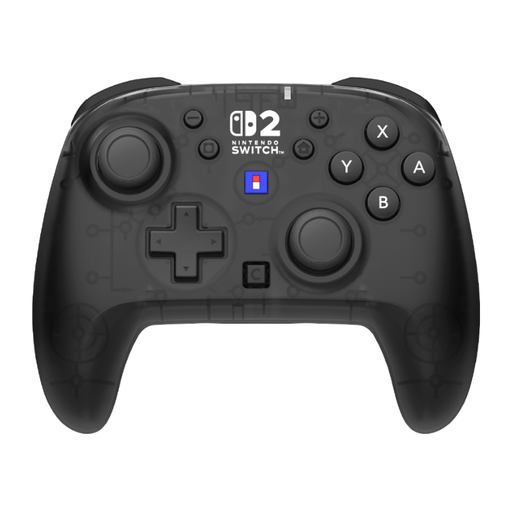 No image available
For a Switch or Switch 2 set-up if you'd rather use one gamepad with two grips; the racing game must support the local game mode you want.
The product listing states that HD Rumble 2 and vibration aren't included.
 No image available
An option for an Xbox set-up; check that your racing game supports local multiplayer and how many controllers you'll need.
Xbox says that performance may be reduced when using multiple controllers via Bluetooth on PC.
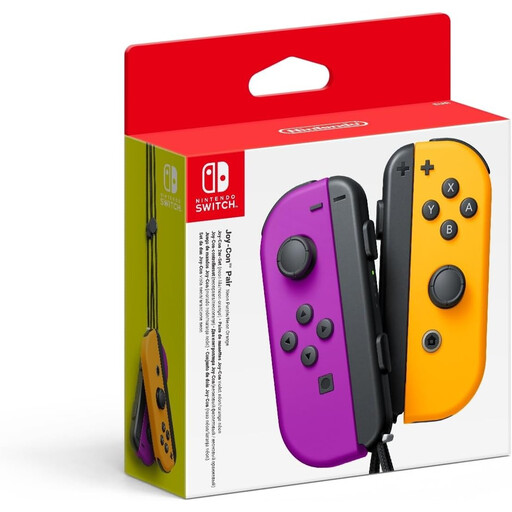 No image available
For a supported multiplayer game on Nintendo Switch: separate Joy-Con can be used as controllers, but the game you choose determines which set-up is available.
Nintendo says that support for using Joy-Con separately can vary by game.
 No image available
For a PS5 game that supports local multiplayer. PlayStation lists haptic feedback and adaptive triggers; the game must support these features.
 No image available
For a Switch 2 set-up where players can use separate Joy-Con 2 if the game supports that set-up.
Nintendo says that Joy-Con 2 are for Switch 2 only.
That depends on the game and the number of players. Nintendo UK confirms that Mario Kart 8 Deluxe supports split-screen play for up to four players in TV and tabletop modes; Mario Kart World supports up to four players on one Switch 2. Check the game's controller set-up before buying extra controllers.
On Switch, go to Controllers, then Change Grip/Order. To use each Joy-Con horizontally, press SL and SR on it. The permitted orientation also depends on the game.
Yes. Nintendo says that original Joy-Con can be paired wirelessly with Switch 2. You can't attach them to the console; to charge them, you'll need an original Switch or a compatible charging accessory.
Not for the local game modes Nintendo describes for Mario Kart 8 Deluxe and Mario Kart World. Nintendo says a Nintendo Switch Online membership is needed for online features; check the specific game's terms for how you plan to use it.
According to the Dutch government, the seller must provide a solution if a product is faulty. The Netherlands has no fixed statutory guarantee period that applies to all products. In many cases, online purchases from a business also come with a 14-day cooling-off period; exceptions may apply.