
Host with a Switch
Wants to work out before the evening how many individual Joy-Cons or full controllers are needed for Mario Kart on one screen. Nintendo Netherlands outlines the local multiplayer options for each Switch system.


Choose a controller that works with both your console and the racing game you’ve picked, then count how many individual controls your group will need. Nintendo Netherlands says that four players can play Mario Kart 8 Deluxe on a split screen on the original Switch; since the update of 2 September 2026, up to eight can play on a single Switch 2 screen, as long as everyone has a compatible controller. In supported games, one Joy-Con can be enough for a player, while a full gamepad is an alternative if your guests prefer that style of controller.
Wants to work out before the evening how many individual Joy-Cons or full controllers are needed for Mario Kart on one screen. Nintendo Netherlands outlines the local multiplayer options for each Switch system.
Looking for an extra gamepad that works with an Xbox, PS5 or supported racing game on Windows. Check support for the specific game and system.
Wants to check connections, battery charge and, if needed, cable reach in advance, so the chosen controllers are ready when guests arrive.
Start with your console and racing game, then decide how many people will play at once. Only then choose between individual Joy-Cons and full controllers.
| What to consider | What to look for | Who is this important for? |
|---|---|---|
| Console and game | Check the exact console, racing game and game version; also check which controllers and local game modes are supported. | If I want to be sure the controller works with both my system and racing game, compatibility comes first; around 31% of consumers have the same top concern. |
| Number of players | Allow one usable controller per player and check the limit for your chosen game, console and game mode. | If I want everyone to play at once, I first count the available controllers; around 25% of consumers focus mainly on having enough controllers for the group. |
| How you control the game | Compare an individual Joy-Con with a full gamepad and check that the game supports your preferred way to play. | If I want to find a controller that feels comfortable for the players, I look at its shape and features; around 19% of consumers say this is their main consideration. |
| Ready to play | Check the battery charge or batteries in advance; if you’re using a wired controller, measure whether the cable will reach the seat. | If I want to start playing without delay, I sort out charging, batteries and connections in advance; around 13% of consumers prioritise being ready to play. |
| Accessories and service | Count the controllers and any batteries or charging accessories you may need; check service terms separately from your statutory rights. | If I want to know about extra costs and what help is available if something goes wrong, I also check the accessories I need and the terms; around 12% of consumers have this as their top concern. |
The maximum number of players varies by game and system. Since the update of 2 September 2026, Nintendo Netherlands states that up to eight players can play Mario Kart 8 Deluxe on one Switch 2 screen. For Mario Kart World, Nintendo lists a maximum of four players on the same system.
Before buying, check the game title, version, console and local game mode.
Nintendo says Joy-Con 2 and the Switch 2 Pro Controller are only compatible with Switch 2. According to Nintendo, the original Switch Pro Controller works with both Switch generations.
Check the controller’s full generation name and the console you’ll be playing on.
For the PowerA Enhanced Wired Controller reviewed, PowerA specifies that it can be used when the Switch is docked, has a 3 m cable, and does not have motion controls or HD rumble. These details apply to this model.
Check the exact model’s play mode, cable reach and the features you need.
ACM ConsuWijzer distinguishes between the statutory guarantee and any seller’s or manufacturer’s guarantee; an additional service plan does not replace your statutory rights.
Read the terms of any additional plan separately and keep your proof of purchase.
A range of relevant controllers for Mario Kart on Nintendo systems, from individual Joy-Cons to full Pro Controllers.
A controller option for Xbox and supported Windows PCs when you’re playing the racing game on those systems.
DualSense is the controller range for a local racing game night on PS5.
The Enhanced Wired Controller reviewed is a wired alternative for a supported Switch setup when docked.
The Ultimate 2 Bluetooth Controller is a possible option if you use both Switch and Windows.
This selection includes controllers for PS5 and Nintendo Switch setups, including individual Joy-Cons and full gamepads.
 No image available
A full wireless gamepad for a PS5 racing game that supports the controller.
The product details list a built-in rechargeable battery, haptic feedback and adaptive triggers. The game must support haptics and triggers.
 No image available
A full controller for guests who prefer playing with a gamepad rather than an individual Joy-Con.
Nintendo says the original Switch Pro Controller works with both Switch generations. The product details list wireless controls, motion controls and HD rumble.
 No image available
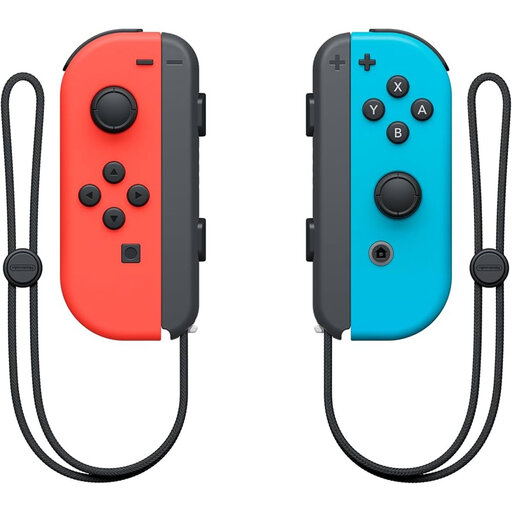
A pair for players who want to use one Joy-Con each in a supported game.
Nintendo says Joy-Cons can each be used as a controller. When both Joy-Cons are used together, they count as one player’s controls. Existing Switch Joy-Cons can connect wirelessly to Switch 2, but can’t be attached to it.
 No image available
A full gamepad for a Switch 2 setup, provided the racing game supports this controller.
This model is only compatible with Nintendo Switch 2. The product details list a wireless Bluetooth connection and an included USB charging cable.
 No image available
A pair of individual controllers for players who want to play a supported Switch 2 game together.
Joy-Con 2 is only compatible with Nintendo Switch 2. The product details list motion controls and up to 20 hours of play time.
On one Switch 2 screen, Nintendo has listed a maximum of eight players in Mario Kart 8 Deluxe since the update of 2 September 2026. Everyone needs a compatible controller, and the game must have the required update. For the original Switch, Nintendo lists four players on a split screen; Mario Kart World has a maximum of four players on one Switch 2 system.
You can pair existing Switch Joy-Cons wirelessly with Switch 2, but they can’t be attached to the system. Nintendo recommends using an original Switch or a suitable licensed charging accessory to charge them. Check the battery charge and make sure they’re charging before your guests arrive.
Not necessarily: Microsoft lists AA batteries as an option, with a compatible rechargeable battery as an alternative. According to Microsoft, rechargeable AA batteries can’t be charged in the controller.
For online purchases in the Netherlands, you generally have a statutory 14-day cooling-off period after delivery, with some exceptions. If a controller doesn’t meet what you could reasonably expect under normal use, the seller is responsible for the applicable statutory guarantee. This right does not depend on buying a service plan.
According to the Dutch Business.gov.nl, sellers of electrical and electronic equipment must ensure their products comply with the relevant European rules. Wireless devices may also be subject to radio equipment rules. These obligations alone do not confirm that a specific controller meets every requirement.