
Switch racers with extra players
You want to know whether the Joy-Con 2 controllers you already have are enough, or whether extra individual controllers or a full-sized gamepad would be more comfortable. The available play styles vary by game.


First, check that the racing game on your console supports split-screen for the number of players you want; an extra controller won’t add that game mode. Then choose between detachable controllers, a full-sized gamepad or a wired model, depending on your system, playing style and cable layout. To reduce glare from daylight, adjust the screen position or use blinds or curtains – changing controllers won’t help.
You want to know whether the Joy-Con 2 controllers you already have are enough, or whether extra individual controllers or a full-sized gamepad would be more comfortable. The available play styles vary by game.
You’re looking for an extra controller for your system and also checking whether the racing game supports local multiplayer.
You want to keep cables out of the seating area and make sure everyone can see the shared screen in daylight. Screen placement and window coverings need a different solution from a new controller.
Start by checking the game, console and number of players together. Once those are right, you can decide which controller layout and connection will work best for the players and the room.
| What to consider | What should you check? | Who is this important for? |
|---|---|---|
| Game, system and number of players | Check the exact game title, console version, local game mode and supported controller configuration. Nintendo Netherlands lists split-screen for up to four players in TV or tabletop mode for Mario Kart 8 Deluxe. | If I want to race with others on one screen, I first check that my game and console support that setup. Around 36% of consumers give compatibility and player numbers top priority. |
| Playing style | Decide whether players would rather each use a small Joy-Con 2 or hold a full-sized gamepad with both hands. Also check which playing styles the game supports. | If players prefer a different grip when sitting at a table or on the sofa, I want to be able to match the controls to their preference. Playing style comes first for around 29% of consumers. |
| Connection and power | Check where the players will sit, whether a cable can be routed safely, and how the exact model connects or charges. A wired controller avoids relying on a controller battery while playing, but you’ll need to plan the cable route. | If I don’t want a cable running through the seating area, I look at wireless options. If I’d rather not stop to recharge, I weigh up a wired controller. Around 21% of consumers care most about this trade-off. |
| Screen visibility | Check for glare at the time you play. The Arboportaal recommends positioning screen-based workstations so you look parallel to the window, and using suitable blinds or curtains to prevent reflections from daylight. | If incoming light makes the shared screen difficult to see, I want to adjust the screen position or window coverings first. Daylight visibility is the main concern for around 14% of consumers. |
The number of players and available game modes vary by game and system. A second controller can’t enable a local game mode that isn’t supported.
Check the exact game, console version, local game mode and number of players you want before choosing a controller.
Nintendo says that Joy-Con 2 only works with Nintendo Switch 2. The original Joy-Con controllers can be used wirelessly with Switch 2.
Check the controller’s full model name and which Switch you own.
A cable may not reach conveniently between the console and the seating area. The PowerA controller for Switch 2 reviewed here is designed for use when the console is in its dock.
Check where the console and players will be sitting, and whether the cable can be routed safely, before choosing a wired controller.
A different gamepad won’t change the light coming into the room or the glare on the shared screen.
Check the screen in the daylight you’ll be playing in, and try adjusting its position or using window coverings if needed.
Relevant for Joy-Con 2 and full-sized controllers for Nintendo Switch 2.
The DualSense is an option for PS5 racers; Sony also mentions use with PC, Mac and mobile devices.
The Xbox Wireless Controller is designed for supported Xbox systems and Windows PCs.
The Advantage Wired Controller is a wired option for Switch 2 when the console is in its dock.
The Ultimate 2 Bluetooth is a customisable option for the Switch and Windows systems listed by 8BitDo.
This selection includes wired and wireless controllers for Switch 2, PS5, Xbox and PC. Always check compatibility with your setup and whether the racing game supports local multiplayer.
 No image available
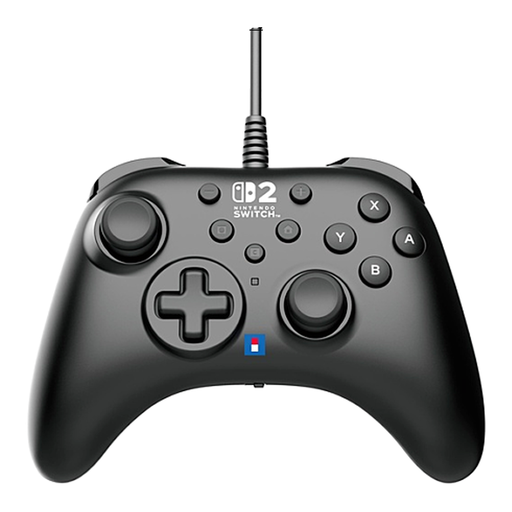
A wired gamepad for playing on Nintendo Switch 2. Check that the cable route works with your seating arrangement.
The product information lists a 3 m USB cable, programmable buttons and a Turbo function.
 No image available
A wireless DualSense gamepad for PS5. Also check whether your chosen racing game supports local split-screen.
The product title lists PS5, PC, Mac and mobile devices. Haptic feedback and adaptive triggers depend on support from the game.
 No image available
A wireless gamepad for supported Xbox systems and Windows PCs.
The product information lists Xbox Series X|S, Xbox One and Windows PCs. It says you can connect wirelessly using Xbox Wireless or Bluetooth; AA batteries are required for wireless use. USB-C is also available.
 No image available
A full-sized gamepad for Nintendo Switch 2 if you prefer playing with both hands.
The product information lists Bluetooth, USB-C, a rechargeable battery, HD vibration and motion controls. The product title lists Nintendo Switch 2 as the platform.
 No image available
A left and right controller for players who want detachable controls on Switch 2. Local multiplayer depends on the game.
The product information lists wireless use and HD Rumble 2. Nintendo says Joy-Con 2 supports local multiplayer in compatible games.
No, the game itself must support a local split-screen mode. Nintendo Netherlands lists up to four players on a shared screen in TV or tabletop mode for Mario Kart 8 Deluxe. Check the game mode and the number of controllers needed per player for your racing game.
Nintendo describes pairing it using the supplied USB-C cable, or by using Controllers and changing the play style/order with the SYNC button. The number of controllers you can then use depends on the game and the play style you choose.
If possible, adjust the screen position or viewing direction, and use suitable blinds or curtains. The Arboportaal recommends these measures to reduce reflections from daylight at screen-based workstations; they aren’t a legal requirement for setting up a home gaming space.
According to the Dutch government, the seller must provide a solution if a product is faulty. For distance purchases from a business, you generally have a 14-day cooling-off period, although exceptions apply. Check which terms apply to your purchase.