Start with your console and the local player mode in the specific racing game: an extra controller won’t add split-screen play by itself. For supported Mario Kart games, individual Joy-Cons can be a compact way to get more players involved; a full gamepad is an alternative if you prefer playing with a controller in both hands. On Xbox, PS5 or PC, you’ll also need to check that both the controller and the game are compatible, and decide whether wireless play or a cable works best in your room.
Who is this buying guide for?
Switch racers with extra players
You want friends to race together on one screen and are comparing shareable Joy-Cons with a full gamepad. First, check which Switch console and Mario Kart game you have. Nintendo says Mario Kart 8 Deluxe supports up to four players on a split screen.
Xbox, PS5 and PC racers
You’re looking for an extra gamepad for your existing system. Check that both the controller and the specific game support local multiplayer. Microsoft lists Xbox and Windows as supported platforms for the Xbox Wireless Controller, while Sony says PS5 supports up to four controllers.
Racers short on space
You want to avoid a cable running across the seating area and are weighing up wireless play against charging or batteries. Think about the grip, too, and how many controllers you already own. The right choice depends on your system and the racing game.
What should you look for when choosing?
First, check that the game supports local racing with the number of players you want. Then choose a controller that suits your system, preferred controls and room layout.
| What to consider |
What should you check? |
Who should pay particular attention? |
| Compatibility |
Check the console, exact game title, local player mode and full controller model name. Look out for any firmware requirements, too. |
I want to make sure my system and racing game work together before I choose anything. Around 31% of consumers give compatibility top priority. |
| Extra player slots |
Count the controllers you already have and check whether each player needs a full gamepad or can play with a single Joy-Con. |
I want to know how many extra players can actually join in and which controls the game supports. Around 25% of consumers put extra player slots first. |
| Cables and power |
Check whether the controller is wired or wireless, where a cable could run, and which batteries or charging solution it needs. |
I want to keep the walkway clear and avoid a cable between the seating area and the console. Around 19% of consumers make a cable-free setup their top priority. |
| Grip and controls |
Compare a single Joy-Con with a full gamepad and check that the game supports your preferred way of steering. |
I want controls that feel comfortable in my hands and suit the way I steer. Around 13% of consumers prioritise how a controller feels in the hand and its steering controls. |
| Cost per player |
Work out how many usable player controllers you’re missing and check which accessories or power options you’ll need for the version you choose. |
I want to get several players involved without unnecessary extra purchases. Around 12% of consumers put the total cost of adding extra players first. |
Common mistakes
-
Assuming an extra controller adds split-screen play
A controller won’t make local multiplayer available if the game doesn’t support it. Nintendo confirms the player modes for Mario Kart 8 Deluxe and Mario Kart World; that information doesn’t automatically apply to other racing games.
First, check the local multiplayer options for the exact game, then make sure the controller works with your system.
-
Confusing the Ultimate 2C Bluetooth with the Ultimate 2C Wireless
8BitDo lists different platforms for the two versions. The Bluetooth version is designed for Switch and supports Switch 2 after the stated firmware update; the Wireless version lists Windows and Android.
Compare the full model name and platform list before choosing a version.
-
Only counting how many controllers come in a set
Two separate Joy-Cons can control two players in a compatible game, but when used together in a grip, they form one controller. Original Joy-Cons also don’t charge when attached to a Switch 2.
Count what you already have for each player and check how the controllers are held and charged.
-
Choosing a wired gamepad without checking where the cable will go
A wired controller needs a cable between the seating area and the system. For the HORIPAD model reviewed, HORI also says it has no motion controls or vibration feedback.
Check where the cable can run and which features you actually need.
Brands to compare by version and platform
Nintendo
A relevant choice for local Nintendo racing games on Switch and Switch 2.
- Nintendo says individual Joy-Cons can be used independently. Mario Kart 8 Deluxe supports up to four players on a split screen.
- Original Joy-Cons can connect wirelessly to Switch 2, but won’t charge when attached to that console. Make sure you choose the right Switch version.
Xbox
A full wireless gamepad for Xbox consoles and compatible Windows PCs.
- Microsoft lists Xbox and Windows as supported platforms for the wireless controller.
- The standard controller uses AA batteries or a compatible charging solution. Controller compatibility doesn’t confirm that a specific game has split-screen play.
Sony PlayStation
The DualSense is an option for an extra player on PS5.
- Sony says you can use up to four controllers at once on PS5.
- The game determines the local player limit. Sony warns that some controller features may not be available on other devices.
8BitDo
The platforms listed depend on the exact Ultimate 2C version.
- According to 8BitDo, the Ultimate 2C Bluetooth supports Switch and, after the required firmware update, Switch 2.
- The Ultimate 2C Wireless is a different version, listing Windows and Android as supported platforms. These are manufacturer specifications, not the results of an independent performance test.
HORI
A wired HORIPAD for Switch may suit you if you want a full gamepad and can position the cable conveniently.
- For the HORIPAD model reviewed, HORI lists analogue sticks and a detachable D-pad.
- HORI says this model has no motion controls or vibration feedback; this doesn’t automatically apply to other HORI controllers.
Joybuy products for different consoles and play styles
These models suit the Switch, Switch 2, PS5 and Xbox or Windows setups mentioned above. Check that your racing game is compatible and count how many controllers you already have.
 No image available
PS5 DualSense™ wireless controller V3 – Cosmic Red
An extra full gamepad for a PS5 setup; check whether your racing game supports local multiplayer.
The product description mentions a rechargeable battery, haptic feedback and adaptive triggers.
View at Joybuy
 No image available
Nintendo Switch 2 Official Pro Controller – Black
A full gamepad for one player on Switch 2; check the local player mode in your racing game.
The product description mentions motion controls, HD Rumble, Bluetooth, a rechargeable battery and a USB charging cable.
View at Joybuy
 No image available
Nintendo Switch 2 Official Joy-Con pair – Light Blue/Light Red
A left and right controller for extra Switch 2 players; check how your chosen game supports Joy-Con 2.
The product description lists two wrist straps, a wireless Bluetooth connection and a battery life of up to 20 hours.
View at Joybuy
 No image available
Xbox Wireless Controller – Ice Breaker Special Edition
A full wireless gamepad for a compatible Xbox console or Windows PC; check that the game supports it, too.
The product description mentions a hybrid D-pad and textured grip. The controller uses AA batteries or a compatible charging solution.
View at Joybuy
 No image available
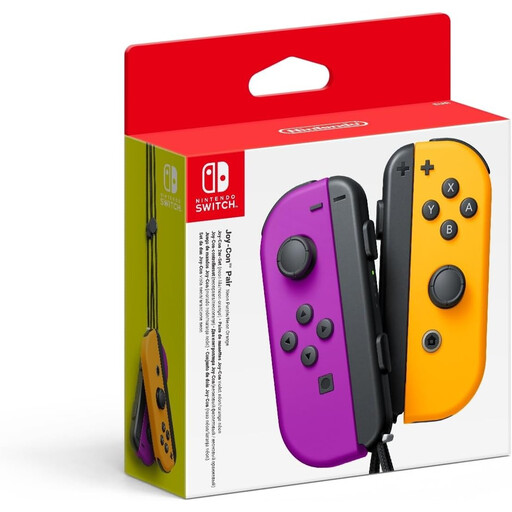
Nintendo Switch Joy-Con pair – Neon Purple/Neon Orange
Individual Joy-Cons can control two players in a compatible game; check the controls in your racing game.
The product description mentions motion controls and HD Rumble. Nintendo says original Joy-Cons work wirelessly with Switch 2, but won’t charge when attached to that console.
View at Joybuy
Frequently asked questions
Can I use one extra pair of Joy-Cons to get two extra players racing?
You can in a game that supports one individual Joy-Con per player. If you use both Joy-Cons together in a grip, they control one player. Check your racing game’s controls and count the player slots already available; Nintendo says Joy-Cons can be used individually.
Can I use and charge original Switch Joy-Cons on a Switch 2?
Yes. Nintendo says you can connect original Joy-Cons wirelessly to Switch 2, but you can’t charge them on the Switch 2 itself. If you want to charge them, you’ll need an original Switch or a compatible charging accessory.
Do I need a steering wheel for Mario Kart World?
No. Nintendo lists steering with a control stick or motion controls. The Joy-Con 2 steering wheel attachment is sold separately.
How many controllers can I use at once on PS5?
Sony says you can use up to four controllers at once on PS5. The game determines how many local players can actually join in, so check the player mode for the specific racing game.
What can I do if a controller I bought online isn’t compatible with my console?
For a standard online purchase by a consumer in the Netherlands, ACM ConsuWijzer says you’ll generally have a statutory 14-day cooling-off period from the date of delivery. Check the exceptions and the conditions for trying out and returning the product. Your statutory guarantee is separate from a manufacturer’s or retailer’s warranty: if a product doesn’t do what you could reasonably expect under normal use, the seller is responsible for providing an appropriate solution.


