Who is this buying guide for?

Racing together on Switch

You want to race locally using the controllers you already own, or one suitable extra controller, without adding more clutter to a small play area. Nintendo lists local play options for games including Mario Kart 8 Deluxe and Mario Kart World; check the game mode available for your title and system.

A second player on PS5 or Xbox

You’re looking for a separate controller for the second player. First check whether your racing game supports local multiplayer on your console; Sony explains how to pair DualSense controllers with PS5, and Microsoft provides guidance on connecting Xbox controllers.

Racing on a shared PC

You want two players to play on the same PC and need to check whether the game supports local multiplayer and recognises both controllers as separate players. Microsoft lists USB, a wireless adapter and Bluetooth as connection options for Xbox controllers on Windows 10 and 11; options may vary for other models.

What should you look for in an extra controller?

In a compact play area, you’ll need to consider game support, room to move, how each player will control the game and how to avoid an unnecessary purchase.

What to consider What to look for Who is this important for?
Console and game compatibility Check the exact console version, local game mode and supported controllers for your racing game. If I want to race together, I need to know that both my system and the game support that set-up. Compatibility is the top priority for around 40% of consumers.
Connection and room to move Check whether the controller is wired or wireless, and whether any cable can be routed safely around the play area. I want enough room to move and no cable running between the players and the screen. A cable-free set-up is the main concern for around 23% of consumers.
Controls for each player Check how the game assigns players and whether a Joy-Con can be used separately. I want every racer to have controls that suit the game, whether that’s a separate Joy-Con or a full gamepad. This is the main consideration for around 23% of consumers.
Buying and using a controller Check which controllers and accessories you already own, and whether you’ll need an adapter or a way to charge it. I don’t want to buy an extra controller if my existing set-up already works, and I want to know in advance which components I’ll need. Avoiding unnecessary purchases is the main priority for around 14% of consumers.

Common buying pitfalls

  • Buying a controller without checking the local game mode

    A controller working with your console doesn’t automatically mean the game has a local split-screen mode. Nintendo lists the local play options for each title.

    First check the game mode for your exact game and system, then choose a controller to suit.

  • Assuming Switch and Switch 2 controllers are fully interchangeable

    Joy-Con 2 doesn’t work with the original Switch. Older Joy-Con controllers can be used wirelessly with Switch 2, but can’t be attached to the system or charged by it, according to Nintendo.

    Check the full name of both the console and controller. If you’re using older Joy-Con controllers, remember to consider a suitable charging solution too.

    Older Joy-Con controllers may need a separate charging accessory for use with Switch 2.

  • Assuming every wireless model uses Bluetooth

    Connections can vary by model and platform. For example, 8BitDo lists 2.4 GHz or USB for the Ultimate 2C Wireless on Windows, while Bluetooth is listed as a connection option for Android.

    Check the connection table for the exact model and your platform, rather than relying on the word ‘wireless’.

    Depending on the connection you choose, you may need a cable or adapter.

  • Confusing an extended warranty with your statutory rights

    A paid extended warranty is separate from your statutory rights if a product is faulty. The Dutch Government notes that there is no fixed statutory warranty period in the Netherlands; what you can expect from a product varies.

    Compare the terms of any additional cover with your statutory rights, and ask the seller for a solution if there’s a problem.

Relevant brands to consider

Nintendo

Offers Joy-Con, Joy-Con 2 and Pro Controller options for Switch systems. The right choice depends on the combination of console, controller and game.

  • Nintendo explains that a Joy-Con 2 can be used horizontally as a separate controller in supported software.
  • Joy-Con 2 and the Switch 2 Pro Controller don’t work with the original Switch. Older Joy-Con controllers can be used wirelessly with Switch 2, but can’t be attached to the system or charged by it.

Sony PlayStation

DualSense is the controller option for an extra player on PS5. Local multiplayer support also depends on the game.

  • Sony explains how to pair a DualSense with PS5 and states that up to four controllers can be used at once.
  • Compatibility and features may be limited on other devices; this doesn’t determine whether a particular game supports split-screen.

Xbox

Xbox Wireless Controllers are designed for Xbox and supported Windows set-ups, provided the game offers local multiplayer.

  • For Windows 10 and 11, Microsoft lists connection via USB, an Xbox Wireless Adapter or Bluetooth.
  • According to Microsoft, controller audio and firmware updates don’t work over Bluetooth on Windows. Check which connection you need for the features you want to use.

PowerA

The range includes controllers for Switch and wired models for Xbox and Windows set-ups. Always check the full model name.

  • According to PowerA, the specific Enhanced Wireless Controller Rechargeable for Nintendo Switch also works with Switch 2.
  • This specific model doesn’t have a C button, HD Rumble, IR or amiibo NFC. The Xbox series mentioned is wired; consider whether the cable will suit your play area.

8BitDo

The Ultimate 2C Bluetooth and Ultimate 2C Wireless are different models, with different listed platform and connection options.

  • For the Bluetooth model, 8BitDo lists Switch support and Switch 2 support following a firmware update.
  • For the Ultimate 2C Wireless, 8BitDo lists 2.4 GHz or USB on Windows, and Bluetooth on Android. Choose based on the exact model and platform.

Joybuy controllers for different systems

This selection includes wireless controllers for Xbox, PC, Switch and PS5, plus a wired HORI controller for Switch and Switch 2.
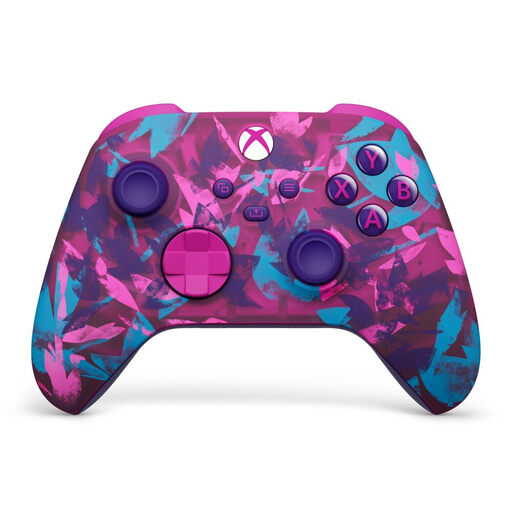
Xbox Wireless Controller for Xbox Series/PC – Heart Breaker Special Edition

Xbox Wireless Controller for Xbox Series/PC – Heart Breaker Special Edition

Well suited to an Xbox or PC set-up where you don’t want a controller cable running through the play area.

The product description lists Xbox Wireless and Bluetooth, and mentions that two AA batteries are included.

View at Joybuy
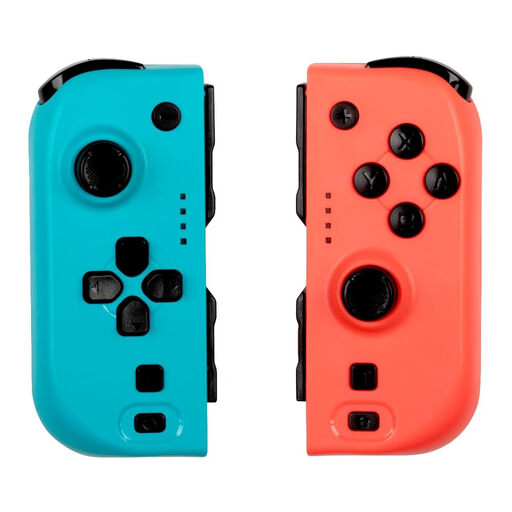
KONIX JoyPad Controller Pair for Nintendo Switch and Switch OLED – Blue and Red

KONIX JoyPad Controller Pair for Nintendo Switch and Switch OLED – Blue and Red

A pair of controllers for a Switch set-up where two players want to play separately.

The product title lists compatibility with Switch 2. The product description mentions Bluetooth, two-player use, up to 8 hours of battery life and a vibration function.

View at Joybuy

PS5 DualSense Wireless Controller V3 – Cosmic Red

PS5 DualSense Wireless Controller V3 – Cosmic Red

An extra wireless controller for a PS5 set-up, if your racing game supports local multiplayer.

The product description mentions USB-C charging, haptic feedback and adaptive triggers.

View at Joybuy

Nintendo Switch Pro Controller – Black

Nintendo Switch Pro Controller – Black

A wireless gamepad for a Switch set-up where you want each player to use a full controller.

The product description mentions motion controls, HD Rumble and amiibo functionality. Nintendo states that the original Switch Pro Controller can be synced wirelessly with Switch 2.

View at Joybuy
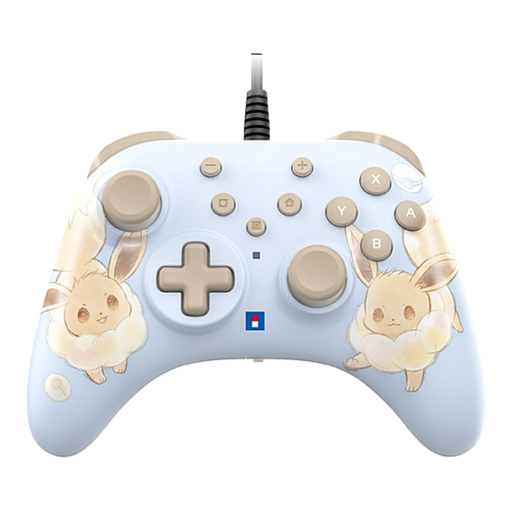
HORI Wired Controller HORIPAD Turbo for Switch and Switch 2 – Pokémon Eevee Cottage Core Edition

HORI Wired Controller HORIPAD Turbo for Switch and Switch 2 – Pokémon Eevee Cottage Core Edition

A wired option for a Switch or Switch 2 set-up where a cable can run through the play area.

The product information lists a USB connection; the USB cable isn’t included.

View at Joybuy

Frequently asked questions

Do I need to buy an extra controller straight away to play with two people on Switch 2?

Not always: Nintendo states that a Joy-Con 2 can be used horizontally as a separate controller in supported software. Check whether your racing game’s controls suit this way of playing, then assign the right controller to each player.

How do I pair a second DualSense with a PS5?

According to Sony, first connect the new DualSense to the powered-on PS5 using a USB cable, then press the PS button. Once it’s paired, you can disconnect the cable if the controller has enough charge; also check whether your racing game supports local multiplayer.

Can I use a controller for the original Switch with Switch 2?

It depends on the model. Nintendo states that original Joy-Con controllers and the original Switch Pro Controller can be used wirelessly with Switch 2; Joy-Con controllers can’t be attached to Switch 2 or charged by it. Conversely, Joy-Con 2 and the Switch 2 Pro Controller don’t work with the original Switch.

What can I do if a controller I bought online doesn’t work properly?

If a product is faulty in the Netherlands, you can ask the seller to put things right. The Dutch Government explains that there is no fixed statutory warranty period, because what you can expect from a product depends, among other things, on the type of product.
