
Listeners who sit at their desk to listen
You want to position both channels around your usual seat, so you’re particularly interested in stereo imaging and how your desk and room affect the sound.


For orchestral recordings in a home office, start by choosing two speakers that fit your usual listening position and can connect to your music source; a high power rating isn’t what determines the right choice. A compact active set can reduce the number of separate components, while separate studio monitors need more thought when it comes to connections, volume control and whether you’re buying one speaker or a pair. Measure the space available and, if possible, listen to both quiet and full passages in the position where you plan to use them.
You want to position both channels around your usual seat, so you’re particularly interested in stereo imaging and how your desk and room affect the sound.
You’re looking for two speakers that fit on or beside your desk, so their dimensions and the components you’ll need are important factors in your choice.
You might use a computer and a phone, for example, and want to check in advance that the chosen speakers have the right connections.
For orchestral recordings from a fixed listening position, speaker placement, connections and available space are practical factors to consider. Genelec recommends positioning monitors symmetrically towards the listening position and taking reflections into account.
| What to consider | What should you check? | Who is this important for? |
|---|---|---|
| Stereo positioning | Measure the available space to the left and right of your screen. Check whether you can position two speakers at a similar height and distance, facing your listening position. | If I want a clear stereo image from my usual seat, I pay particular attention to the position of both speakers. Around 37% of consumers in this breakdown put stereo positioning first. |
| Sound and room | Look at frequency ranges alongside their measurement conditions; if possible, try the speakers with familiar recordings in the position where you plan to use them. | If you want to hear how both quiet and full orchestral passages sound in your room, consider tonal balance and the effect of the room. Around 27% of consumers prioritise this. |
| Connections and controls | Compare the outputs on your computer and other sources with the inputs on the exact model. Check how you’ll control the volume, too. | If I want to use a computer and other music sources, I need suitable connections and convenient volume control. Source connectivity is the main priority for around 18% of consumers. |
| Complete stereo set | Check whether you’re buying one speaker or a pair, and which cables or connection components you’ll need. | If you want to know what you’ll need for left and right before buying, look for a complete set rather than a single speaker. Around 18% of consumers prioritise the cost of a complete stereo set. |
A single Genelec 8010A isn’t the two-monitor stereo setup described by Genelec. Check how many speakers are included and which connections and components you’ll need.
A stereo pair may require a second monitor, as well as suitable connecting equipment.
Before buying, check whether the offer includes one speaker or a pair, and whether you have the necessary outputs and volume control.
A stated frequency range alone doesn’t tell you which set will sound better in your room. For example, Genelec gives a measurement condition of −6 dB for the 8010A; other ranges aren’t necessarily directly comparable.
Read the measurement conditions in the specifications and, where possible, assess the speakers in the listening position you intend to use.
A larger cabinet or a rear bass reflex port can affect where a speaker will fit. ADAM Audio says the T5V has a rear-facing bass reflex port.
Measure the space on both sides of your desk and check the setup instructions for your chosen model.
These brands offer different types of active speakers and monitors that you can use as a reference. The features mentioned apply to the specific models and product ranges below, not every product from each brand.
The compact 8010A active monitor is designed for a small, fixed listening setup.
The T5V active nearfield monitor is an option if you have room for two separate cabinets.
The Eris 3.5BT 2nd Gen is a compact active pair with analogue inputs and Bluetooth.
The R1280DBs active bookshelf speakers are designed for listeners who want to use a range of inputs.
The LSX II LT is an active stereo pair for anyone looking for network and other source features alongside computer playback.
These Joybuy products are aimed at listening at a desk or in a workspace. The selection includes compact stereo sets, a passive speaker pair and a soundbar; check that each model’s setup and connections suit the way you plan to use it.
 Image unavailable
The description lists two speakers for stereo playback on a desktop or in a workspace.
Dimensions according to the product description: approx. 72 × 73 × 65 mm per speaker.
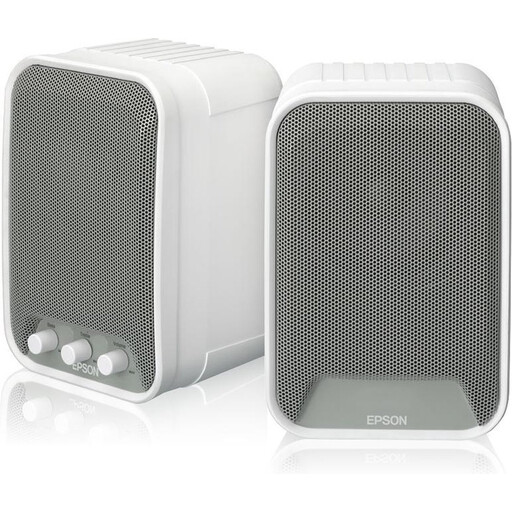 Image unavailable
This active set consists of two speakers; the description mentions a built-in amplifier.
The specifications list a 2-way system and 15 W RMS per speaker. The description mentions connection to the ELPCB01 and installation using the included kits.
 Image unavailable
The description mentions two full-range drivers and stereo playback for computer use.
Listed connection options are Bluetooth 5.3, USB and 3.5 mm AUX. USB power is also mentioned.
 Image unavailable
This passive pair is described as suitable for stereo music in settings such as an office or home studio.
A separate amplifier is required.
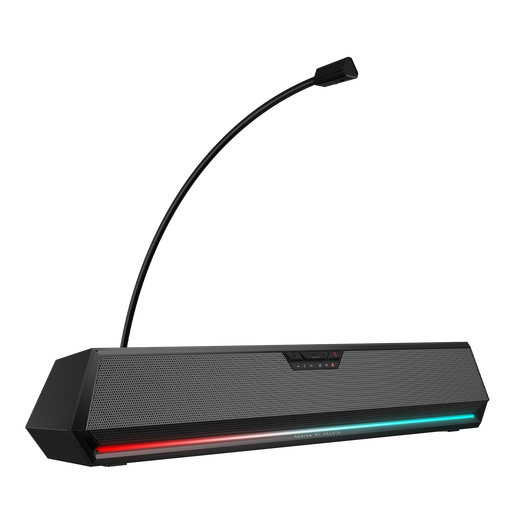 Image unavailable
The title lists Bluetooth, USB, 3.5 mm audio and RGB lighting for desktop use.
This is a soundbar, not a setup with two separate speaker cabinets. Bear that in mind if you want to position speakers to the left and right of your listening position.
No, they don’t have to sit directly beside it. Position both speakers as symmetrically as possible in relation to your usual listening position, and take reflections into account; Genelec recommends a stereo pair aimed towards the listening position.
It depends on the model. Genelec lists one analogue XLR input for the 8010A, so check whether your computer or audio interface has a suitable output and volume control. KEF lists a USB-C computer connection for the LSX II LT.
First, check whether you’re buying one speaker or a pair, and which cables are included. According to ACM ConsuWijzer, statutory guarantees apply alongside any manufacturer’s or seller’s guarantee; the seller must resolve an issue if a product, when used normally, doesn’t do what you could reasonably expect it to.
According to ACM ConsuWijzer, online consumer purchases generally come with a statutory cooling-off period of up to 14 days after delivery, subject to legal exceptions. Check the terms that apply to your purchase, and don’t assume the cooling-off period allows every kind of use.
The Netherlands Food and Consumer Product Safety Authority states that CE marking is required for electrical products offered on the Dutch market. The EU Radio Equipment Directive is also relevant for wireless models. Check the product information for the exact item; a general rule doesn’t confirm that a specific offer complies.