
Jazz listener with room for stereo
You want to position two speakers around your regular listening spot and need connections that work with your album source.


A stereo pair is a good choice if you can position two speakers around your listening spot and want to make the most of left-to-right stereo. If your desk is small, look for compact computer speakers. If you mainly want easy streaming or the flexibility to move your speaker, a Bluetooth or Wi-Fi speaker could be a better fit. For each model, check that its connections suit your music source and whether you need a pair, an adapter or an additional amplifier.
You want to position two speakers around your regular listening spot and need connections that work with your album source.
You mainly play albums from your work computer and want two compact speakers that take up little desk space.
You stream from your phone or move between workspaces; wireless controls or portability matter more to you than a permanent set-up.
First, work out how much room you have for one or two speakers. Then compare their connections with your album source and consider whether you’ll use them in one place or move them around.
A good fit if: you can position two speakers to the left and right of your listening spot.
Bear in mind: you’ll need room for both enclosures and, depending on the model, a cable to connect them.
A good fit if: your computer is your main music source and you need two small speakers to fit beside your monitor.
Bear in mind: size alone doesn’t tell you how a speaker will reproduce jazz; check what the USB connection is for, too.
A good fit if: you mainly listen from your phone or a supported streaming service and want one device for your workspace.
Bear in mind: one speaker isn’t the same as two speakers positioned separately; you may need an adapter for an analogue source.
A good fit if: you want to move your speakers between workspaces and position two separate channels.
Bear in mind: both speakers need charging, and the stated playback time won’t necessarily reflect your listening volume.
| What to consider | What should you check? | Who is this important for? |
|---|---|---|
| Stereo positioning | Check whether the product includes one speaker or a pair, where both speakers can go and whether they’re connected by a cable. | I want to position instruments to the left and right and have room for two enclosures; around 36% of consumers say stereo positioning is their top priority. |
| Connecting to your music source | Compare your source’s output with the connections on the exact model, and check whether you need an adapter. | If I play albums from a computer, phone or other audio player, I want a compatible connection; around 29% of consumers prioritise source compatibility. |
| Desk space | Measure the available width and depth, then compare them with the dimensions of the version you’re considering. | On a crowded desk, I want to know whether there’s room beside my screen; around 21% of consumers say size is their main buying concern. |
| Portability | Check whether both speakers have a battery, how they’re charged and whether they pair wirelessly as a stereo set. | When I move between workspaces, I want to be able to take the speakers with me easily; around 14% of consumers prioritise portability. |
A single compact speaker and two separately positioned speakers call for different workspace layouts, even if both are described as stereo.
Check how many speakers are included and whether you can position them to the left and right.
Depending on the model, USB-C may be used for audio, power or charging; the connection alone doesn’t tell you which functions are supported.
Check the information for the exact model to see what its USB port is used for.
For an analogue source connected to the Sonos Era 100, Sonos specifies a separate line-in adapter; an AUX cable isn’t included with that adapter.
Compare the outputs on your album source with the speaker’s inputs, and check which adapter and cable you’ll need.
You may need a compatible adapter and cable to connect an analogue source.
Active bookshelf speakers for anyone considering a stereo pair and several possible sources.
Compact computer speakers for anyone who plays albums from a desktop computer.
Active stereo pairs with streaming and connectivity options, including the LSX II LT.
App-controlled Wi-Fi and Bluetooth speakers for anyone who listens from a phone or streaming service.
The BS20 is an active, battery-powered stereo pair for anyone who wants to move their listening spot.
This selection includes compact PC and desktop speakers, a passive bookshelf pair and a portable Bluetooth speaker. Check that each model’s connections and set-up suit your music source and desk.
 No image available
Designed as a compact stereo set-up for a PC or desk.
 No image available
A desktop set for anyone who wants to position two compact speakers on or beside their desk.
 No image available
A computer speaker set for anyone looking for a stereo pair with several listed connection options.
The product name lists Bluetooth 5.3, USB and 3.5mm AUX.
 No image available
A passive pair for anyone who wants to position two speakers around their listening spot.
The set includes one pair of passive speakers; you’ll need a separate amplifier to use them. The product name lists 6.5 inch.
 No image available
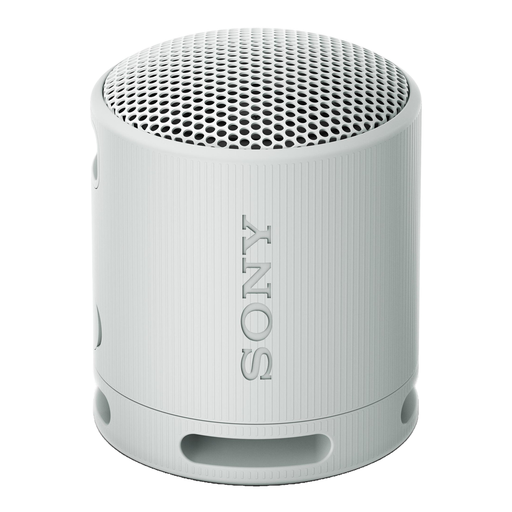
A portable speaker for anyone who wants to play music wirelessly or move the device around.
The listed specifications show one audio channel; this isn’t a separate left-and-right stereo pair.
It depends on your player’s output and the inputs on the exact speaker model. For an analogue source connected to the Era 100, Sonos specifies a separate line-in adapter and AUX cable. Whether your record player needs a phono preamp depends on the specific model.
First, work out where you can position two separate speakers and how any connecting cables will run. Edifier lists a cable between the speakers for the R1280DB; Audizio says the BS20 charges via USB-C and supports wireless stereo pairing.
For online purchases from a business, ACM ConsuWijzer says you’ll generally have up to 14 days after delivery to change your mind, subject to legal exceptions. In the Netherlands, statutory guarantees also apply, with no fixed statutory guarantee period; if a product is faulty, the seller is your point of contact.
Radio equipment covered by the applicable EU rules, including devices with Bluetooth or Wi-Fi radio functions, must carry CE marking. EU radio equipment legislation and guidance from the European Union make clear that CE marking is the manufacturer’s declaration of conformity, not an independent sound test. This requirement doesn’t automatically apply to every type of passive speaker.
Before buying, check which devices and services work with the model you’ve chosen and what software updates to expect. ACM ConsuWijzer highlights compatibility and updates as points to consider with smart speakers.