
Listeners who care about bass
If you listen to electronic music in one fixed spot, don’t just look at a frequency figure. Speaker placement and the option to add a subwoofer matter too.


Start with your main constraint. If you listen in one fixed spot and want to focus on low frequencies, active stereo speakers or nearfield monitors are worth considering, while compact desktop speakers take up less space. A subwoofer output gives you the option to expand your setup, but it doesn’t tell you how deep the bass will sound in your room. So check the dimensions, connections and what’s included in the complete set too.
If you listen to electronic music in one fixed spot, don’t just look at a frequency figure. Speaker placement and the option to add a subwoofer matter too.
If you need to fit two speakers beside your screen, their dimensions and the space needed for cables are important. Also consider whether you might want to expand your setup later.
If you switch between a computer, phone or streaming device, check that the exact model version has the inputs you need.
First, work out how much space you have and which sources you want to connect. Then compare bass expansion options and how the speakers can be positioned in your room.
| What to consider | What to look for | Who this matters to |
|---|---|---|
| Bass response | Compare frequency specifications only when they use the same measurement conditions, and check whether the model has a subwoofer output. ADAM Audio lists 45 Hz at −6 dB for the T5V; that figure doesn’t tell you how it will perform on your desk. | If you mainly want to hear the low parts in electronic music, what works in your listening setup is what counts. Around 31% of consumers say bass is their top buying priority. |
| Space and positioning | Measure the space available for both speakers and check where the connections and any bass ports are located. | If you want to place two speakers beside your screen, their size and cable routing may determine what fits practically. Around 31% of consumers prioritise available desk space. |
| Connections | Note which outputs your computer and other sources have, then compare them with the inputs on the exact model version. | If you use more than one audio source, you’ll want to know whether it can connect to the speakers without compatibility issues. Around 23% of consumers put source compatibility first. |
| Shared living space | Consider the volume and when you’ll be listening. If there’s a specific disturbance or household rule, check which arrangements apply to your situation. | If you live with other people, you’ll want to enjoy your music without overlooking their need for peace and quiet. Around 15% of consumers say consideration for housemates is their top priority. |
A stated frequency range doesn’t measure how speakers will sound on your desk or in your room. ADAM Audio lists 45 Hz at −6 dB for the T5V; figures from other manufacturers aren’t automatically comparable with that measurement.
Compare the measurement conditions and, if possible, listen to the speakers in a similar setup before making bass your deciding factor.
A subwoofer output doesn’t mean a subwoofer is included. The number of speakers, model version and connections you need can also vary between offers.
Before buying, check how many speakers are included, the exact model version, what’s in the box and which cables or other connection accessories you’ll need.
According to the Government of the Netherlands, a manufacturer’s warranty is additional, and the retailer remains your point of contact for your statutory guarantee. There is no fixed statutory guarantee period in the Netherlands; what you can expect from a product depends, among other things, on the product and the information provided.
Keep your proof of purchase and check what any additional warranty covers.
The R1700BTs is an active stereo set with multiple connection options and a subwoofer output.
The T5V is an active nearfield monitor for listening from a fixed position, if you have room for monitors.
According to Audioengine, the A2+ Next Gen is designed for desktop use and offers several ways to connect your sources.
The LSX II LT is a two-part streaming stereo system for anyone who wants to combine computer and other digital sources.
The Pebble Pro is a compact 2.0 desktop option with computer and Bluetooth connections.
These product picks range from desktop PC speakers to wireless Bluetooth speakers.
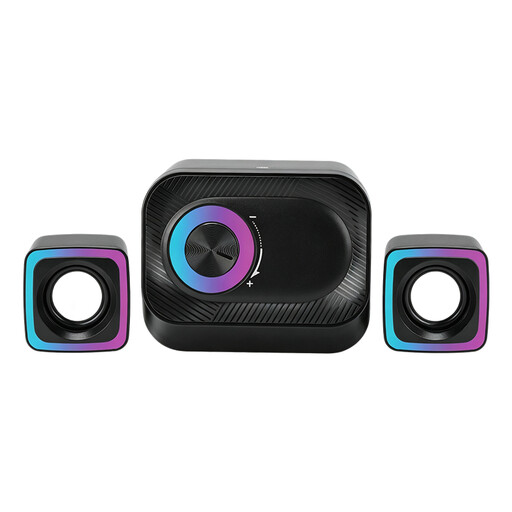 No image available
Worth considering if you’re looking for wired speakers for a PC workstation.
The product name lists a 3-piece system, volume control and RGB lighting.
 No image available
Worth considering if you’re looking for stereo speakers for your PC and desk.
The product information describes compact speakers; check their dimensions and how they’ll fit on your desk.
 No image available
Worth considering if you’re looking for compact stereo speakers for your desk.
Check the space available and where the speakers will sit in your workspace.
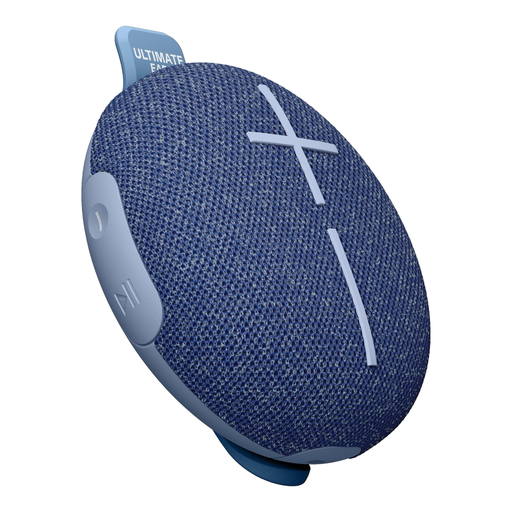 No image available
A portable Bluetooth speaker to consider if wireless playback matters more to you than a stereo pair on your desk.
The product name describes a wireless Bluetooth speaker; the product information specifies 1.0-channel playback, not a stereo pair.
 No image available
Worth considering if wireless listening is your priority.
The product information lists one speaker. Two speakers are needed for the TWS stereo pairing described.
An active set has built-in amplification, so you don’t need a separate amplifier. Do check which source and cables your model requires. With studio monitors, you should also check how to connect both speakers and control the volume.
Only if your chosen setup supports it. Edifier lists a subwoofer output on the R1700BTs, Audioengine on the A2+ Next Gen and KEF on the LSX II LT. Check that the connection is compatible with the subwoofer you want to use.
Keep both volume and listening time in mind. The World Health Organization notes that sound level, exposure duration and how often you’re exposed to loud sound all matter. A speaker’s volume setting isn’t the same as a measurement at your ears.
For a consumer purchase in the Netherlands, you can contact the retailer about your statutory guarantee. According to the Government of the Netherlands, there is no fixed statutory guarantee period; what you can expect from the product depends, among other things, on the product and the information you were given.