If you can position two speakers at a suitable distance from each other, a stereo pair is the most straightforward way to reproduce the left and right channels of a brass band recording separately. Active speakers don’t need a separate amplifier, a Wi-Fi pair gives you app control and streaming, and passive speakers are a good fit if you want to choose an amplifier separately. Always compare the connections you need, the available space and the complete setup; these options aren’t ranked by proven sound quality.
Which setup is right for you?
Listeners who want to pick out individual parts
If you usually listen from the same spot and want to hear the space between instrument groups in a stereo recording, a pair of speakers you can position separately could suit you. The result will also depend on the room and the recording. Sonos describes stereo pairing for supported speakers.
Listeners with limited space for positioning
If you have little spare shelf or floor space, measure the area available for both speakers first and check the dimensions of your chosen model. KEF describes the LSX II LT as having a cable connecting the speakers, while Wharfedale positions the Diamond 12.0 as a compact hi-fi setup.
Listeners who want easy streaming
If you mainly play music from a phone or streaming service, check which app, Wi-Fi connection, cables and any adapters your chosen setup requires. Edifier lists Bluetooth, optical and coaxial inputs, as well as two RCA inputs, for the R1280DBs.
What should you look for when choosing?
Start with where you’ll be listening, then check that your source, the speaker placement and all the components you need work with the same setup.
Compact active stereo pair
Choose this if: you want to position two speakers without a separate amplifier.
Bear in mind: inputs vary by model, so check that your music source will connect.
Two Wi-Fi speakers as a stereo pair
Choose this if: app control and Wi-Fi streaming are important to you.
Bear in mind: two Sonos Era 100 speakers need to be set up over Wi-Fi first; KEF specifies a cable between the speakers for the LSX II LT.
Passive bookshelf speakers
Choose this if: you already have a suitable amplifier or want to choose your amplifier and speakers separately.
Bear in mind: the speakers need an amplifier and the necessary cables.
| What to consider |
What to look for when buying |
Who should pay particular attention |
| Stereo image |
Check that you’re buying a complete pair and can position both speakers in suitable places. |
If you want to pick out instrument groups in a stereo recording from a fixed listening spot, the stereo image comes first; around 29% of consumers list it as their main concern when buying. |
| Placement |
Measure the available space and check the model’s dimensions and cable route. |
If you have little spare shelf or floor space, you’ll want both speakers to fit without making the room impractical to use; around 23% of consumers put placement first. |
| Music source |
Compare your source’s output with the speakers’ inputs and setup requirements. |
If you want to use your existing phone, streamer or other source, a compatible connection is the main consideration; around 18% of consumers prioritise this. |
| Listening volume |
Assess the setup at your usual listening volume and agree on when to play music if needed. |
If you live close to your neighbours, you’ll want to listen to music without causing unnecessary disturbance; around 18% of consumers put consideration for neighbours first. |
| Complete setup |
Where needed, include a second speaker, amplifier, cables or adapter in your comparison. |
If you want to know in advance what you’ll need to play music, look at the complete working setup; around 12% of consumers make the required components their top priority. |
How to avoid common buying mistakes
-
Assuming one speaker is a complete stereo pair
A product listing may include one speaker, even though you need two for the stereo pairing you have in mind. Sonos describes a stereo pair as two supported speakers.
Before buying, check how many speakers are included and whether your chosen model can be set up as a pair.
You may need a second speaker for a stereo pair.
-
Assuming ‘wireless’ means ‘no setup or cables’
A Sonos Era 100 needs to be set up over Wi-Fi before you can use Bluetooth. KEF describes the LSX II LT as having a cable connecting the speakers.
Plan the power, source and speaker-to-speaker connections in advance, and check that the cable route works in your living room.
An analogue source connected to an Era 100 requires a suitable adapter; also consider the cable route between the speakers.
-
Comparing a passive pair with a complete active setup
Passive speakers aren’t a complete playback system on their own. They need a suitable amplifier and cables, whereas an active setup may have amplification built in.
Compare setups that can actually play music from your source, and include all the components you’ll need.
If you don’t already have a suitable amplifier, you’ll need to include one, along with the necessary cables, in your setup.
Brands to compare
Edifier
The R1280DBs is an example of an active stereo pair with several source inputs.
- Edifier lists Bluetooth, optical and coaxial connections, two RCA inputs and a subwoofer output for the R1280DBs.
- These connection details aren’t an independent assessment of the sound quality of this model or other Edifier speakers.
KEF
The LSX II LT is a compact active stereo system for anyone looking for streaming and digital connections.
- For this model, KEF lists AirPlay 2, Google Cast, Bluetooth, HDMI ARC and USB-C.
- Check that you can route the cable between the speakers conveniently; these features don’t amount to a comparison test of sound quality in a small living room.
Sonos
Two Era 100 speakers could be an option if you want to set up a stereo pair using an app and Wi-Fi.
- Sonos describes stereo pairing for supported models. Once set up over Wi-Fi, the Era 100 can also use Bluetooth.
- A suitable adapter is needed for an analogue line input on the Era 100; one standalone speaker isn’t the same as a pair.
Wharfedale
The Diamond 12.0 represents the compact passive bookshelf speaker option.
- Wharfedale describes this model as designed for hi-fi setups with a small footprint.
- You’ll need a suitable amplifier and cables; the manufacturer’s description doesn’t prove a sound advantage over active options.
Joybuy products
This selection includes active speakers, passive bookshelf speakers and a soundbar. For each product, check that the number of speakers, the amplification required and the connections suit your listening space and music source.
 No image available
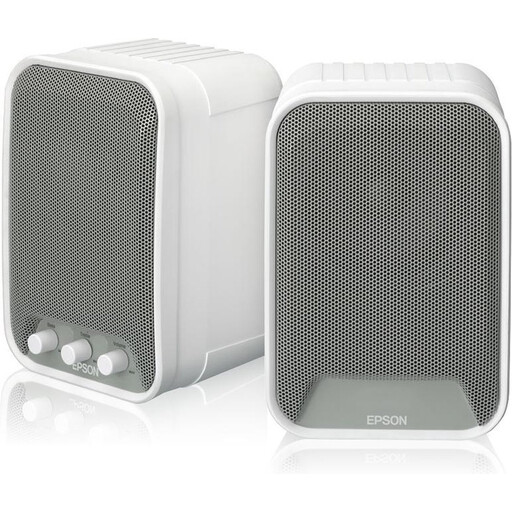
Epson ELPSP02 active speakers (2 × 15 W)
An active set could suit you if you’re looking for speakers with built-in amplification; check that the connections are compatible with your music source.
The product name states 2 × 15 W.
View at Joybuy
 No image available
Edifier G1500 computer speakers
These computer speakers could suit you if you’re considering a compact setup with a phone or computer as the source; check that they’ll work in your chosen spot.
The product name lists Bluetooth 5.3, USB and 3.5mm AUX.
View at Joybuy
 No image available
HiVi-Swans DIY3.1 passive bookshelf speakers, 6.5 inch, pair
A passive pair could suit you if you want to choose separate bookshelf speakers and already have, or are including, a suitable amplifier in your setup.
The product name specifies a pair of 6.5-inch passive speakers. A suitable separate amplifier is required.
View at Joybuy
 No image available
HiVi-Swans D3.1MKII passive bookshelf speakers, 6.5 inch, pair
This passive pair could suit you if you’re looking for stereo speakers for your home and can use the required amplifier and cables.
The product name specifies a pair of 6.5-inch passive speakers. A suitable separate amplifier is required.
View at Joybuy
 No image available
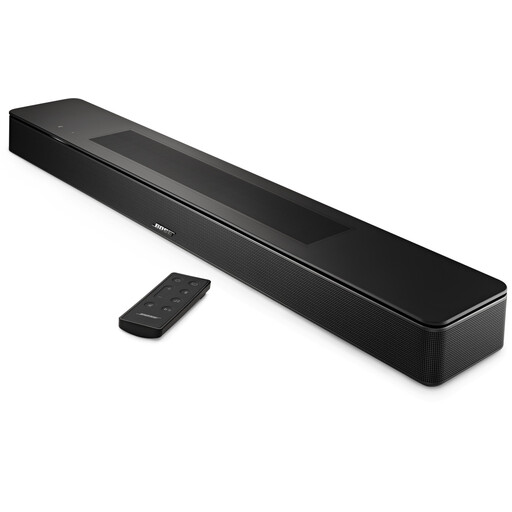
Bose Smart Soundbar, black
A soundbar could suit you if you’d rather position a single audio unit; it isn’t a pair of separately positioned speakers for a stereo setup.
The product name specifies the colour as black.
View at Joybuy
Frequently asked questions
Do I always need a subwoofer for brass band music?
No, the music genre alone doesn’t make a subwoofer essential. Start with a suitable setup and assess it at your usual listening volume in your own room. A subwoofer can be added if you want more bass; Edifier and KEF list a subwoofer output for the R1280DBs and LSX II LT.
How do I set up two Sonos Era 100 speakers as a stereo pair?
First set up both Era 100 speakers over Wi-Fi using the Sonos app, then create a stereo pair in the app. According to Sonos, two supported speakers of the same model need to be paired; the Era 100 must be set up over Wi-Fi before you can use Bluetooth.
What components should I include in my budget, and can I cancel an online purchase?
First check whether you’re ordering one speaker or a pair, and whether you need an amplifier, cables or an adapter. According to the Dutch Government, when buying remotely from a business, you’ll often have a 14-day cooling-off period; check the terms that apply to your specific purchase.
Can I play music at any volume and at any time in the Netherlands?
There isn’t one general volume limit or time that applies to every home and situation. The Dutch Government advises you to agree arrangements first if your neighbours may be disturbed, such as what time you’ll play music. Check which arrangements apply to your home.


