
Stereo listener
You want to hear space between vocals and instruments on blues recordings, and have room for two speakers. KEF recommends following the instructions for your chosen model when positioning it.


If you want to hear vocals and instruments as distinct positions in stereo on blues recordings, choose a compact stereo pair if you have space for two speakers. If you only have room for one, a single home speaker is more practical. Whichever you choose, first check that it connects to your music source and that you can position it properly in your room.
You want to hear space between vocals and instruments on blues recordings, and have room for two speakers. KEF recommends following the instructions for your chosen model when positioning it.
You mainly play music from a phone or streaming service and want to use one dedicated spot for a speaker. The Consumers' Association lists Wi-Fi speakers as an option for listening to music at home.
You want to connect a player or computer, for example, so you first check which inputs are compatible with your source. Edifier Netherlands and Sonos list different connection options for their models.
First, check whether you can position two speakers. Then decide how to connect your music source and check which components you’ll need for the complete setup. KEF recommends consulting the instructions for your chosen model when positioning it.
| What to consider | What to check before buying | Who will find this important? |
|---|---|---|
| Stereo space | Check whether you’re buying a pair or a single speaker, and where both speakers and your listening position can go. | If I want to listen to blues in stereo, I need room to position two speakers around my listening spot. Around 36% of consumers say stereo positioning is their top priority when buying. |
| Connection to your music source | Check the output on your source, the compatible input on the speaker and whether you’ll need an adapter. | I want to connect my phone, computer or player in the way that suits me. Around 29% of consumers therefore prioritise connecting to their existing music source. |
| Space for positioning | Measure the available spots and check the positioning instructions for the model. | In a small living room, the setup needs to fit the available space. I want to know in advance whether one speaker or two will work. Around 21% of consumers give the available space for positioning the most weight. |
| Complete setup | Check how many speakers are included and whether you’ll need a cable, adapter or amplifier for your source. | I want to know in advance which components I’ll need for my setup, so I don’t overlook anything essential. Around 14% of consumers prioritise having a complete setup. |
Sonos describes the Era 100 as a single speaker, while Edifier Netherlands describes the R1280DB as a pair connected by a cable. The number of speakers and the space needed therefore vary by setup.
Before choosing a model, check how many speakers are included and where you can position them.
If you want to position two separate speakers, you may need an extra speaker or connecting cable.
The right connection depends on the output on your player and the input on the specific speaker model.
Compare the connections on both devices and check which cable or adapter you’ll need.
For a wired line input on the Era 100, Sonos specifies a separate adapter.
The distance from the walls and the position relative to your listening spot can affect the sound. In a small living room, your options may also be limited.
Measure the space, follow the instructions for your chosen model and try different positions once it’s set up.
The connection mainly determines how you play audio from your source. It doesn’t automatically mean a model will sound better. The Consumers' Association notes that many listeners can barely hear any potential difference in quality between Wi-Fi and Bluetooth.
Choose a connection that suits your source and how you use it, then try the specific model in your own listening space.
The models mentioned here illustrate different types of setup and connection. These features apply to the specific product ranges, not to every product from each brand.
The R1280DB is an example of an active bookshelf speaker pair for anyone looking for two speakers and a choice of inputs.
The Era 100 is an example of a single compact home speaker with Wi-Fi and Bluetooth.
The LSX II LT is an example of an active stereo pair with streaming and digital connections.
The Acton III is an example of a single Bluetooth home speaker with on-device controls.
This selection includes Bluetooth and Wi-Fi speakers, a computer speaker set and a passive bookshelf pair. When choosing, consider the space you have, how the speakers connect to your source and whether you already own an amplifier.
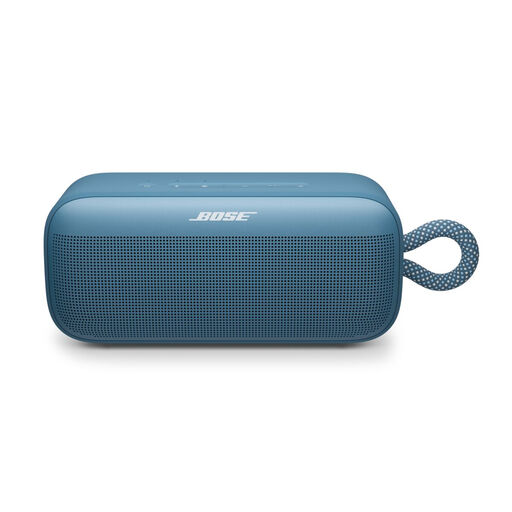 Image unavailable
Suitable for playing music from a phone via Bluetooth; the product description also mentions app control.
According to the product description, the app lets you adjust the bass, midrange and treble. It also says that two SoundLink Plus speakers can be paired in stereo mode; check whether a second speaker is needed and included.
 Image unavailable
A compact Bluetooth speaker for anyone who wants to keep one speaker in a set place.
The product information lists Bluetooth, an equaliser in the app and horizontal or vertical positioning. Its stated 1.0-channel sound is not the same as having two separate speakers that can be positioned for stereo.
The product name specifies IP67 and a 16-hour battery life.
 Image unavailable
Suitable for streaming at home via Wi-Fi or AirPlay 2, and for playing music from a Bluetooth source.
The product description also lists USB and AUX connections for wired sources.
 Image unavailable
Suitable for a computer setup if you’re looking for two speakers for stereo sound.
The product information lists 2.0 stereo speakers with Bluetooth 5.3, USB and a 3.5mm AUX input, plus controls on the speakers.
 Image unavailable
A pair of passive bookshelf speakers for anyone who wants to position two speakers separately and already has a suitable amplifier.
The product information lists a pair of 6.5-inch passive speakers. A separate amplifier is required.
Only if your player’s output is compatible with an input on the model you choose. Edifier Netherlands lists analogue and optical inputs, among others, for the R1280DB; Sonos specifies a separate adapter for the Era 100’s line input. Also check which cable or adapter you’ll need.
Start by finding two suitable spots and a listening position, then adjust the setup as you listen. KEF recommends considering the distance between the speakers, your listening position and the walls, but refers you to the instructions for the specific model for the best positioning. General distance guidelines aren’t requirements for every small room.
Not necessarily. According to the Government of the Netherlands, you have a legal guarantee in the Netherlands, but there is no fixed statutory guarantee period; if a product is faulty, the retailer is your point of contact. Check what an extended warranty actually adds.
The Dutch Authority for Digital Infrastructure outlines European requirements for electrical, electronic and radio equipment, including the mandatory CE marking for products covered by these requirements. Check the product information for the model on offer; the general rule alone doesn’t confirm whether a specific offer complies.
According to the Government of the Netherlands, when you buy a new, similar appliance, you can return your old one to the retailer free of charge; this also applies to online purchases. You can also take it to a local recycling point.