For acoustic guitar recordings in a home hobby room, a stereo pair is a good choice if you can position two speakers around a fixed listening spot. A single wireless speaker is more practical if easy control from your phone or tablet matters more. A passive pair needs a suitable amplifier, while with active speakers and monitors you should check the inputs, placement and number of speakers included for each model.
Who is this guide for?
Listeners with a fixed listening spot
You want to position two speakers around a desk or chair to enjoy the spacious sound of guitar recordings. Genelec points out that both the room and speaker placement affect what you hear. So consider whether you can position the speakers similarly to the left and right of your listening spot.
Listeners using a phone or tablet
You want to control recordings from a mobile device and are comparing Wi-Fi, Bluetooth and the possibility of creating a stereo pair later. Check that the playback method and controls work with your device.
Owners of a hi-fi amplifier
You want to know whether a passive pair will work with your existing equipment, rather than choosing built-in amplification again. Check the speakers' requirements against the connections and capabilities of your amplifier.
What should you look for when choosing?
Active stereo pair for a fixed spot
Best for: you can position two speakers around your listening spot and don't want to use a separate amplifier.
Bear in mind: check that the inputs suit your music source; two speakers also need space.
Single wireless speaker
Best for: easy control from your phone or tablet matters more than having two separate speakers.
Bear in mind: check the app, network and playback method. A separately available adapter is needed for an analogue line input on the Sonos Era 100.
Passive pair with amplifier
Best for: you already have a suitable amplifier or want to choose your amplifier and speakers separately.
Bear in mind: the KEF Q1 Meta is passive; KEF specifies an amplifier requirement of 10–150 W for this model.
Nearfield studio monitors
Best for: you listen from a fixed workspace and have a suitable audio output or interface.
Bear in mind: Yamaha states that the HS5 is packaged individually, so check how many you need and what's included in the offer.
Whichever setup suits you, first check the space available and how your music source will connect.
| What to consider |
What should you check? |
Who is this important for? |
| Stereo imaging at your listening spot |
Measure whether you have space on the left and right; compare a complete stereo pair with two separate speakers. |
If I listen from one fixed spot, I want to be able to position speakers on the left and right. Around 33% of consumers prioritise stereo placement. |
| Connection to your music source |
Check which output your phone or computer has and which inputs the exact model supports. |
When I want to play recordings from my phone or computer, a suitable connection is essential. Around 27% of consumers prioritise connecting to their music source. |
| Cost of a complete system |
Compare like for like: per speaker or per pair, with or without amplification, and including any parts you need. |
I want to know in advance whether I'll need an amplifier, a second speaker or an adapter to complete the setup. Around 20% of consumers prioritise the cost of the complete system. |
| Fitting your hobby room |
Measure the intended locations and listen at your normal volume from your usual listening position. |
My setup needs to fit around the furniture and listening spot in my hobby room; possible noise disturbance matters too. Around 20% of consumers prioritise how the setup fits their room and listening environment. |
Common buying pitfalls
-
Mistaking a passive pair for a complete playback system
A passive speaker such as the KEF Q1 Meta needs a suitable amplifier. Without one, your setup isn't complete.
Check your existing amplifier and compare the cost of a complete set with active alternatives.
You may need a second speaker to create a stereo pair.
-
Assuming every active speaker connects directly to every source
The Edifier MR4, Audioengine A2+ Gen 3 and Sonos Era 100 have different connection options. A separate adapter is needed for an analogue line input on the Era 100.
Compare the output on your own source with the inputs and playback methods supported by the exact model.
Depending on your source, you may need a suitable adapter, interface or cable.
Brands to compare
Edifier
Edifier offers two different options here: the wired active MR4 and the wireless ES300 tabletop speaker. They are not interchangeable versions of the same product.
- Edifier says the MR4 has TRS, RCA and AUX inputs. For the ES300, the brand lists AirPlay 2, Bluetooth, USB-A and AUX, among other features.
- Check which model and connection suit your source; the specifications alone don't tell you how guitar recordings will sound in your room.
Audioengine
Audioengine positions the A2+ Gen 3 as a compact stereo system for a desk or smaller room.
- According to Audioengine, this generation supports USB-C audio, Bluetooth and an analogue connection.
- Check that you're looking at the A2+ Gen 3; specifications for other A2+ versions aren't necessarily interchangeable.
Sonos
The Era 100 is a wireless speaker for playback via Wi-Fi or Bluetooth, among other options.
- Sonos describes pairing two Era 100 speakers for a wider stereo soundstage, with control via the Sonos app and Trueplay.
- A separately available adapter is needed for an analogue line input. Also check the playback method and the cost if you want to use two speakers.
KEF
The passive Q1 Meta is suited to a setup with a separate amplifier. KEF describes the LSX II LT as a wireless stereo pair with USB-C for a computer, among other connections.
- KEF specifies an amplifier requirement of 10–150 W for the Q1 Meta.
- Compare the complete setup, including amplification and connections. Any sound comparisons made by KEF are the brand's own claims.
Yamaha
Yamaha describes the HS5 as an active nearfield studio monitor for a fixed listening or workspace.
- Yamaha specifies XLR and TRS inputs.
- The HS5 is packaged individually. Check how many you need and how your source will connect; the specifications don't prove that this monitor will provide the most enjoyable music playback for everyone.
Joybuy products for this listening setup
This selection ranges from compact desktop speakers and active monitors to a passive bookshelf pair and a single wireless speaker. For each model, check that the connections, amplification and setup suit your music source and hobby room.
 No image available
Compact desktop speakers with colour LED lighting
The product name describes a compact stereo set for desktop use.
The product name mentions colour LED lighting.
View at Joybuy
 No image available
Edifier G1500 computer speakers
These computer speakers are worth considering for a fixed desktop listening spot.
The product name lists Bluetooth 5.3, USB and a 3.5 mm AUX input.
View at Joybuy
 No image available
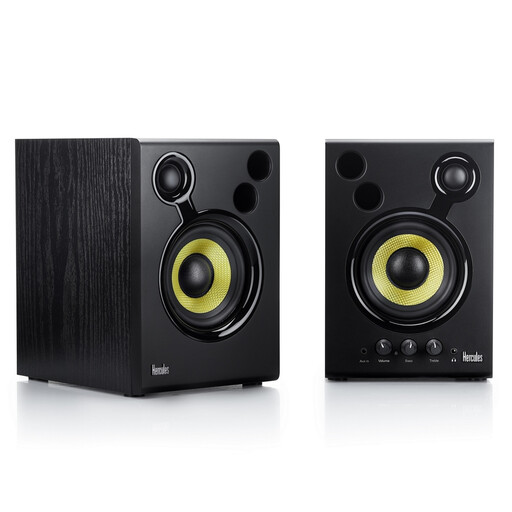
Hercules DJMonitor 42 active monitor
This active monitor is worth considering for a fixed listening spot.
According to the product information, leave at least 10 cm of space behind the bass ports.
View at Joybuy
 No image available
HiVi-Swans DIY3.1 passive bookshelf speakers, pair
This passive pair is suited to a setup with a suitable amplifier.
The product name lists 6.5 inches; this passive pair requires a separate amplifier.
View at Joybuy
 No image available
Edifier ES300 Wi-Fi and Bluetooth speaker, 60 W
This is a single wireless speaker, not a stereo pair. Consider it if you're looking for one speaker with wireless control.
The product name lists Wi-Fi, Bluetooth, USB and AUX. Check which connection you want to use with your source.
View at Joybuy
Frequently asked questions
Can I connect a guitar directly to these speakers?
This guide is about existing recordings, not amplifying a live guitar. For a guitar or recording interface, check the output signal your device provides and which input the exact speaker system accepts; the models listed have different connections.
How should I position two speakers for a fixed listening spot?
Start by placing both speakers at a similar distance from your listening spot and angle them towards it. Genelec highlights this as an important point for monitor placement and stresses that the room affects what you hear, so try out the setup in your own room.
Do I need a separate subscription for a wireless speaker?
That depends on the music service and playback method you use; a wireless connection doesn't in itself mean you need a subscription. Check that you can play music from your existing service or locally stored recordings through the model and device you've chosen.
What if a speaker I bought online doesn't suit my room or breaks soon after purchase?
For online purchases in the Netherlands, you generally have a 14-day statutory cooling-off period from delivery, subject to applicable exceptions. You're also covered by the statutory guarantee if a product doesn't meet what you could reasonably expect from it; ACM ConsuWijzer explains these rights.
What should I consider if my neighbours can hear my music?
Be mindful of your listening environment and the possibility of noise disturbance. For noise from neighbours, the Dutch government recommends discussing and agreeing on a solution together first; also check the agreements and rules that apply to your home.


