
Active workshop participant
You read aloud, respond to feedback and change position at your sit-stand desk. Clear speech and being able to switch smoothly between speaking and listening are important.


Choose a wired USB model if your laptop stays in one place; a portable model may be a better fit if you want to move the speakerphone when you change position. Also check the microphone range, full-duplex calling and connection options for each device: Jabra recommends USB for using the Speak2 55 with a computer, and describes Bluetooth for a phone or tablet. In a shared room, privacy is a separate consideration, and model specifications can’t predict how your space will sound.
You read aloud, respond to feedback and change position at your sit-stand desk. Clear speech and being able to switch smoothly between speaking and listening are important.
You call from one laptop and want the connection and mute controls to suit your workspace.
You’re weighing up whether other people at home will be able to hear the workshop, and whether sounds in the room will come through on the call.
A good fit if: you join the workshop from a laptop and can leave the device in one place. According to Jabra, the Speak2 40 has an integrated cable of around 80 cm; the AnkerWork PowerConf S330 uses USB-C and comes with a USB-A adapter.
Keep in mind: the available port and the distance between your laptop and the speakerphone.
A good fit if: you want to reposition the speakerphone when raising or lowering your desk, or switch between devices. For the Speak2 55, Jabra describes USB for a computer and Bluetooth for a phone or tablet.
Keep in mind: choosing the right connection for each device. Jabra recommends USB for a computer and warns that standard Bluetooth with a computer isn’t certified and may sound different.
For a writing workshop at a sit-stand desk, your choice mainly depends on clear speech, connectivity, placement and whether you’re happy to share sound with the room.
| What to consider | What to look for | Who will find this important? |
|---|---|---|
| Clear speech | Compare full duplex, microphone placement and the stated range for the exact model; test it from both your standing and sitting positions. | When I read aloud and respond to feedback, I want to be easy to hear. Around 36% of consumers prioritise clear speech. |
| Connection and controls | Check your laptop’s port, the cable or adapter included, and whether your workshop app selects the device as both microphone and speaker. | I want to know before the workshop whether my laptop and app will work together. Around 29% of consumers prioritise a hassle-free connection. |
| Placement as desk height changes | Measure where you want to position it on your desk, then check the cable length or stated battery life for the exact variant. | If I want to move the speakerphone when I change my desk height, I’ll consider how much room I have to manoeuvre it. Around 21% of consumers prioritise flexible placement. |
| Privacy and background noise | Decide whether you’re happy for others to listen in, check the mute controls and, if needed, consider a personal listening device with a microphone. | I want to avoid other people at home hearing the workshop or room noise disrupting the call. Around 14% of consumers give privacy top priority. |
Connections can vary from one device to another. Jabra recommends USB for using the Speak2 55 with a computer; according to Jabra, standard Bluetooth with a computer isn’t certified and may sound different. EPOS includes a PC dongle with the EXPAND 40+, but not necessarily with the EXPAND 40.
First choose the device you’ll use for calls, then check the exact model variant and the connection included.
A stated range is a model specification; echo, desk position and background noise can all affect how it performs in your space.
Check the distance from both your sitting and standing positions, and try the speakerphone where you plan to use it.
AnkerWork has announced a recall of certain units because their batteries may overheat. This doesn’t mean every PowerConf S3 is affected; the UK authority identifies batch 22D51.
Before use, check the serial number with AnkerWork and follow the manufacturer’s instructions if your unit is affected.
A paid-for extended warranty isn’t the same as your statutory rights. The Dutch government explains that there’s no fixed statutory warranty period in the Netherlands; what you can reasonably expect from a product is what matters.
Compare the terms of an extended warranty with your existing rights before paying for it.
The Speak2 40 is a wired USB option; the Speak2 55 offers USB for a computer and Bluetooth for a phone or tablet.
According to HP, the Sync 20 is designed for use with a PC via USB and a smartphone via Bluetooth.
The EXPAND 40 is a portable speakerphone that can be used via USB or Bluetooth.
The PowerConf S330 is a USB option; the PowerConf S3 is a separate model.
According to EMEET, the OfficeCore Luna Plus offers USB and Bluetooth. The Meeting Kit is a separate configuration for situations where several people in the room need to speak.
This selection includes portable speakerphones and personal headsets as an alternative if you’d rather not share workshop audio with the room through a speakerphone.
 No image available
This Bluetooth speakerphone is a good fit for a setup where you may want to move the device around.
 No image available
The product name lists both USB-A and Bluetooth; check which connection suits the device you’ll use for the workshop.
 No image available
This model may suit you if you want to move the speakerphone when changing your desk height.
Jabra specifies four beamforming microphones and full-duplex audio. For a computer, Jabra recommends USB; Bluetooth is described for a phone or tablet. The stated wireless battery life is up to 12 hours.
 No image available
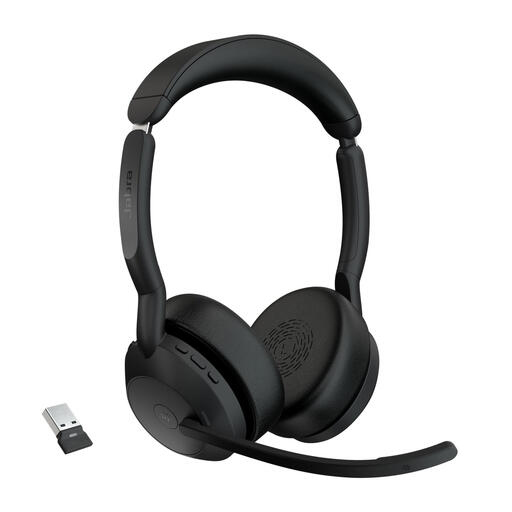
A personal headset may be a good fit if you’d rather not share the workshop with the room through a speakerphone.
 No image available
This personal headset is an alternative to consider if you don’t want workshop audio to be shared with the room.
Connect the device as instructed in the manual for the exact model, then select it in your operating system and meeting app as both the speaker and microphone. Microsoft describes this selection process for the Modern USB-C Speaker in Teams; Jabra recommends the same check for the Speak2 55.
Jabra recommends a USB connection for a computer. According to Jabra, standard Bluetooth with a computer isn’t certified and may deliver different sound quality; Bluetooth for a phone or tablet is described separately.
Check the serial number with AnkerWork. If your unit is part of the affected group, the manufacturer advises switching it off and following the instructions for a replacement or refund. The UK safety notice identifies an affected batch, but doesn’t in itself establish that every unit in the Netherlands is affected.
For a distance purchase by a consumer, you generally have 14 days to change your mind, subject to exceptions explained by the Dutch government. The Netherlands also has no fixed statutory warranty period: what you can reasonably expect from the product is what matters. If a product is faulty, contact the seller.
Bluetooth devices fall under the European regulatory framework for radio equipment, as explained by the European Commission. According to Your Europe, the CE marking is the manufacturer’s declaration that the product meets the applicable EU requirements; it isn’t an independent quality assessment. Check the product identity and conformity information for the unit you’re buying.