Who is this relevant for?

Participants who want to be heard clearly

You want to hear feedback and text being read aloud clearly, and to be easy to understand yourself. If others are taking part alongside you, the stated microphone range becomes more important; check how it performs from every seat. Jabra and HP Netherlands publish microphone-range specifications for their models.

Participants who want to see whether the mic is muted

You’re working in dim lighting and want to check whether your microphone is on at a glance. Compare the position of the button and what the status lights mean, rather than simply checking whether there’s a light. HP and EMEET describe indicators for specific models.

Participants who move between workspaces

You move the speakerphone around or switch between a laptop and a mobile device. Check which connection each device supports, and keep an eye on the battery level when using it wirelessly. Jabra and HP Netherlands list connection options for each version.

What should you look for when choosing?

Wired USB speakerphone

Choose this when: you’ll be joining from a fixed spot with a laptop and want a connection that doesn’t require battery management.

Trade-off: you’ll need to stay connected to the cable and have a suitable USB port. The EMEET OfficeCore M0 doesn’t have a built-in battery.

Portable, battery-powered speakerphone

Choose this when: you want to move the device around or don’t want to be tied to one fixed USB cable position.

Trade-off: check the battery beforehand, and make sure the model’s Bluetooth connection works with the device you’ll be using for the workshop.

What to consider What should you check? Who is this important for?
Clear audio Compare the stated microphone range with the distance between the device and the participants, then test a call from the seats you’ll be using. If I want to hear everyone clearly and be easy to understand while reading and discussing text, I look at both the range and the setup. Around 33% of consumers put clear audio first.
Mute status in low light Check what the indicator shows and whether you can see it from your seat. HP mentions status light bars for the Sync series; EMEET describes a red indicator when muted on the OfficeCore M0. When I want to mute the microphone during a quiet writing exercise and then check that I can be heard again, I look at how visible the status is. Around 25% of consumers give mute status their top priority.
Connection Check USB-A, USB-C and Bluetooth separately for your laptop, phone or tablet. For the Speak2 55, Jabra specifies USB for computers and Bluetooth for smartphones and tablets. If I want to make sure the speakerphone works with the device I’ll be using for my workshop, I compare the connection options for each device. Around 25% of consumers put device compatibility first.
Placement and battery Compare a fixed USB connection with a battery-powered model. If you’ll be using it wirelessly, check the stated talk time and charge the battery beforehand. If I want to be able to place the device in different spots, a fixed cable position is less suitable for my setup. Around 17% of consumers put flexible placement first.

Common things to watch out for

  • Assuming a stated microphone range guarantees clear audio

    A manufacturer’s figure describes the model, not the acoustics, background noise or seating positions in your workshop.

    Use the range to compare models, then test a call from the places where participants will be sitting.

  • Confusing Bluetooth for a phone with wireless use on a laptop

    Supported connections and any adapter included in the box vary by model and version.

    Check the exact model and what’s included before relying on a wireless connection to your laptop.

  • Assuming every status light clearly shows whether the mic is muted

    Indicators can have different functions. In dim lighting, the viewing angle and the speakerphone’s position matter too.

    Check the manual to see what the indicator means, and try out your setup before the workshop.

Brands to consider

Jabra

The Speak2 series includes portable models. For the Speak2 55, Jabra lists USB-A/USB-C for computers, Bluetooth for smartphones and tablets, and a microphone range of up to 2.3 metres.

  • The stated connections and microphone range give you concrete points to compare the Speak2 55 with your setup.
  • The microphone-quality indicator Jabra mentions for the Speak2 75 shouldn’t automatically be assumed to apply to the Speak2 55. Also check whether you need the MS or UC version.

HP Poly

HP describes the Sync series as suitable for personal use through to small and medium-sized meeting rooms. The Sync 20 is designed as a portable option for people who work in different places.

  • HP specifies details such as status light bars, connections and microphone range for each model.
  • The Sync 20 and Sync 20+ differ in the connection options included, so check which version you’re choosing.

EPOS

EPOS describes the EXPAND 20 as a compact speakerphone for personal use or small group calls, with USB or a 3.5 mm connection.

  • The choice of connections may matter if your equipment requires a specific connection.
  • The stated battery life of up to 20 hours is a manufacturer’s figure. Check the exact version and don’t treat this as a measured workshop runtime.

EMEET

EMEET describes the wired OfficeCore M0 as a model with USB-C and a red indicator that lights up when mute is enabled.

  • The documented indicator may be worth checking if you’ll be using it in a dimly lit room.
  • According to EMEET, the OfficeCore M0 doesn’t have a built-in battery. Features of the M0 Plus don’t automatically apply to the M0.

Products at Joybuy

This selection focuses on portable speakerphones and a portable Bluetooth speaker with hands-free calling, for anyone who doesn’t want to be tied to one fixed cable position during the workshop.

Insta360 Wave AI conference speakerphone with Bluetooth, white

Insta360 Wave AI conference speakerphone, Bluetooth, white

Worth considering if you’re looking for a portable Bluetooth speakerphone that you can move around during the workshop.

Joybuy

Jabra Speak 510 MS conference speakerphone, Bluetooth, USB-A, black

Jabra Speak 510 MS, Bluetooth, USB-A, black

Worth comparing if you’re considering both USB and Bluetooth for taking part in calls.

Joybuy

Jabra Speak2 55 MS Teams, dark grey

Jabra Speak2 55 MS Teams, dark grey

Worth comparing if you’re looking for a portable model that you can move around as you take turns speaking during the workshop.

Joybuy
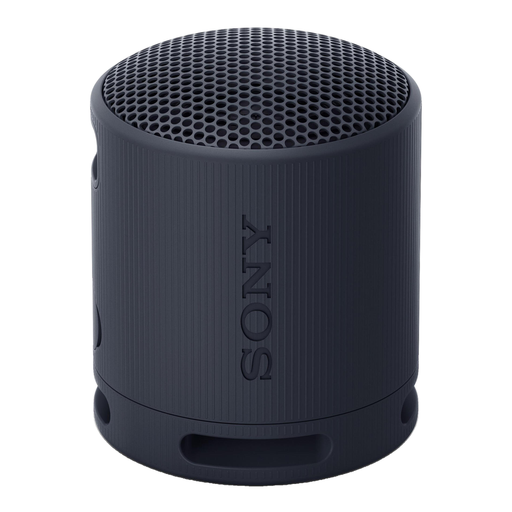
Sony SRS-XB100 portable Bluetooth speaker, black

Sony SRS-XB100, portable Bluetooth speaker, black

Worth considering if you want to take part hands-free using a portable speaker. Check whether its stated microphone function suits your workshop setup.

Joybuy

Frequently asked questions

How can you check whether the mute button is easy to use in a dimly lit room?

Check the manual to see what the light means, then see whether you can view the button and indicator from your workstation. EMEET describes a red indicator when muted on the OfficeCore M0; HP mentions status light bars for the Sync series. A light on its own doesn’t prove that it will be clearly visible in your setup.

Can you automatically use a Bluetooth speakerphone wirelessly with your laptop?

No. Don’t assume you can without checking the model specifications. For the Speak2 55, Jabra lists Bluetooth for smartphones and tablets, and USB for computers. HP distinguishes between the Sync 20 and versions that come with a Bluetooth adapter for PC.

What should you connect and test before the workshop?

Connect the speakerphone and select it as the microphone and speaker in your meeting app. Make a test call, check the mute status, and test it from every seat if several people will be speaking in the room.

Do you need extra cover if the product develops a fault?

No, not to benefit from your statutory rights when making a consumer purchase in the Netherlands. According to the Dutch Government, there is no fixed statutory guarantee period, and the seller must provide a solution if there’s a problem with a product. An additional guarantee is only relevant if its terms give you extra rights.

Can you record the writing workshop?

That depends on how the recording is processed and what has been agreed; product specifications can’t give a general yes or no. If an organisation processes personal data, the Dutch Data Protection Authority says it needs a lawful basis under the GDPR. Consent is one possible basis, but it isn’t automatically the only one. Before recording, ask the organiser what has been agreed and how the recording will be used.
