
Organiser of an event with an audience in the room
You want everyone in the room to hear several poets clearly. First, decide whether you need voice amplification: Shure distinguishes this from conference audio for remote participants.


A speakerphone is suitable when several speakers need to be heard by remote listeners in a small space. Check that the stated microphone range covers the seating area, and test quieter passages too. If people further away in the same room need to hear the voices amplified, choose a suitable microphone and sound reinforcement setup rather than relying on a conference speakerphone alone. For a hybrid reading, the connection, room acoustics and audio at both ends are important too.
You want everyone in the room to hear several poets clearly. First, decide whether you need voice amplification: Shure distinguishes this from conference audio for remote participants.
You have several people reading in one room for remote listeners. Consider microphone range, room acoustics and connection together; Jabra and HP Poly state the microphone ranges for specific models.
You’re looking for a portable speakerphone for readers gathered around one table, and want to test quieter voices and the right USB or Bluetooth connection beforehand. Jabra lists a microphone range of up to 2.3 m for the Speak2 55.
Suitable when: the readers stay within the stated microphone range and the room is small.
Bear in mind: distance, echo and quieter voices; the built-in speaker is not automatically a solution for amplifying sound around the room.
Suitable when: readers are further apart at a hybrid event.
Bear in mind: a stated participant capacity does not guarantee that quieter passages will be picked up clearly; check the version and any expansion options required.
Suitable when: people further away in the same room need to hear the voices amplified.
Bear in mind: the microphone, amplification and speaker placement all need to suit the room.
| What to consider | What to look for when buying | Who should consider this? |
|---|---|---|
| Clarity around the room | Work out where the readers and audience will sit. For amplification, consider the microphone, amplifier and speakers as one complete setup. | If you want people further away in the same room to hear the reading, prioritise suitable voice amplification. Around 27% of consumers say this is their main reason for buying. |
| Several voices picked up from a distance | Measure the distance from the furthest reader to the microphone, and test a sample passage from each seat. | For a hybrid reading, you’ll want remote listeners to hear every reader. An estimated 26% of consumers give this their highest priority. |
| Quieter passages and voice volume | Test quiet and loud passages using the conference app you’ll actually use. | If vocal expression matters, listen for yourself to how the audio comes through at different volumes. Around 21% of consumers prioritise this. |
| Connection and setup | Check for USB-A or USB-C, any Bluetooth adapter, and how to select the microphone and speaker in the app. | If you want to start the event without connection problems, test the setup with your own device. Around 16% of consumers give connection their highest priority. |
| Portability | Check the power supply, stated talk time and accessories included with the exact version. | For a reading group that meets in different places, an easy-to-move setup is useful, provided it still offers the range you need. Around 10% of consumers choose this as their main consideration. |
A speakerphone for remote conversations and sound reinforcement for an audience in the same room serve different purposes.
First, decide who needs to hear the readers: remote listeners, the audience in the room, or both.
A stated range doesn’t tell you how quieter voices will sound in the actual room, with your chosen placement and acoustics.
Ask each reader to read quiet and loud lines from their intended position, then assess the audio at the other end.
HP says the Poly Sync 40+ includes a PC Bluetooth adapter, so check the wireless connection options for each version.
Before buying, check the full model name and the accessories included with the version you’ve chosen.
An adapter or second unit that you need to buy separately could affect the final setup.
The Speak2 range is designed for conversations around a table with remote participants. The Speak2 55 and Speak2 75 have different stated specifications.
The Sync range includes versions for different meeting setups, with connections varying by model.
The EXPAND 40 is a portable speakerphone; EPOS positions the EXPAND 80 as a scalable option for larger groups.
The SP92 is a portable speakerphone with several connection options for remote conversations.
The PowerConf S500 is designed for meeting setups using USB, a dongle or a smartphone connected via Bluetooth.
This selection includes a voice amplifier for an audience in the room and speakerphones for conversations with remote listeners. The right setup depends on who needs to hear the reading and where the participants are sitting.
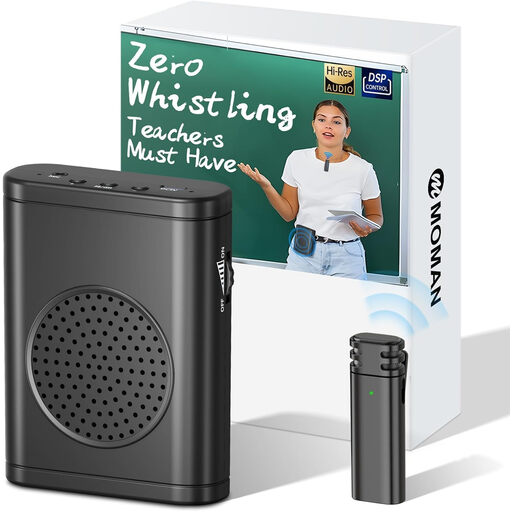 No image available
Suitable for a reading where the audience in the room needs to hear the voices amplified.
The product description lists an output power of 30 W and up to 12 hours of talk time.
 No image available
Suitable for a hybrid meeting with remote participants; check the recording from the actual seating positions.
The product description lists eight MEMS microphones, several recording patterns and connection for up to three devices.
The stated recording range is 16.4 feet.
 No image available
Suitable for a portable setup for conversations and meetings with remote participants.
The product name lists USB-A and Bluetooth. The Jabra Link 370 adapter mentioned for a wireless connection of up to 30 m is optional.
 No image available
Suitable for several readers sitting close to one table and remote listeners; test quieter passages from the intended positions.
Jabra lists four microphones and a microphone range of up to 2.3 m. The product description mentions USB and Bluetooth.
The stated battery talk time is up to 12 hours.
Don’t assume so: a conference speakerphone is designed for conversation audio, while sound reinforcement for an audience in the same room is a different application. For that, choose a suitable microphone and speaker setup, and test it in the room.
Test each reader from their intended position, using a quiet and a loud passage in the conference app you’ll actually use. Also check that the app is using the speakerphone as both the microphone and the speaker; a stated range doesn’t guarantee clear audio in your room.
No, it varies by version. HP says the PC Bluetooth adapter is included with the Poly Sync 40+, but describes the standard Sync 40 as connecting to a PC via USB. Check the full model name and what’s in the box before planning a wireless PC setup.
If you buy as a consumer in the Netherlands, you may be entitled to a statutory guarantee if the product doesn’t meet what you could reasonably expect. ACM ConsuWijzer directs consumers to contact the seller to find a solution; an additional manufacturer’s warranty doesn’t replace your statutory rights.
A recording in which someone can be identified may contain personal data. According to the Dutch Data Protection Authority, processing personal data requires an applicable legal basis under the GDPR; consent is one possible basis, but not automatically the only one. Also check the rights to any protected poems before using or sharing other people’s work. This does not give general permission to make or share every recording or reading.