A speakerphone is a good fit if remote participants need to hear the reading and responses from the room. Match the stated microphone range to the speaking position, and test quieter passages too. If the main aim is to make the speaker’s voice louder for people in the room, choose a presentation microphone with suitable sound reinforcement rather than relying on a tabletop speakerphone alone. For hybrid use, also check the computer connection and the audio settings in your meeting app.
Who is this guide for?
Organisers with remote listeners
You want online participants to hear both the reading and responses from the room. Your choice will depend on the distance between speakers and the tabletop microphone, as well as the connection to the meeting computer. Jabra and HP publish model-specific information about microphone range and connectivity.
Organisers with an audience in the room
Your main aim is to help people in the room hear the reader more clearly. First decide whether you need sound reinforcement: Shure describes this as a different use case from an interactive meeting, while JBL Professional describes a portable PA setup.
Organisers with speakers in different positions
Several poets or visitors will be speaking from different places. Compare the stated microphone range of the exact model with those positions, and test the setup before the reading begins. Jabra and HP provide model-specific figures for this.
What should you look for?
Tabletop speakerphone for online participants
Choose this when: the reader and people in the room need to talk to remote participants through a meeting app.
Bear in mind: a stated microphone range does not tell you how softly spoken poetry will sound in your room. Also check the computer connection for the version you are considering.
Speakerphone for speakers seated apart
Choose this when: the reader and people in the room want to exchange responses online from different positions. HP specifies a microphone range of up to 2.5 metres for the Poly Sync 40.
Bear in mind: a greater stated range does not guarantee that a quiet voice will come through equally well everywhere. Test it from the furthest speaking position.
Presentation microphone with sound reinforcement
Choose this when: the main priority is making the speaker’s voice louder for people who are physically present. Shure describes this as taking sound from one speaker to multiple listeners.
Bear in mind: this requires a different setup from a speakerphone. Check the microphone, connections, speaker placement and volume levels at the venue.
| What to consider |
What should you check? |
Who is this important for? |
| Clarity for remote listeners |
Compare the speaking position with the stated microphone range, then test quiet and loud passages through the meeting app you plan to use. |
If I’m reading poetry online, I want participants to be able to follow my voice and the responses from the room. Around 36% of consumers prioritise clear sound for remote listeners. |
| Audibility in the room |
Decide whether people in the room can hear the speaker clearly without amplification. If needed, look into a presentation microphone with suitable sound reinforcement. |
If the audience is mainly in the room, I want to know whether a meeting speakerphone is the right type of device. Around 29% of consumers put sound reinforcement for the room first. |
| Multiple speaking positions |
Map out where people will sit and speak, compare those positions with the range of the exact model, and test a response from the furthest position. |
If several poets or visitors will speak from different positions, I want to know whether the device can handle that setup. Around 21% of consumers prioritise coverage for speakers in different positions. |
| Connecting in a borrowed venue |
Check the laptop port, included cable or adapter, and the microphone and speaker selected in the meeting app. |
If I’m connecting to another computer, I want to know in advance which connection and accessories I’ll need for my setup. Around 14% of consumers prioritise easy connections to the equipment available. |
Common buying mistakes
-
Buying a meeting speakerphone when you need sound reinforcement in the room
Sending audio to online participants and amplifying a voice for an audience in the room are different goals. A tabletop speakerphone is not necessarily suitable for reaching an audience across a room.
Before comparing models, decide who needs to hear the reading more clearly.
Sound reinforcement may require a separate microphone and speaker setup.
-
Assuming the stated microphone range guarantees clear, quiet speech
Manufacturer figures apply to specific models and do not measure the acoustics or speaking style at your venue. So, being within the stated range does not guarantee that every quiet passage will be clear.
Measure the distance to the speaking position, then test quiet passages and responses from the planned positions.
-
Assuming Bluetooth on the box means wireless PC use
Connectivity can vary between models and versions. HP specifically lists the included BT700 PC adapter with the Poly Sync 40+, while the Sync 40 connects to a PC via USB.
Before buying, check the connection method and what’s included with the exact model.
Depending on the version, you may need a separate adapter for wireless PC use.
-
Relying on an outdated recommendation for the Yealink CP900 without checking the date
Yealink says the CP900 has been out of production since 22 December 2025. An older product specification therefore does not automatically tell you whether this model is still a current alternative.
If you find one for sale, check the exact version and support status before considering it.
Brands to consider
Jabra
The Speak2 range includes tabletop speakerphones for hybrid calls; the Speak2 55 and Speak2 75 are separate models.
- Jabra specifies four microphones, full-duplex audio and a range of up to 2.3 metres for the Speak2 55. The stated range for the Speak2 75 is up to 2.5 metres.
- These are manufacturer specifications, not a test of a poetry reading. Check the computer connection for the version you choose.
HP Poly
The Sync range offers different versions for personal use and small meeting rooms.
- HP positions the Sync 40 for small meeting rooms and specifies a microphone range of up to 2.5 metres. In battery mode, HP lists up to 30 hours of talk time for the Sync 40.
- According to HP, the included wireless PC adapter comes with the Sync 40+, not automatically with the Sync 40. Stated figures are no substitute for testing the device in your room.
EPOS
The EXPAND 40 is a portable Bluetooth speakerphone for meetings.
- EPOS lists three beamforming microphones.
- Don’t compare this model based on an assumed pickup range. Test your chosen setup with the reader in the actual speaking position.
AnkerWork
The PowerConf S500 is a meeting speakerphone with several connection options.
- AnkerWork lists four microphones, full-duplex audio, USB-C, Bluetooth and an included dongle.
- The stated suitability for rooms of up to 12 people is a brand claim, not an independent assessment of softly spoken poetry.
JBL Professional
The EON ONE Compact is a portable PA system for setups that need sound reinforcement in the room.
- JBL specifies a mixer and two XLR/TRS microphone inputs.
- This is not a substitute for a verified speakerphone connection with online participants. Check which microphone and setup you need.
Products on Joybuy
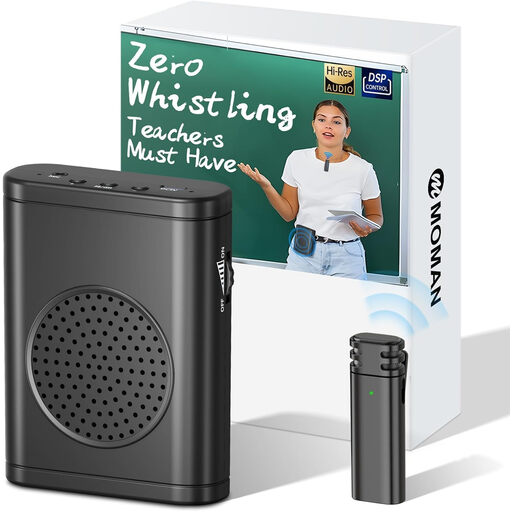
This selection includes tabletop speakerphones for a hybrid reading, plus a portable voice amplifier for people in the room.
 No image available
Moman S57 voice amplifier with wireless lapel microphone
A good fit for a reading where people in the room need to hear the speaker’s voice amplified. This is a voice amplifier with a lapel microphone, not a tabletop speakerphone.
Joybuy
 No image available
Insta360 Wave AI conference speakerphone, Bluetooth, Black
The product name describes this as a conference speakerphone and lists Bluetooth. Before use, check that its connection is compatible with the computer and meeting app in your setup.
Joybuy
 No image available
Jabra Speak 510 MS
A portable speakerphone for conference calls. The product name lists Bluetooth and USB-A (USB 2.0). Check which connection suits the device you’ll use for the reading.
Joybuy
 No image available
Jabra Speak2 55 MS Teams, Dark Grey
A good fit for a hybrid reading when everyone is within the stated microphone range. Jabra specifies up to 2.3 metres, full-duplex audio and connection to a computer via USB-A or USB-C for the Speak2 55. The stated Bluetooth connection is for a smartphone or tablet.
Joybuy
Frequently asked questions
Can a speakerphone also amplify the reader’s voice for an audience in the room?
Don’t assume it can: a speakerphone for meetings and sound reinforcement in a room serve different purposes. Shure describes amplifying one speaker for listeners in the room as a separate use case. First decide who needs to hear the sound, then test your chosen setup in the room.
How should you set up the speakerphone before the reading?
Connect it using the method specified for the exact model, then select the intended microphone and speaker in both the operating system and the meeting app. The AnkerWork manual explicitly refers to this audio selection. Then test a quiet passage from the actual speaking position.
What should you check about the version and any extra equipment?
Check which cable or adapter is included and whether your setup needs any extra equipment. HP specifically lists the BT700 adapter for the Poly Sync 40+; amplifying sound for an audience in the room may require a separate microphone setup.
Can you record or livestream a poetry event?
If people can be identified in an audio recording, it may contain personal data. The Dutch Data Protection Authority (Autoriteit Persoonsgegevens) states that an organisation needs a GDPR legal basis for processing; consent is one possible basis, but not automatically the only one. Business.gov.nl explains that original literary works are protected by copyright. Before recording or publishing, check the applicable legal basis and the rights to other people’s poems.


