What should you look for when choosing?
Start by considering what matters most during the workshop: being heard clearly, listening in peace, exchanging feedback smoothly or connecting reliably.
A speakerphone for active participation
Choose this when: you want to read aloud, respond or give feedback from your desk.
Bear in mind: microphone noise cancellation won’t stop colleagues from hearing the workshop through the speaker. Manufacturer specifications don’t measure how clearly you’ll be heard in your office.
A model with the right PC connection
Choose this when: you switch between devices or workspaces and want a connection to suit your setup. HP lists a USB PC connection for the Sync 20; for the Sync 20+, HP also lists a BT700 adapter supplied for connecting to a PC.
Bear in mind: check the full model name, port and included accessories. Features of one variant don’t automatically apply to another.
An enclosed space
Choose this when: you mainly want to listen without interruptions or discuss confidential writing. The Dutch NEN white paper recommends enclosed spaces for focused work and confidential conversations.
Bear in mind: you may need to move the session away from your usual workspace; a speakerphone won’t prevent people sitting nearby from hearing what’s said.
| What to consider |
What should you check? |
Who should pay particular attention? |
| Being heard clearly |
Check which microphone features the manufacturer lists for the exact model variant, then test it with your usual background noise. |
If I’m reading aloud or giving feedback, I want participants to hear me clearly. Around 36% of consumers in this situation put clear speech first. |
| Listening in peace and in confidence |
Consider whether you need a quieter or enclosed space; people nearby may be able to hear the session through a speakerphone. |
If I need to follow instructions clearly or discuss writing that colleagues don’t need to hear, where I listen matters. Around 29% of consumers make listening in peace and in confidence their top priority. |
| Exchanging feedback |
Check whether the manufacturer lists full-duplex audio for the exact variant, and test the call using your workshop app. |
If I’m giving and receiving verbal feedback, I don’t want to rely on a general sound claim alone. Around 21% of consumers prioritise smooth turn-taking. |
| Connection and portability |
Check the computer connection, your meeting app settings and whether any required adapter is included with the variant you’ve chosen. Jabra recommends connecting the Speak2 55 to a computer via USB. |
If I switch between a laptop, phone or workspace, the connection needs to work with my devices. Around 14% of consumers make connectivity and portability their top buying priorities. |
Joybuy products for a writing workshop
The Joybuy products below range from conference speakerphones to portable speakers. Above all, check that the variant you choose has a suitable microphone feature and computer connection for taking part in your workshop.
 No image available
Insta360 Wave AI Conference Speakerphone, Bluetooth, Black
The product name identifies this as a Bluetooth conference speakerphone for use on a desk. Before buying, check how the variant you choose connects to your computer and workshop app.
View at Joybuy
 No image available
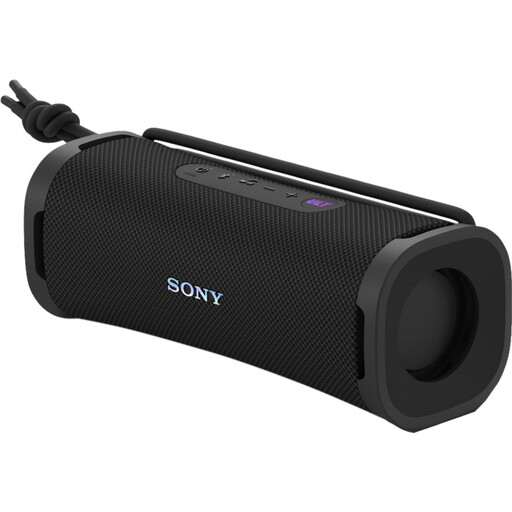
Sony ULT FIELD 1 Wireless Bluetooth Portable Speaker, Black
The product name describes this model as a portable Bluetooth speaker, not a speakerphone. Before choosing it for a workshop, check that its microphone feature and computer connection are suitable for active participation.
View at Joybuy
 No image available
Jabra SPEAK 510 MS Conference Room Loudspeaker, Bluetooth, USB-A (USB 2.0), Black
The product name lists Bluetooth and USB-A (USB 2.0). Check which connection works with your computer and meeting app; a Bluetooth connection to a phone doesn’t automatically indicate how it will work with a PC.
View at Joybuy
 No image available
Jabra Speak2 55 MS Teams, Dark Grey
The product name identifies this as the MS Teams variant. Check that it’s compatible with your workshop app and computer connection; both the Teams variant you choose and the way you connect it matter.
View at Joybuy
Frequently asked questions
Is noise cancellation enough to take part in a writing workshop in an open-plan office?
Not if you also want to listen in peace or stop colleagues from hearing the session. Microphone noise cancellation is designed to affect what the people you’re speaking to hear from your end; the Dutch NEN white paper recommends an enclosed space when concentration or confidentiality matters.
How do I connect the speakerphone before the workshop?
Check the connection on the exact variant, then select the speakerphone as the microphone and playback device in your computer and meeting app. Jabra recommends using the integrated USB cable to connect the Speak2 55 to a computer. HP lists a BT700 adapter supplied for PC use with the Sync 20+, but not necessarily with the Sync 20.
What can I test before the workshop?
Make a test call in your usual workspace, check that the correct microphone and speaker are selected, and make sure the microphone isn’t muted. This lets you check the connection and how clearly you can be heard with the background noise you’re likely to encounter during the workshop.
Am I automatically entitled to a two-year legal guarantee in the Netherlands?
No. The Dutch government says there is no fixed statutory guarantee period in the Netherlands. You’re entitled to expect a product to be of satisfactory quality; what’s reasonable depends, among other things, on the product and the information provided at the time of purchase.
Can I simply let people listen in on or record a workshop through the speakerphone?
Bear in mind that people nearby may be able to hear the workshop through the speaker. If you’re discussing confidential writing, choose a suitable enclosed space. If personal data is being processed or conversations are being recorded, check which information requirements and workplace policies apply. The Dutch Data Protection Authority outlines an obligation to provide information when processing personal data and sets out conditions for employers recording conversations.


