
Interviewee sitting alone at the table
You want to make sure your answers come across clearly, and check that the connection works with your computer or phone and the audio settings in your meeting app.


Choose a speakerphone based on how many people are at the table, how far they are from the microphone, and the connections your computer, phone and meeting app require. For a confidential interview, you’ll also need a private space: a table speaker lets other people in the room hear the interviewer. Before the interview, test the microphone, speaker and mute function. The stated range doesn’t guarantee that everyone will be easy to hear in your room.
You want to make sure your answers come across clearly, and check that the connection works with your computer or phone and the audio settings in your meeting app.
You have an interviewer or companion sitting beside you, so check whether the stated microphone coverage suits all the seats. Jabra and HP provide range and room-size figures for specific models; these aren’t measurements taken in your meeting room.
You’ll be discussing personal information, so choose a suitable private space first. The Dutch Data Protection Authority points out that employers collect personal data during job interviews. It’s therefore important to consider who else might hear the conversation when choosing a table speaker.
Start with the table layout and the connection you need. Consider how private the room is before choosing a speakerphone or another way to take the call.
| What to consider | What should you check? | Who is this important for? |
|---|---|---|
| Table coverage | Compare the stated microphone range and recommended room size for the exact model with the seating layout. Test it from every seat you’ll use. | If I’m sitting at the table with other people, I want to know whether everyone is within the stated range. Around 33% of consumers say clear audio from different seats is their top priority. |
| Connection and settings | Check the port or Bluetooth pairing, then select the speakerphone as both the microphone and speaker in your device’s settings and meeting app. | I want to be sure my device and app are using the speakerphone before the interview. For around 27% of consumers, a working connection and correct audio settings come first. |
| Confidentiality | Consider who can hear the conversation. If necessary, choose a private space or use a headset rather than relying on noise cancellation alone. | When personal information is being discussed, I want to avoid others in the room hearing the conversation. Confidentiality is the main concern for around 27% of consumers. |
| Cost and after-sales support | Check the exact model, who the seller is and what any additional warranty offers. | I want to know which features I need and what an extended warranty actually covers. Around 13% of consumers put cost and after-sales support first. |
Range figures apply to specific models and don’t tell you how clearly voices will come through from every spot in your room.
Before the interview, test the speakerphone from every seat that will be used.
Jabra warns that standard Bluetooth connectivity between a computer and the Speak2 55 isn’t certified and may sound different from USB.
Check the connection for the exact model, then test it on your computer and in your meeting app before the interview.
A speakerphone plays the conversation out loud in the room. This may matter when personal information is discussed during an interview.
First, check whether the room is private. If it isn’t, find somewhere else to take the call or consider using a headset.
An additional warranty may add to the cost without necessarily giving you more rights than the statutory guarantee.
Read the terms of the extended warranty. The Dutch government says that if a product is faulty, the seller is your point of contact for a solution.
The Speak2 55 is worth considering for a small meeting room if you want to connect to a computer via USB-A or USB-C, or use Bluetooth with a phone or tablet.
The Poly Sync 20 USB-A is worth considering if you use a computer with USB-A and have a small table setup.
The PowerConf A3301 is worth considering if you’re looking for a speakerphone with USB-C for a computer and Bluetooth for a phone.
These options include speakerphones for a computer or meeting table, as well as a headset alternative if you don’t want the sound to come through a table speaker. Check the connection and features of the exact model before your interview.
 No image available
A speakerphone option for table conversations where Bluetooth connectivity is useful.
The product description lists eight microphones and a stated pickup range of up to 16 feet. It also mentions AI transcription with cloud processing, so bear this in mind if you don’t want interview audio to be processed.
 No image available
A speakerphone for a computer with USB-A, if you’ll be taking calls at a table.
The product information lists USB-A (USB 2.0), Bluetooth and battery life of up to 15 hours. Check in advance which connection you want to use with your computer and meeting app.
 No image available
An option for a wired computer setup at the table. Jabra lists USB-A and USB-C for the Speak2 55.
Jabra specifies four microphones and full-duplex audio. The manufacturer warns that standard Bluetooth connectivity with a computer isn’t certified and may sound different from USB. Test your chosen connection and audio settings before the interview.
 No image available
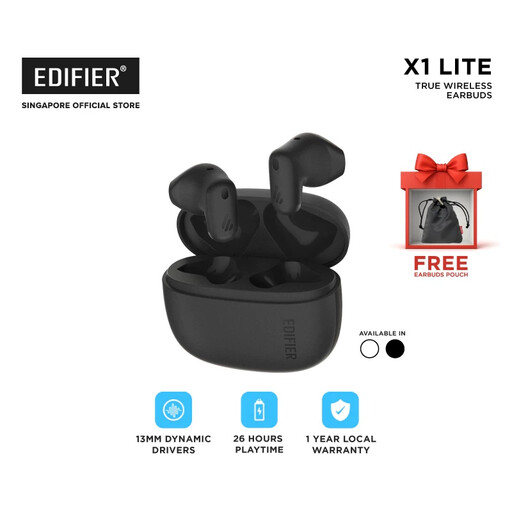
A headset alternative if you don’t want the interviewer’s voice to come through a table speaker.
The product information lists Bluetooth 5.4 and a microphone for calls. These are earbuds, not a speakerphone for use at a table; a private space still matters for anything you say yourself.
Position the speakerphone so that everyone speaking in the room is within the stated microphone range, then test it from the actual seats. Jabra lists a maximum range of 2,3 metres for the Speak2 55, while HP lists up to 2 metres for the Poly Sync 20 USB-A. These are manufacturer specifications, not measurements taken in your meeting room.
Check the connection or Bluetooth pairing, then select the speakerphone as both the input and output device in your system and meeting app. Jabra covers these audio settings in the Speak2 55 user guide. Then test the sound and mute function.
According to the Dutch government, the seller must provide a solution if a product is faulty. The Netherlands doesn’t have a fixed statutory warranty period, so check what an offered extended warranty includes.