A speakerphone is a good fit when several people at your table need to join in, or when using speaker mode at your desk isn’t a problem. Check the microphone setup, noise and echo cancellation, and how it connects to your meeting device. If you don’t want colleagues to hear the conversation, a headset or a separate room may be more suitable.
Who is a speakerphone suitable for?
Taking part from a noisy workplace
If you want to be heard clearly during a study group call, look at the microphone setup and noise cancellation. Jabra and HP Poly describe these features for specific models, but they don’t guarantee clear calls in every workplace.
A small group around one table
If several people in the same location need to join in, check where the speakerphone can be placed, its microphone range and whether people can speak at the same time. Jabra, HP and EPOS list model-specific features for this use.
Taking part alone among colleagues
If you’re joining on your own, consider whether the speaker will disturb others or let them hear the conversation. For conversations involving sensitive information, the Dutch Data Protection Authority advises discussing as little sensitive information as possible. A headset or separate room may be a better fit.
What should you look for when choosing one?
First decide whether you’ll be speaking with several people around a table or joining on your own among colleagues. Then check that the connection and audio settings work with the device and meeting app you use.
| What to consider |
What should you check? |
Who is this most important for? |
| Being heard clearly over office noise |
Look at the microphone setup and noise and echo cancellation. Test the speakerphone where you plan to take part in the session. |
If I want to be heard clearly over background voices, these are the features I’ll focus on. Around 36% of consumers say clear sound is their top priority. |
| Privacy and noise for colleagues |
Decide whether people nearby can listen in and whether several people need to speak around the table. A mute button mutes the microphone, not the sound from the speaker. |
If I’m joining on my own among colleagues or discussing sensitive information, I want to stop others from hearing the conversation. Around 29% of consumers put privacy first. |
| Connection and meeting settings |
Check which USB port is available and which Bluetooth connection is supported. Select the speakerphone as both the microphone and speaker in your meeting app. |
If I want to join using my own device without connection or setup problems, I’ll check both audio sources beforehand. Around 21% of consumers put a reliable connection first. |
| Portability and wireless use |
Check whether you need a battery and wireless connection, how to charge the device, and the battery life stated by the manufacturer. |
If I want to take my speakerphone between workspaces and use it without a cable for a while, I’ll look at the battery and connection. Around 14% of consumers put portability first. |
Common buying mistakes
-
Assuming ‘noise cancelling’ guarantees silence
A noise-cancellation claim alone doesn’t tell you how clearly you’ll be heard in a particular noisy office. Manufacturer descriptions aren’t independent tests of your space.
Make a test call in the place you plan to use before your study group meeting. Choose a headset or separate room if you don’t want the conversation to be heard through a speaker.
-
Assuming USB and Bluetooth work the same way on a computer
According to the Jabra manual, a standard Bluetooth connection between the Speak2 55 and a computer isn’t certified and may sound different from USB.
Check the recommended connection for the exact model and device you plan to use. Test it in your meeting app too.
-
Choosing a personal speakerphone without checking the table layout
Microphone range and recommended placement can vary by model. The range stated for one model isn’t a general range standard for other speakerphones.
Consider where everyone will be sitting and follow the placement advice for the model you choose.
Brands to compare
Jabra
The Speak2 40 is a wired USB option, while the Speak2 55 combines USB and wireless use. Versions may differ in their meeting platform certification.
- Jabra says the Speak2 models listed have four beamforming microphones and noise cancellation.
- For computer use, the Speak2 55 manual recommends USB. The specifications aren’t an independent test in a noisy office.
HP Poly
The Poly Sync 20+ is a portable USB and Bluetooth option for calls at your desk or around a small table.
- For the Sync 20+ version reviewed, HP lists three microphones, echo and noise cancellation, and up to 20 hours of talk time.
- Check the USB version. These features don’t automatically apply to every Poly Sync model.
Yealink
The CP700 is a compact speakerphone with USB and Bluetooth, worth comparing if you’re joining with a small group.
- According to the CP700 datasheet, this model has two omnidirectional microphones and a stated microphone range of 1.5 metres.
- The datasheet lists up to 9 hours of talk time. These are figures for the CP700, not an independent comparison with other brands.
EPOS
The EXPAND 40 is a USB-C and Bluetooth option for calls with several people taking part.
- EPOS lists three beamforming microphones and the ability for people to speak at the same time.
- This product information doesn’t tell you how well the model performs in your particular noisy office.
Products for this use case
This selection includes speakerphones for calls around a table, plus an alternative for anyone joining on their own among colleagues.
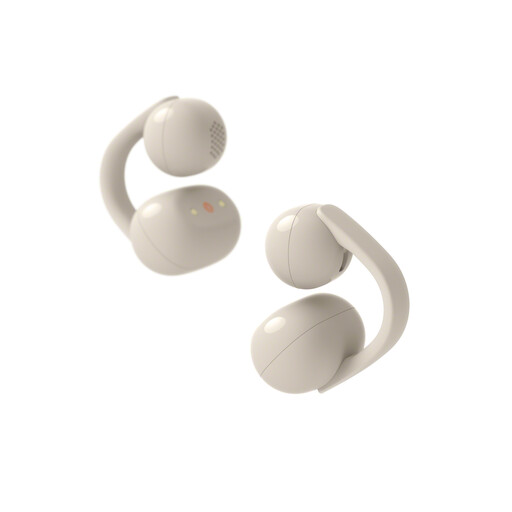 Image unavailable
Sony WFLC900C.CE7
An alternative to consider if you’re joining on your own and don’t want to use a speakerphone on the table. The product information describes open-ear listening. Sound leakage is reduced, but not eliminated.
Check whether this listening style offers enough privacy for you when you’re sitting among colleagues.
View at Joybuy
 Image unavailable
Insta360 Wave AI Conference Speakerphone, White
Worth considering for a study group with several people around the table. Bluetooth is listed in the product name; check that the connection and table layout suit your device and group.
Test how clearly you can be heard where you plan to hold the call.
View at Joybuy
 Image unavailable
Jabra Speak 510 MS, USB-A, black
An option to compare for personal calls via USB-A or Bluetooth. Check that your device and meeting app support the connection you choose.
Make a test call in advance from the place where you plan to use the speakerphone.
View at Joybuy
 Image unavailable
Jabra Speak2 55 MS Teams, Dark Grey
An option if you want to switch between USB use and joining wirelessly. Jabra lists up to 12 hours of wireless use; this is a manufacturer’s stated figure.
For computer use, Jabra recommends USB. According to the manual, a standard Bluetooth connection with a computer isn’t certified and may sound different.
View at Joybuy
Frequently asked questions
How can I tell whether my study group can hear me through the speakerphone?
Select the speakerphone as both the microphone and speaker in your meeting app, then make a test call beforehand. Microsoft Support explains how to do this in Teams. For other apps, check their own audio settings.
Should I turn on extra noise cancellation in Zoom?
Zoom uses noise and echo cancellation by default. Test the settings during a normal conversation in your space. The original sound or professional audio setting may change these filters, and isn’t automatically better for a noisy office.
Where should I place a speakerphone when several people are sitting around the table?
For the Speak2 55, Jabra recommends placing it in the middle of the table, no more than 2.3 metres and at least 0.5 metres from each person. This is advice for this model, not a general range standard for speakerphones.
Can I simply discuss sensitive information over a speakerphone at the office?
Don’t assume that you can. The Dutch Data Protection Authority advises discussing as little sensitive information as possible during video calls. Whether workplace or organisation rules also apply depends on your situation.


