If you’re listening on your own and the main issue is the noise around you, a speakerphone isn’t necessarily the answer: microphone noise reduction limits the noise picked up and transmitted by your mic, but it won’t shield you from office noise. A headset is worth considering if your main priority is hearing the trainer clearly; a speakerphone is more suitable when you want to speak hands-free or listen with colleagues. In that case, compare the microphone pick-up, intended set-up and connection options with your training device.
Who is this relevant for?
Listening on your own in a noisy space
You want to hear the trainer clearly. First, consider whether an open speaker is suitable for your workplace: microphone noise reduction won’t remove the noise around you. Arboportaal explains how workplace noise can affect performance.
Taking an active part and asking questions
You speak regularly during the training and want your voice to come across clearly. Microsoft Support points out that background noise picked up by an active microphone can distract other participants, so also check how the device connects to your equipment.
Sharing one laptop with a small group
You’re attending the training with colleagues around the same table. Check whether the stated microphone pick-up and intended set-up are suited to one another. Manufacturer figures for pick-up distance or simultaneous speech don’t test how clearly people will be heard in your office.
What should you look for when choosing?
First, decide whether you’ll mainly be listening, speaking yourself or sharing one device with others. Then check that the connection is compatible with the device you’ll use for the training.
| What to consider |
What should you check? |
Who is this important for? |
| Hearing the trainer |
Decide whether you’ll be listening alone or with others, and whether an open speaker is practical in your workplace; consider a headset if needed. |
If I’m listening on my own, I want to follow the trainer clearly without a speakerphone shielding me from office noise. Around 36% of consumers prioritise clear sound. |
| Speaking yourself |
Check the microphone features, mute button and whether the set-up is designed for one speaker or several people. |
If I’m asking questions during the training, I want my voice to come across clearly without sending too much background noise. Around 29% of consumers prioritise being heard clearly. |
| Connection |
Check the exact model against your device’s ports and wireless support; also select the right audio input and output in your meeting app. |
If I want to join the training on my device without any hassle, I check which connections it supports. Around 21% of consumers prioritise connectivity and ease of use. |
| Sharing around a table |
Compare the stated pick-up distance and suitability for the space with the distance between the participants and the speakerphone. |
If I’m sharing one training connection with colleagues, I want everyone to be able to listen and speak. Around 14% of consumers prioritise group participation. |
Common pitfalls
-
Confusing microphone noise reduction with personal quiet
Microphone noise reduction affects what other participants hear through your microphone. It doesn’t mean you’ll hear the trainer more clearly over colleagues talking.
If you’ll mainly be listening, assess your listening environment first and consider comparing a headset.
-
Assuming Bluetooth works with every laptop
Supported devices vary by model. Jabra lists Bluetooth for smartphones and tablets with the Speak2 55; the BT50 dongle is optional with the Yealink CP700.
Before buying, check the connection options for the exact model and whether any required dongle is included.
-
Assuming microphone range guarantees clear speech
A stated pick-up distance doesn’t tell you how clearly your voice will come across with colleagues talking nearby.
Compare the distance between the speaker and device with the model’s specifications, and test your intended set-up where possible.
Brands to compare
Jabra
The Speak2 40 is designed for a wired USB set-up; the Speak2 55 combines USB with Bluetooth for the mobile devices specified by Jabra.
- Jabra lists four beamforming microphones and full-duplex audio for both models. For the Speak2 55, Jabra specifies a pick-up range of up to 2.3 metres and talk time of up to 12 hours.
- These are stated product specifications, not an independent test of performance in office noise. Also check whether you need the Teams or UC version.
EPOS
The EXPAND 40 is a portable USB-C and Bluetooth speakerphone for meetings with several participants.
- EPOS describes three beamforming microphones, background noise reduction and simultaneous speech.
- This manufacturer description doesn’t tell you how much office noise an individual participant will hear.
HP Poly
HP describes the wired Poly Sync 10, among other models. Check the specifications for each model rather than assuming they apply to the entire Sync range.
- For the Sync 10, HP describes two microphones focused on the speaker’s voice and full-duplex audio.
- These features apply to the Sync 10 and don’t, in themselves, tell you anything about other Sync models.
Yealink
Yealink positions the CP700 as a compact personal USB and Bluetooth speakerphone.
- The Yealink specification sheet lists two omnidirectional microphones, a pick-up range of 1.5 metres and talk time of 9 hours.
- The BT50 dongle is optional, so check the version if you want to connect to a laptop wirelessly.
AnkerWork
The PowerConf S500 is an option to compare for a shared training or meeting set-up.
- AnkerWork describes four microphones, two-way noise reduction and connection via USB-C, Bluetooth or a dongle.
- Check which accessories are included with the exact model; the manufacturer’s description isn’t a comparative test.
Joybuy products for this situation
This selection includes a wired headset for listening on your own and speakerphones for hands-free participation. Choose based on whether you’ll be listening alone, speaking yourself or sharing one device with others.
 No image available
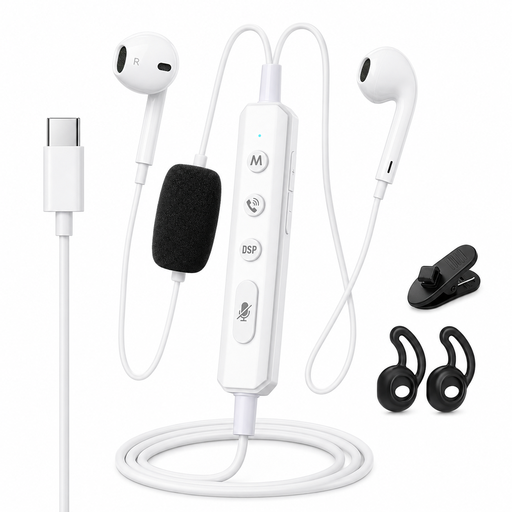
VoxorAI KM08 White wired headphones
Headphones for individual participation, not a speakerphone; consider whether this type of listening solution suits your workplace.
The product name specifies a wired connection, Type-C compatibility and built-in Bluetooth. Check which connection suits your device and how you plan to use it.
Joybuy
 No image available
Insta360 Wave AI Bluetooth conference speakerphone, black
The product name presents this model as a conference speakerphone for hands-free participation. An open speakerphone won’t shield you from office noise.
The product name specifies Bluetooth; before the training, check that the connection works with your device and the audio settings in your meeting app.
Joybuy
 No image available
Jabra Speak 510 MS, Bluetooth and USB-A
A speakerphone for hands-free participation; bear in mind that an open speaker won’t shield you from office noise.
The product name specifies Bluetooth and USB-A. Check which connection and version are suitable for your training device.
Joybuy
 No image available
Jabra Speak2 55 MS Teams, dark grey
A speakerphone for hands-free participation. If you’re mainly listening on your own, microphone noise reduction won’t remove the noise around you.
Check that the MS Teams version and supported connection are right for your device and meeting app.
Joybuy
Frequently asked questions
Do I need a special speakerphone for Teams?
Don’t choose based on a Teams label alone: the exact version and connection must be compatible with your device. Microsoft Support explains that you can select your preferred speaker and microphone in Teams before joining; don’t assume a Teams label applies automatically to another version.
How can I stop colleagues hearing too much background noise during training?
Mute your microphone when you’re not speaking. Microsoft Support also describes noise reduction settings for sounds picked up by an active microphone and transmitted to other participants; check which options are available in your Teams environment.
What should I check when buying a speakerphone with a battery?
Compare the stated talk time with the length of your training and check how your chosen model is charged. Jabra lists up to 12 hours of talk time for the Speak2 55, while Yealink lists 9 hours for the CP700. These are manufacturer figures, not measured battery life in your situation.
What cooling-off period and warranty apply when buying in the Netherlands?
For many online consumer purchases, the Dutch government states that you have 14 days to change your mind, although there are exceptions. In the Netherlands, there is no fixed period for the statutory guarantee: a product must meet what you can reasonably expect of it. Check the terms for your purchase; these consumer rules don’t necessarily apply to business orders.
Can an employer record an online training session without asking?
Don’t assume that having a speakerphone means you have permission to record a training session. The Dutch Data Protection Authority sets conditions for recording employees’ phone calls and monitoring the workplace. Whether a particular online training session can be recorded depends, among other things, on its purpose and circumstances.


