Choose a speakerphone if you want to speak hands-free in a quiet, private space where others cannot hear the conversation. In a shared or very noisy office, a headset is usually the better choice: a speakerphone plays the interviewer’s voice aloud, and stated noise-cancelling features do not guarantee that your colleagues’ voices will be filtered out. When comparing speakerphones, check the microphone processing, full-duplex audio, connection options and mute controls, and test your set-up before the interview.
Who is this relevant to?
Job applicant with colleagues talking nearby
Wants to be clearly understood during a one-to-one conversation while other people are talking nearby. Consider whether you also need a quieter place or a headset. Jabra and HP describe microphone features for their models, but those specifications do not necessarily predict how they will perform in your office.
Job applicant having a confidential conversation
Wants to make sure answers or personal details cannot be heard across the office. The Dutch Data Protection Authority discusses the privacy of job applicants and employees; the space available is a factor when choosing between a speakerphone and a headset.
Job applicant who moves between workspaces
Wants to take the call on a laptop or phone, so looks for a suitable USB or Bluetooth connection and easy-to-use controls. HP and EMEET describe different connection options for each model.
What should you consider when choosing?
First, decide whether you can have a confidential conversation. Then compare voice clarity, and choose connection options and portability to suit your workspace.
| What to consider |
What should you check? |
Who is this important for? |
| Voice clarity with background voices |
Check the microphone processing and full-duplex feature, and make a test recording with the usual office noise in the background. |
If I want the interviewer to follow my answers clearly while colleagues are talking, voice clarity comes first. Around 34% of consumers say this is their top priority. |
| Confidentiality |
Decide whether you have a sufficiently private space. If not, consider a headset instead of a speaker. |
If I do not want to share answers or personal details with colleagues, preventing others from listening in matters most. Around 33% of consumers say confidentiality is their top priority. |
| Connection and controls |
Check the port, cable or adapter and whether your device is supported. Test the microphone, speaker and mute button in your meeting app. |
If I want to be sure my laptop or phone will use the right audio devices, I focus on the connection and controls. Around 20% of consumers put this need first. |
| Moving between workspaces |
Check whether the model has a battery, the talk time stated by the manufacturer, and whether the required cable or adapter is included. |
If I want to take calls in different workspaces, portability and easy connection matter more. Around 13% of consumers say portability is their top priority. |
Common pitfalls
-
Confusing noise cancellation with privacy
Microphone processing affects the sound your conversation partner hears. It does not stop colleagues from hearing the built-in speaker.
Choose a private space first. If that is not possible, compare headsets instead of simply looking for a speakerphone with more features.
-
Choosing an omnidirectional conference speaker as if you were speaking alone
An omnidirectional microphone is also designed to pick up voices from people sitting around the device. Stated noise-cancelling features do not prove that nearby colleagues will be inaudible.
Test the device with the background voices you actually expect, and decide whether a quieter space or headset would be more suitable.
-
Mixing up product variants or adapters
The Poly Sync 20 and Sync 20+ differ in the connection options included in the box; the Sync 20+ comes with a BT700 adapter. Certification can also vary between Jabra versions.
Before buying, check the full model variant, connections, certification and box contents.
You may need a separate adapter if the version or package you choose does not include the connection you need.
Brands to compare
Jabra
The Speak2 55 is a compact speakerphone worth comparing if you are looking for USB flexibility, wireless use and full-duplex audio.
- Jabra lists four beamforming microphones, noise cancellation and up to 12 hours of wireless use for the Speak2 55.
- These are manufacturer specifications, not the results of an independent test with colleagues talking nearby. Check the certification for the exact version too.
Poly (HP)
HP describes the Sync 20 as suitable for flexible use in the office, at home and on the go, with USB for a PC and Bluetooth for a smartphone.
- According to HP, the Sync 20 has a three-microphone configuration.
- Do not confuse the Sync 20 with the Sync 20+, which comes with different connection options. The stated features are not the same as an independent test in an office.
EMEET
The OfficeCore M0 Plus is an option to compare if you are looking for USB-C, Bluetooth and omnidirectional microphones.
- EMEET lists four microphones, full-duplex audio and noise cancellation.
- Omnidirectional pick-up is designed for meetings with multiple participants. Test whether this model is suitable for one person speaking with colleagues talking nearby.
Anker
The PowerConf S3 is another USB-C and Bluetooth speakerphone to compare for use at a desk or in a meeting room.
- Anker lists six omnidirectional microphones and processing for echo, reverberation and background noise.
- These manufacturer specifications do not show how the device performs during a job interview with colleagues talking nearby.
Joybuy products
This selection includes hands-free speakerphone options, a portable Bluetooth speaker and earbuds as an alternative when a speakerphone is not right for the situation. Only use a speaker where other people cannot listen in on the conversation.
 No image available
Insta360 Wave AI Conference Speakerphone, Black
Suitable if you want to speak hands-free using a Bluetooth speakerphone in a private space.
The product description lists a 3D array of eight microphones, 48 kHz sampling, automatic gain control, AI noise cancellation and five directional pick-up patterns. The stated voice pick-up range is up to 16 feet. These features do not guarantee that colleagues’ voices will be filtered out.
View at Joybuy
 No image available
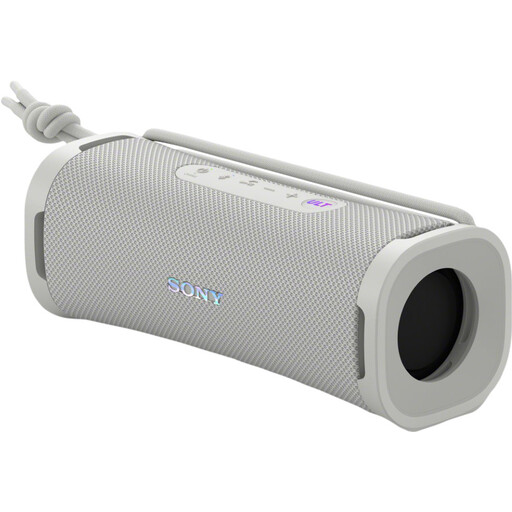
Sony ULT FIELD 1, Off White
This is a portable Bluetooth speaker with a built-in microphone for hands-free calls, rather than a model described as a conference speakerphone.
The product description lists echo cancellation, Bluetooth, IP67 and up to 12 hours of battery life. Before use, check that the speaker and microphone work as audio devices in your meeting app.
View at Joybuy
 No image available
Jabra SPEAK 510 MS, USB-A, Black
Suitable if you want a hands-free speakerphone that connects via USB or Bluetooth, with call controls on the device.
The product description lists button controls, a portable design and up to 15 hours of battery life. Check that it connects to your computer or phone, and test your chosen audio devices in advance.
View at Joybuy
 No image available
Jabra Speak2 55 MS Teams, Dark Grey
Suitable if you want to speak hands-free and are looking for full-duplex audio with a choice of USB or wireless use.
The product description lists four beamforming microphones, noise cancellation and up to 12 hours of wireless use. Check that the version and certification are suitable for your meeting app; specifications do not guarantee clear speech in every office.
View at Joybuy
 No image available
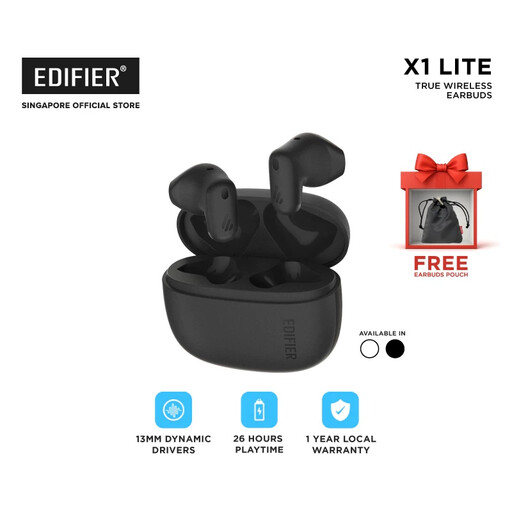
EDF-X1 Lite-black true-wireless-oordopjes
An earbud option to consider if you do not want to use a speaker in a shared space.
The product description lists one microphone with AI noise cancellation for calls, Bluetooth 5.4, IP54 and a weight of 4 grams per earbud. The stated playback time is up to 26 hours with the charging case; check compatibility with your device and meeting app.
View at Joybuy
Frequently asked questions
Where should I place the speakerphone before my job interview?
Place the device on your desk and test it from where you usually sit. Compare the recording with the usual office noise, and check in your meeting app that the correct microphone and speaker are selected. Manufacturer specifications cannot guarantee how it will perform in your space.
How can I avoid a flat battery or the wrong Bluetooth connection?
Charge a wireless model in advance, or check whether you can use it with the right USB connection. Pair the device beforehand, check which audio devices are selected and test the mute button. The stated battery life is the manufacturer’s maximum figure.
What are my rights if I buy a speakerphone online or it develops a fault?
For an eligible online purchase from a business, the Dutch government generally provides a 14-day cooling-off period, subject to conditions and exceptions. In the Netherlands, you are also entitled to a product that works as it should; there is no fixed statutory guarantee period, and you should contact the seller if the product is faulty.
Can I have a job interview using a speakerphone in a shared office?
The main considerations are whether colleagues can hear the conversation and whether your answers will remain confidential. The Dutch Data Protection Authority highlights the importance of handling job application information carefully and protecting privacy at work. If possible, choose a private space and check any office rules; a headset may be more suitable if other people are sitting nearby.


