Choose a speakerphone if you’re in a quiet, private room or if several people will be speaking around the table; test the microphone from the actual seats. If you’re interviewing alone and others might overhear, prioritise a quiet room and consider using a headset: a speakerphone doesn’t make incoming audio private. Before the interview, check the connection, select the microphone and speaker in your calling app, and check the mute button.
Which set-up is right for you?
Interviewing in a shared room
If other people might overhear or walk in, finding a private space is a priority. A headset stops incoming audio playing through an open speaker, but it won’t make your own answers inaudible. The Dutch Data Protection Authority points out that job applications involve personal data.
Interviewing in a quiet room
If you’re speaking alone from one fixed seat, a speakerphone may be worth considering. Place it nearby and test how your voice and the interviewer’s sound; a stated microphone range doesn’t predict how the device will sound in every room.
Interview with people around the table
If a support person or someone else in the room also needs to speak, compare the furthest seat with the stated range and test that seat separately. Manufacturers give a maximum range of 2 metres for the HP Poly Sync 20 series, for example, and 1.5 metres for the Yealink CP700.
What should you look for when choosing?
Speakerphone
A good choice when: you want to speak hands-free in a quiet, private room, or when several people will be speaking around the table.
Bear in mind: incoming audio plays through a speaker, so test the room and the distance to each speaker.
Headset
A good choice when: you’re the only person speaking and don’t want the interviewer’s voice to play through an open speaker.
Bear in mind: a headset won’t stop people nearby from hearing your answers, so choose a private room too if needed.
| What to consider |
What should you look for? |
Who is this important for? |
| Privacy and quiet |
Check whether you can close the room and who might overhear. A headset keeps incoming audio from playing through an open speaker. |
If I’m interviewing alone and others might walk in, I want to find a private space first. Around 26% of consumers prioritise privacy. |
| How clearly your voice comes through |
Make a test call from your actual seat and ask how your voice and background noise sound. Don’t treat the stated range as a guarantee for every room. |
If you want the interviewer to hear the candidate clearly from their usual seat, it’s best to test the actual set-up. Around 26% of consumers give clear speech the highest priority. |
| Connection and controls |
Check whether you need USB-A or USB-C, whether the Bluetooth connection works with your device, and select the speakerphone or headset as both the microphone and speaker in your calling app. |
If I want to avoid connection problems just before an important interview, I test my device and calling app in advance. Around 21% of consumers prioritise a reliable connection. |
| Multiple speakers |
Compare the distance to the furthest person with the stated microphone range, and test their voice from that seat. HP gives a maximum of 2 metres for the Sync 20 series; Yealink gives 1.5 metres for the CP700. |
If someone else at the table needs to speak too, I want to know whether they’ll be clearly heard from their seat. Around 16% of consumers make clear speech from multiple people their top priority. |
| Portability and charging |
Check the battery level and whether the connection you’ve chosen works with the device you’ll be calling from. Jabra gives the Speak2 55 a maximum talk time of 12 hours; HP gives the Sync 20 series a maximum of 20 hours. |
If I’m moving between rooms, I want a set-up I can prepare and charge in advance. Around 11% of consumers prioritise portability. |
Common pitfalls
-
Confusing noise cancellation with privacy
Processing microphone audio won’t stop people nearby from hearing the interviewer through an open speaker.
First, work out who might overhear from inside or near the room. Then choose between open audio and a headset, and find a separate room if needed.
-
Assuming the microphone range covers the whole room
Manufacturers give ranges of 1.5 to 2.3 metres for various compact speakerphones. That doesn’t tell you how the acoustics or seating in your classroom will affect the sound.
Test every seat from which someone needs to speak, especially the furthest one.
-
Assuming Bluetooth in the product name means it’s compatible with your laptop
For the Jabra Speak2 55, Jabra specifies USB-A or USB-C for a computer and Bluetooth for a smartphone or tablet.
Check the connection on the exact version you’re considering and test the speakerphone in the calling app you’ll use for the interview.
-
Treating an older test as a current buying recommendation
DXOMARK’s speakerphone test was published in 2024. Its results aren’t a current Dutch sales ranking and don’t determine which version is right for your room.
Use test results only in their original context and check the full model details before buying.
Brands to consider
Jabra
The Speak2 range includes models to compare for one speaker or a small group around a table.
- For the Speak2 55, Jabra specifies USB-A or USB-C for a computer, Bluetooth for a smartphone or tablet, and a microphone range of up to 2.3 metres.
- DXOMARK ranked the Speak2 75 top in a test published in 2024. That result doesn’t automatically apply to the Speak2 55.
HP Poly
The Sync 20 series is worth considering for a portable USB or Bluetooth set-up for a small group.
- HP gives the series a microphone range of up to 2 metres and a maximum talk time of 20 hours.
- DXOMARK ranked the Poly Sync20 fourth in its historical test. Check the exact USB version when choosing.
EPOS
The EXPAND 40 is a model to compare if several people will be speaking around a table.
- EPOS lists three beamforming microphones for the EXPAND 40.
- DXOMARK ranked the model second in its historical 2024 test; this isn’t a test of your classroom.
Yealink
The CP700 is a compact USB and Bluetooth speakerphone to compare against the actual distance between speakers.
- Yealink gives the CP700 a microphone range of 1.5 metres and a maximum talk time of 9 hours in its datasheet.
- Compare that distance with the furthest seat; the specification isn’t an independent comparison of sound quality.
Logitech
The Zone Wired is a headset alternative for an interview where only the candidate is speaking and incoming audio shouldn’t play through a speaker.
- Logitech lists a wired USB connection and a microphone boom with a mute function.
- A headset won’t stop people nearby from hearing your answers, so you may still need a quiet, private space.
Products at Joybuy
These products are options to consider for a speakerphone or headset set-up during a remote job interview.
 No image available
Insta360 Wave AI Conference Speakerphone, white
Worth considering for a hands-free set-up in a quiet, private room; people nearby will still be able to hear audio through the open speaker.
Bluetooth appears in the product name; check that the connection works with your device and calling app.
View at Joybuy
 No image available
Jabra Speak 510 MS, USB-A (USB 2.0), black
Worth considering for a personal speakerphone set-up; use it in a quiet room and test your chosen seat in advance.
The product name lists USB-A (USB 2.0) and Bluetooth. Check which connection is right for the device you’ll use for the interview.
View at Joybuy
 No image available
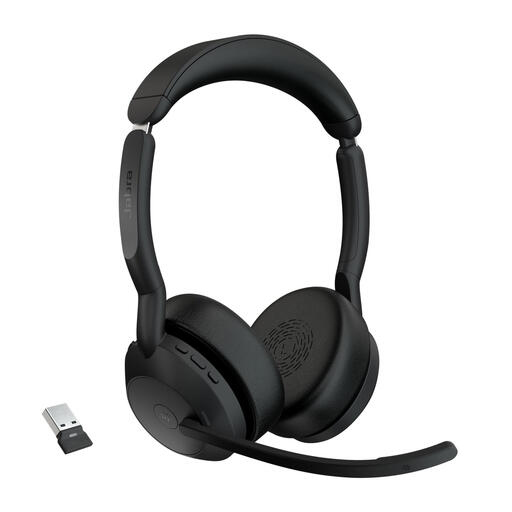
Jabra Evolve2 55 Link380a MS Stereo
Worth considering if you’re the only person speaking and don’t want incoming audio to play through an open speaker.
A headset won’t stop people nearby from hearing your answers, so choose a private space too if needed.
View at Joybuy
Frequently asked questions
Is a speakerphone suitable if you’re interviewing alone from a classroom?
Yes, if the room is quiet and private and you test the audio from your seat in advance. If other people can hear the interview, consider finding a separate room first and using a headset for incoming audio if needed. A headset won’t stop them from hearing your answers.
What should you test just before the interview?
Select the right microphone and speaker in your calling app, check that the mute setting is correct, and make a test call from your actual seat. Microsoft explains how to select devices for the Modern USB-C Speaker in Teams on a Windows 10/11 PC; check the settings in your own app and on your device too.
What are your rights if a speakerphone you bought online doesn’t work properly?
For a consumer purchase in the Netherlands, the product must meet the terms of the agreement. If it’s faulty, the seller must provide a solution. When you buy online from a business, you’ll generally have a 14-day cooling-off period, subject to applicable exceptions. The Dutch government explains these consumer rights.
What should you bear in mind about privacy during a job interview?
As a practical measure, choose a private space and make sure others can’t overhear. The Dutch Data Protection Authority states that employers collect personal data during job interviews; also follow any rules set by the venue and the organisation inviting you.


