Start with your usual listening spot and how you play your recordings. One speaker is easier to position, while two speakers placed separately give you the option of a left-right setup. Check which app, cables or accessories you’ll need, and consider your housemates and neighbours. A larger speaker or extra bass doesn’t, by itself, tell you whether the sound will be more enjoyable where you listen.
Which speaker setup is right for you?
Attentive musical theatre listener
You listen from a regular seat and want to assess voices and instruments from there. The room and speaker placement both play a part; a stereo pair is an option if you have space for two speakers. The Consumers’ Association, Genelec and Edifier Netherlands all highlight sound quality, placement and speaker configurations as important considerations.
Listener in a shared flat
You may want to hear music beyond your usual listening spot, while being mindful of housemates or neighbours. Placement and volume should suit your home and the time of day. The Dutch government notes that noise nuisance affecting neighbours may be covered by local municipal regulations.
Listener with an existing audio source
You have recordings on a phone, through a music service or on a device with an audio output, and want to find a suitable way to play them. Check which connections your source and chosen model actually support, such as Bluetooth, Wi-Fi or a cable input.
What should you look for in a speaker for musical recordings?
Start with where you usually listen, then check whether one speaker or two speakers placed separately will suit the room. Also consider how you play your recordings and what volume is appropriate in a shared home.
| What to consider |
What to look for |
Who is this important for? |
| Voices and instruments from your listening spot |
Decide where you usually sit, then assess how one speaker or two speakers would sound from there. |
I want to assess voices and instruments from my usual seat before choosing a setup. Around 31% of consumers put sound quality from their listening spot first when buying. |
| A separate left-right soundstage |
Check whether you can position two speakers and whether the models can be paired for stereo. |
I want to position the left and right speakers separately, so I’ll check whether my room has enough space. Around 25% of consumers prioritise a stereo setup that they can position to suit their room. |
| Your living environment |
Consider placement and volume at the times you listen. The Dutch government notes that noise nuisance affecting neighbours may be covered by local municipal regulations. |
I want to enjoy music in a shared flat without disturbing the peace at home. For around 25% of consumers, being mindful of their living environment is the top priority. |
| Connection to your audio source |
Make a note of where your recordings are stored and check the connections, app and any accessories required for the exact model. |
I want to use my existing phone, music service or audio device without finding out too late that it has the wrong connection. Around 19% of consumers prioritise compatibility with their audio source. |
Common buying mistakes
-
Assuming that two wireless speakers automatically make a stereo pair
There may be specific requirements for creating a stereo pair. Sonos states that only compatible speakers of the same model can be paired for stereo.
Before you buy, check the full model name of both speakers and confirm that stereo pairing is supported.
-
Assuming ‘wireless’ means no cables or setup
The Edifier R1280DB uses a cable between the speakers. A 3.5mm line-in connection on the Sonos Era 100 requires an adapter, and the initial Bluetooth pairing requires setup via the Sonos app over Wi-Fi.
Map out how your audio source will connect to the speaker, and check which cables, adapters and setup steps you’ll need.
-
Thinking a larger speaker or more bass will suit every listening spot
What you hear also depends on the room and speaker placement. A larger speaker on its own won’t determine how musical recordings sound from your seat.
First decide where you’ll usually listen and consider speaker placement before choosing a larger setup.
Brands to compare
Sonos
The Era 100 is worth comparing if you’re looking for a compact home setup with Wi-Fi and Bluetooth, and the option to pair a compatible second speaker for stereo.
- Sonos lists Wi-Fi and Bluetooth for the Era 100 and supports stereo pairing for compatible models.
- The initial Bluetooth pairing requires setup via the app over Wi-Fi. A 3.5mm line-in connection requires an adapter.
Denon
The Home range is worth comparing if you’re looking for a single streaming speaker for your home or want to expand a HEOS setup.
- Denon lists Bluetooth, Wi-Fi, AirPlay 2 and HEOS for the Home 200, and describes it as a standalone stereo speaker.
- That product description doesn’t mean a single Home 200 will produce the same stereo soundstage from every listening spot as two separately positioned speakers.
Edifier
The R1280DB is an active bookshelf speaker pair worth comparing if you have space for two speakers and want to use both wireless and wired sources.
- Edifier lists Bluetooth, RCA/AUX, optical and coaxial connections.
- The speakers are connected to each other by a speaker cable, so bear this in mind when deciding where to place them.
IKEA
NATTBAD is worth comparing if you’re looking for a standalone Bluetooth speaker.
- IKEA Netherlands describes NATTBAD as a Bluetooth speaker.
- Check whether Bluetooth is compatible with the source you’ll use to play your musical recordings.
Joybuy speakers for home use
This selection includes standalone speakers for home use and options with two speakers. Check the connections, placement options and any setup requirements for each model to make sure they suit your listening spot.
 No image available
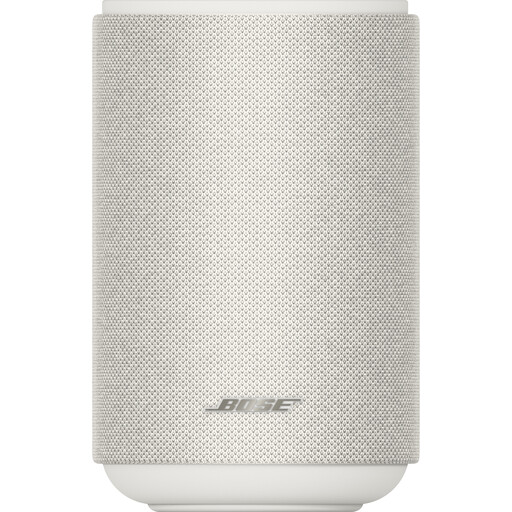
Bose Lifestyle Ultra Speaker, white
Suitable if you’re looking for a single speaker for a fixed spot at home, with the option of considering a stereo pair later.
Before adding another speaker, check which models can work together as a stereo pair.
View at Joybuy
 No image available
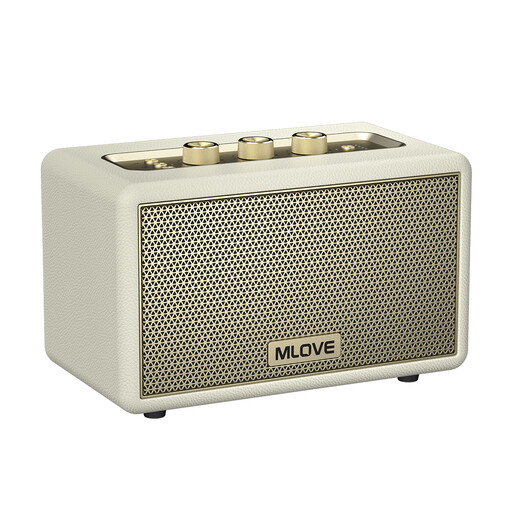
mlove A200 Bluetooth speaker, white
An option worth comparing if you want to play audio from a Bluetooth source.
Bluetooth 5.3; the product name states a 24-hour play time.
View at Joybuy
 No image available
Edifier ES300 Wi-Fi and Bluetooth speaker
An option worth comparing if you want to stream wirelessly at home or connect an existing wired source.
The product name lists Wi-Fi, Bluetooth, AirPlay 2, USB and AUX, 60 W of power and a 12-hour battery life.
View at Joybuy
 No image available
Edifier G1500 Hecate computer speakers, black
An option worth comparing if you want to use two speakers in a listening or computer setup.
The product name lists Bluetooth 5.3, USB and a 3.5mm AUX input.
View at Joybuy
 No image available
HiVi-Swans D3.1MKII passive bookshelf speakers, pair
A pair worth comparing if you want to position two speakers for listening from a regular spot.
Passive speakers; a separate amplifier is required. The product name lists a 6.5-inch woofer.
View at Joybuy
Frequently asked questions
Do I need two speakers for a stereo setup?
Not just to play a recording. If you want to position the left and right speakers separately, check that you have two compatible speakers and that they can work as a stereo pair. Sonos lists model requirements for stereo pairing.
Can I connect a Sonos Era 100 directly via Bluetooth without setting it up over Wi-Fi?
No. Sonos says you must first set up the Era 100 using the Sonos app over Wi-Fi before you can pair it via Bluetooth.
What should I check if my recordings are on a device with an audio output?
Compare your device’s output with the input on the exact speaker model. Edifier lists analogue and digital inputs, among others, for the R1280DB; Sonos says an adapter is needed for a 3.5mm line-in connection on the Sonos Era 100.
What should I bear in mind if my neighbours can hear my music?
Take account of the rules and household agreements that apply at your address. According to the Dutch government, noise nuisance affecting neighbours may be covered by local municipal regulations. Speak to your neighbours if needed and check your local rules.
What are my rights if a speaker I bought online isn’t suitable or breaks too soon?
For a typical online consumer purchase, ACM ConsuWijzer says you generally have a cooling-off period of up to and including 14 days after delivery, subject to statutory exceptions. You’re also covered by the legal guarantee: if a product is faulty under normal use, the retailer is responsible for providing an appropriate remedy free of charge.


