Who is this guide for?

Listeners who are considerate of others

You share the space and want to play film music without assuming that everyone else is happy with the volume or bass. Agreeing how to manage noise matters just as much as choosing a product; the Dutch government advises people to try agreeing on arrangements together first when noise is causing a nuisance.

Listeners who stream soundtracks

You mainly listen to film music without switching on the TV and want a suitable connection and controls, perhaps with the option of using a stereo pair.

People who use both the TV and music

You want one setup for TV audio and streamed soundtracks. The connections available on your TV will help determine which soundbars you can use.

What should you look for when choosing?

Fixed Wi-Fi speaker

Best suited to: streaming soundtracks without the TV, when you can give the speaker a permanent place with power and the required network access.

Bear in mind: the controls and initial setup; a stereo pair requires two speakers and enough space.

Portable Bluetooth speaker

Best suited to: moving the music to a different seating area regularly, or avoiding reliance on a fixed Wi-Fi setup.

Bear in mind: charging and the Bluetooth connection; the stated maximum battery life isn’t guaranteed at every volume level.

Soundbar for TV and music

Best suited to: a setup that also needs to play audio from the lounge TV.

Bear in mind: the TV’s connection and the soundbar’s fixed position by the screen; it’s less convenient to move around.

What to consider What to look for when buying Who is this important for?
Sound in a shared space Consider where you can place the speaker and check whether you can adjust the volume or equaliser. If I share the lounge, I want to hear film music without drowning out conversation or disturbing anyone who wants peace and quiet. That’s why around 36% of consumers prioritise sound that suits shared use.
Streaming without the TV Check Wi-Fi, Bluetooth, supported services and any initial setup requirements for the exact model. I want to play soundtracks without switching on the TV, and the controls need to work with my device or service. Around 29% of consumers prioritise streaming without the TV.
Connecting TV audio Compare the TV output with the soundbar input. HDMI-(e)ARC is an option if both devices support it. If the same setup also needs to play TV audio, I want to know in advance whether the devices can connect. Around 21% of consumers give TV integration top priority.
Moving the speaker Check whether the model has a battery, how it charges and its stated battery life. If seating arrangements or the way the lounge is used often change, I want to be able to move the speaker easily. Around 14% of consumers prioritise portability.

Things to consider before buying

  • Choosing a music streamer when you also need TV audio

    Being able to play music wirelessly doesn’t automatically mean that the speaker can connect to your TV.

    First decide whether you’ll use the TV with the setup, then compare the connections on your TV and the exact device you’re considering.

    You may still need a separate solution for TV audio.

  • Assuming Bluetooth means it’s ready to use straight away

    Sonos says that the Era 100 must first be set up over Wi-Fi before you can use Bluetooth playback.

    Check the initial setup steps for the exact model, especially if the lounge doesn’t have a suitable Wi-Fi network.

    Allow time for setup and make sure you have the required network connection.

  • Assuming the maximum battery life is guaranteed playback time

    JBL says the stated playback time depends in part on the volume and audio content.

    Plan charging around how you use the speaker, and treat the stated hours as a maximum, not a measure of how long it will last at your listening volume.

    You may need to charge it more often than the maximum figure suggests.

  • Choosing a bigger bass setup without considering the space

    Sound can cause a nuisance; a bigger system won’t automatically solve that.

    Start by considering placement, your preferred listening volume and arrangements with other users. Only then decide whether to expand the setup.

Brands to consider

Sonos

The Era 100 is a fixed speaker for streaming without the TV, while the Beam (Gen 2) is designed for a setup that also handles TV audio.

  • Sonos says the Era 100 offers Wi-Fi and Bluetooth, and can be paired with a second speaker for stereo sound.
  • Sonos says the Era 100 must first be set up over Wi-Fi before you can use Bluetooth. Check that your TV has HDMI eARC if you’re considering the Beam (Gen 2).
  • Sonos says the Beam can stream music while the TV is off.

Denon

The Home 150 is a fixed Wi-Fi and Bluetooth speaker for anyone considering a HEOS setup.

  • Denon says you can group compatible devices using HEOS, including soundbars.
  • Denon describes the Home 150 as a mono speaker; check which compatible devices are suitable for the setup you want.

Sony

The ULT FIELD 3 is a portable Bluetooth option for a setup that changes regularly.

  • Sony lists a battery, Bluetooth and around 24 hours of battery life.
  • The stated battery life isn’t guaranteed playback time at every volume level. Sony describes USB-C as DC IN/OUT; this specification doesn’t mention a direct TV audio input.

JBL

The Flip 7 and Charge 6 are portable Bluetooth ranges to compare for size and charging needs.

  • JBL gives a maximum playback time of 14 hours for the Flip 7 and 24 hours for the Charge 6, depending on volume and audio content.
  • These maximum figures from the manufacturer don’t determine which speaker is better for your lounge or how long it will play for in your setup.

Products at Joybuy

These product options suit portable music listening, combining TV audio with music, or using a wired speaker set in a living space.
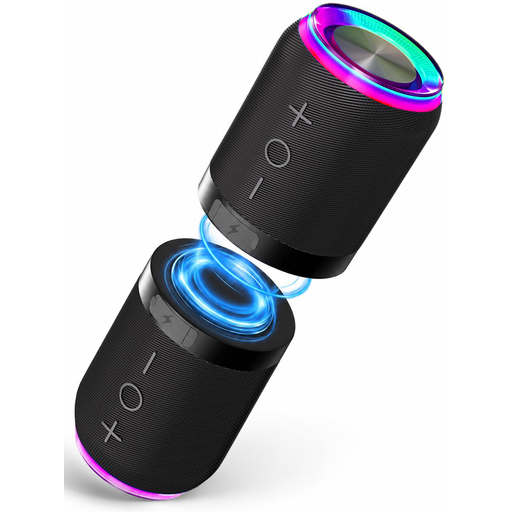
Bluetooth speaker set with magnetic attachment, set of two

2-in-1 Bluetooth speaker set with magnetic attachment, set of 2

For anyone who wants to play music from a compatible device over Bluetooth and use two speakers as a stereo set.

The product name mentions IPX6 and a magnetic attachment. The product description lists Bluetooth 5.4, AUX and TF card; it says the two speakers can be used together or separately as a stereo set.

View at Joybuy
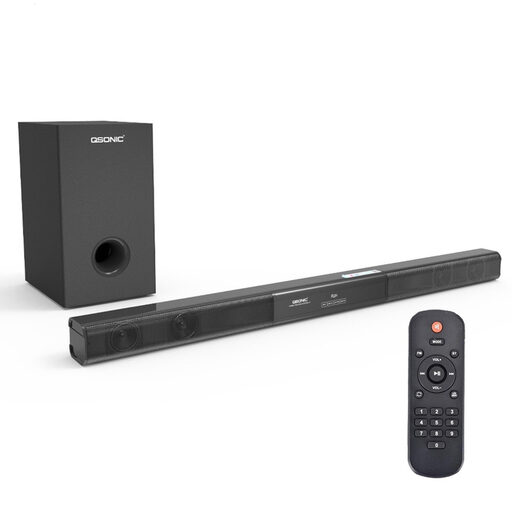
2.1 soundbar with subwoofer and remote control

2.1 soundbar with subwoofer, Bluetooth 5.0, coaxial/AUX/USB

For anyone considering one setup for both TV audio and music; check that the connections are compatible with your TV.

The product name lists Bluetooth 5.0, coaxial, AUX and USB. The product description says the subwoofer is wired, so bear the cable in mind when choosing where to place it.

View at Joybuy
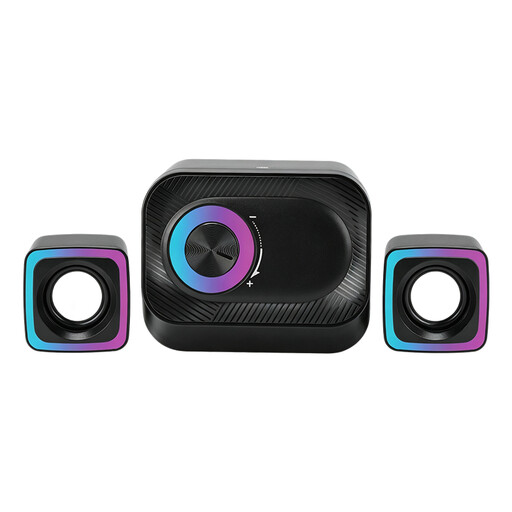
Wired 3-piece PC speaker system with volume control and RGB lighting

Wired 3-piece PC speaker system with volume control and RGB lighting

For anyone looking for a wired set with volume control on the speaker for music or films in a living space.

The product description lists two satellite speakers, RGB lighting and a volume control. The system is described as wired.

View at Joybuy

Compact RGB stereo speakers for PC and desk

Compact RGB stereo speakers for PC and desk

For anyone looking for a compact set of two speakers for music or films in a living space.

The product name and description list a stereo set with RGB lighting for PC and desk use.

View at Joybuy

Compact desktop stereo speakers with coloured LED lighting

Compact desktop stereo speakers with coloured LED lighting

For anyone considering a compact stereo set for music or films in a living space.

The product description lists a set of two speakers with coloured LED lighting.

View at Joybuy

Frequently asked questions

Can you use a Sonos Era 100 as a Bluetooth speaker straight away, without Wi-Fi, during initial setup?

No. Sonos says you must first set up the Era 100 on a Wi-Fi network; after that, the speaker can switch to Bluetooth mode.

What should you check before connecting a soundbar to the lounge TV?

Compare the actual output on your TV with the input on the exact soundbar model. The Consumentenbond recommends HDMI-(e)ARC if both devices support it; some compatible models may also offer an optical connection.

Is there one volume setting that always makes a speaker suitable for every shared lounge?

No, there isn’t one setting that works for every room and situation. The Dutch government advises people to try agreeing on arrangements together first when noise is causing a nuisance; also check the house or usage rules and consider the other users when choosing the volume and speaker position.

Can you play film music in any shared lounge without a music licence?

The fact that a space is shared doesn’t answer that question on its own. The Dutch government distinguishes between private use and making copyright-protected music available to the public. So establish whether your use is private and restricted or public, then check what permission is needed for your specific situation.

Do you always need an extra warranty when buying a product?

Not necessarily. According to the Dutch government, you’re entitled to a product that works properly, and the seller is responsible for resolving any problems. If you’re considering an additional warranty, check what extra rights it actually gives you.
