
Speaker and phone charger
You want a handy place to charge your speaker and occasionally a phone, without cluttering your desk with chargers. The right cable depends on your speaker model; a two-port charger could be a compact solution.


Choose a charging point based on your speaker’s connection and power requirements, not just the highest wattage on the packaging. A compact charger with two ports may be enough for a speaker and, occasionally, a phone. If you also charge a laptop or several desk devices, a desktop charger with ports and power output suited to simultaneous use may be a better choice. JBL Support recommends comparing the charger’s specifications with the capacity listed in your speaker’s product specifications if it has a USB charging port.
You want a handy place to charge your speaker and occasionally a phone, without cluttering your desk with chargers. The right cable depends on your speaker model; a two-port charger could be a compact solution.
You want to charge your speaker alongside other desk devices. So, check the combination of USB-A and USB-C ports, as well as how much space the charger takes up at the socket.
You want to use one charging setup for both a laptop and a speaker. Check the power available when your devices are connected at the same time, rather than just the maximum output for a single port.
| What to consider | What to look for | Who is this important for? |
|---|---|---|
| Connection and power | Compare the connection, cable and output ratings with your speaker’s manual or charging specifications. | I want to check first that my speaker can connect to the chosen output and that the power supply is suitable. Around 33% of consumers give connection and power their highest priority. |
| Charging at the same time | Count the devices you’ll connect at once and check how power is shared between the ports you’ll be using. | If I want to charge my speaker alongside, for example, a laptop or other desk devices, the ports and available power need to suit that combination. Around 25% of consumers prioritise charging several devices at the same time. |
| Desk placement | Consider where the socket and speaker are, and check the length of any power cable. | I want to connect my speaker somewhere within easy reach without an awkward cable run. Around 25% of consumers consider placement and a tidy workspace most important. |
| Safety and aftercare | Check the CE marking and seller details. Read the returns information too, and keep your proof of purchase. | When I buy a mains-powered charger, I want to be able to check what product information and support contacts are available. Around 17% of consumers prioritise safety and aftercare. |
A charger’s maximum power may apply to just one port or a specific use case. It doesn’t automatically tell you how much power is available when you connect several devices at once.
Check how power is shared across the exact combination of ports you plan to use, rather than focusing only on the highest wattage.
Connections and power requirements vary between speaker models. So, the connection type or a charger’s maximum power alone doesn’t confirm compatibility.
Check your speaker’s manual first, then compare the charger’s required cable and output ratings.
An extra USB port isn’t automatically a mains-powered USB charger with a specified charging output.
Check whether the product runs on mains power and which outputs the product specifications say are intended for charging devices.
The range reviewed includes compact two-port chargers and desktop chargers with several USB ports.
The Nexode Pro Smart Display is a multi-port charger for anyone who wants to connect other desk devices as well as a speaker.
The GaN3 Pro Desktop Charger is an example of a desktop charger with several types of USB port.
These products are designed for a dedicated desk charging spot, with USB charging options and, on some models, mains sockets too. Always check that the connection and charging output are suitable for your speaker’s specifications.
 No image available
An extension lead with a cable and USB-A and Type-C charging ports for a dedicated charging spot. Check which USB output is suitable for your speaker’s cable and power requirements.
The product title lists several mains sockets, an on/off switch and a maximum of 2500 W for the extension lead; this isn’t a stated USB charging output. Cable: 1.5 m.
 No image available
This charging station lists two built-in retractable USB-C cables, giving you a cable at your charging spot for devices with a compatible USB-C connection.
The product title lists 320 W and two retractable USB-C cables. Check the output ratings and how power is shared when several devices are connected at once; the stated maximum alone doesn’t confirm compatibility with your speaker.
 No image available
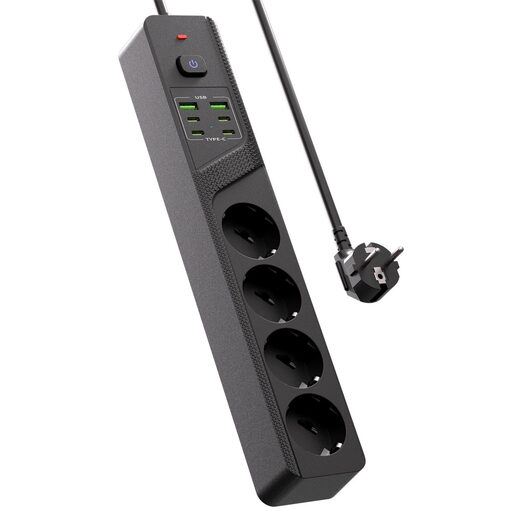
The combination of mains sockets and USB ports is designed for a desk where you want to connect several devices in one place. Decide in advance which ports you’ll need to use at the same time.
The product title lists four Schuko sockets, four USB-C ports, two USB-A ports and an on/off switch. Check the charging output for each port you’ll use with your devices.
 No image available
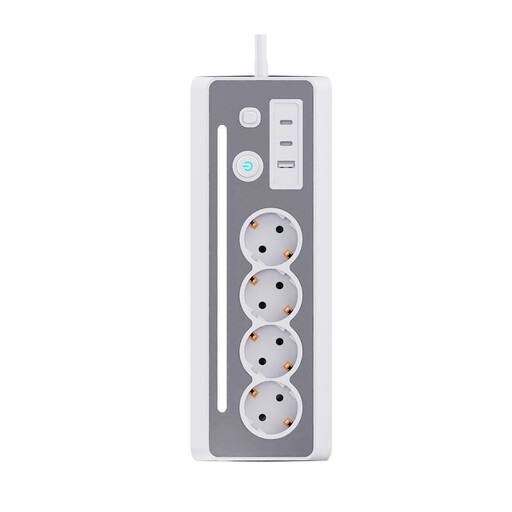
This desktop extension lead combines mains sockets with USB charging ports. The product description lists two USB-C ports and one USB-A port; check that this layout suits your speaker cable.
The product title lists three Schuko sockets, an LED light and an on/off switch.
 No image available
A multi-charger with USB-A and USB-C connections for a central charging spot. Check your speaker’s connection and which output is suitable for it.
The product title lists ten ports and a PC+ABS casing. How power is shared across several ports in use at once needs to suit your charging requirements.
No. Don’t choose based on USB-C or maximum wattage alone. Check your speaker’s charging connection and power requirements, then compare them with the output and cable you plan to use. For a device with a USB charging port, JBL Support recommends using a charger with at least the capacity listed in the product specifications; this isn’t a universal specification for all speakers.
Check how much power is available for the specific combination of ports you’ll be using at the same time. A stated maximum for one port doesn’t automatically tell you how much power each device receives when several ports are in use.
Stop charging and consult the instructions for your speaker and charger. In its guidance on lithium-ion batteries, JBL Support recommends charging somewhere you can keep an eye on the device, so you can act if it overheats. This isn’t a legal temperature limit.
According to the Netherlands Food and Consumer Product Safety Authority, CE marking is mandatory for electrical products where this requirement applies. The marking alone doesn’t prove that every individual item has been independently tested.
For a standard online consumer purchase, you generally have up to 14 days after delivery to change your mind, subject to legal exceptions. If the charger breaks earlier during normal use or doesn’t meet reasonable expectations, contact the seller for a suitable solution. ACM ConsuWijzer explains the cooling-off period and statutory guarantee; a manufacturer’s warranty doesn’t replace your statutory rights.