For gentle background music in a small living room, your choice mainly depends on how you stream, how much space you have and whether you move the speaker around. The Dutch Consumers’ Association identifies Wi-Fi as an option for streaming at home and combining speakers across multiple rooms. If you mainly play audio directly from a device or take the speaker with you, it’s worth considering a Bluetooth model with the features you need. Where possible, compare the sound at the low volume you usually listen at, and check that the specific item has the correct CE marking before you buy. The Dutch Digital Infrastructure Inspectorate says this is a requirement for wireless speakers.
Who is this choice relevant to?
Relaxed listener at home
You play music quietly in one place for a long time and want to be able to set and adjust playback easily. The Dutch Consumers’ Association highlights sound quality and ease of use as factors to consider when choosing wireless speakers.
App and multi-room user
You want to stream through a supported music service, or might want to connect speakers in other rooms later. The Dutch Consumers’ Association highlights Wi-Fi and multi-room functionality as factors to consider for home use.
Move-it-around listener
You regularly take the same speaker to another spot and don’t mind recharging it. The Dutch Consumers’ Association lists battery life as one of the criteria to consider when choosing wireless speakers.
What should you look for when choosing?
| What to consider |
What to look for when buying |
Who is this most important to? |
| Adjusting the sound for relaxed listening |
Where possible, listen at the volume you usually use; check the volume increments and tone controls on the exact model. |
If I want to adjust soft background music comfortably, I focus on how easy the speaker is to use at low volume. Around 36% of consumers put sound control first. |
| Streaming and controls |
Check that your phone, music service and home network work with the playback method supported by the model. |
I want to play music from my own devices and services without complicated steps. Around 29% of consumers put streaming and controls at the top of their list. |
| Space in the living room |
Measure the available space and check the dimensions, power cable and any placement instructions. |
If you have a small shelf or limited table space, the speaker needs to fit. Around 21% of consumers give available placement space the highest priority. |
| Moving and recharging |
Check whether the model has a battery, how it is recharged and under what conditions the stated playtime applies. |
If I regularly take the speaker between rooms or to other places, I want to know when it needs recharging. Around 14% of consumers put portability first. |
Common buying mistakes
-
Assuming a Bluetooth version means Bluetooth music playback is supported
A Bluetooth version number alone doesn’t confirm that you can play music from your phone in the way you want. Check the playback sources and connections listed for the exact model.
Before buying, check exactly how your phone and music service send audio to the speaker.
-
Assuming a line input or stereo pairing is included as standard
According to Sonos, the Sonos Era 100 SL requires a separately available line-in adapter for an analogue source. Marshall lists a 3.5mm aux input for the Acton III, but no audio cable is included.
Check the connections and box contents, and only factor in the accessories you need for your source.
The Sonos Era 100 SL may require a separate adapter; an audio cable is not included with the Marshall Acton III.
-
Choosing a battery-powered speaker when you won’t move it
A battery is most useful if you use the speaker in different places. If you keep it in one spot, you’ll also need to recharge it.
First decide whether portability matters to you. If not, also compare models designed to stay in one place.
Brands to compare
Sonos
The Era 100 SL is a home speaker with Wi-Fi and Bluetooth, worth considering if you want app control or might use speakers in multiple rooms.
- Sonos says the Era 100 SL must first be set up over Wi-Fi using the Sonos app.
- According to Sonos, an analogue source requires a separately available line-in adapter.
JBL
The JBL Authentics 200 is a home speaker worth comparing if you’re considering Wi-Fi, Bluetooth and physical controls.
- JBL lists multi-room functionality and automatic self-tuning for this model.
- These model specifications don’t prove that the speaker will sound better in every small living room.
Apple
The HomePod mini is a compact option if your devices and music services are compatible with the playback methods described by Apple.
- Apple lists AirPlay 2 and the option to use two speakers as a stereo pair.
- A listed Bluetooth version doesn’t prove that standard Bluetooth audio playback is supported; check that your music source will work.
Marshall
The Acton III is a home speaker to consider if direct Bluetooth playback and on-device controls are important to you.
- Marshall lists Bluetooth, adjustable tone controls and a 3.5mm aux input for the Acton III.
- Marshall says that an audio cable is not included.
Edifier
The ES60 is a portable Bluetooth option worth comparing if a battery-powered speaker suits the way you listen in your living room.
- Edifier lists stereo pairing and a maximum playtime of 9 hours for the ES60.
- This playtime is a manufacturer’s estimate and shouldn’t automatically be taken as the playtime you’ll get in everyday use.
Joybuy products for listening at home
This selection includes options for a fixed home setup, portable Bluetooth playback and computer speakers. The best fit for you depends on the space you have, the connections you need and your listening habits. The Dutch Digital Infrastructure Inspectorate says that wireless speakers offered for sale in the Netherlands must have the correct CE marking. Check this on the specific item before buying.
 No image available
Bose Lifestyle Ultra Speaker – black
This option is suited to streaming at home from a fixed position; check that the app or service you need works for the way you listen.
Also check the dimensions and make sure you have enough space for it in your living room.
View at Joybuy
 No image available
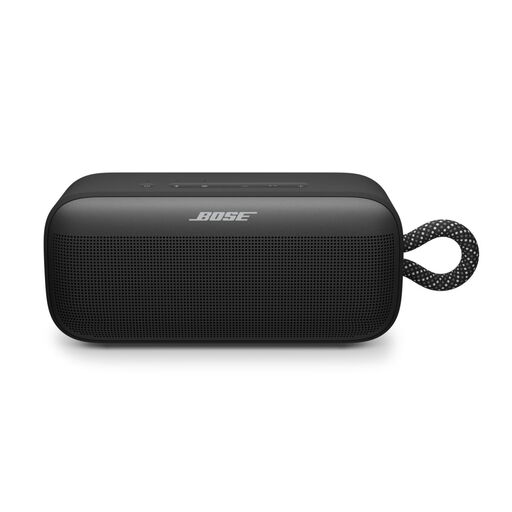
Bose SoundLink Plus – black
This option is suited to anyone who wants to take a speaker from place to place; check that its battery features and controls suit your listening sessions.
Remember that you’ll need to recharge it when using it on battery power.
View at Joybuy
 No image available
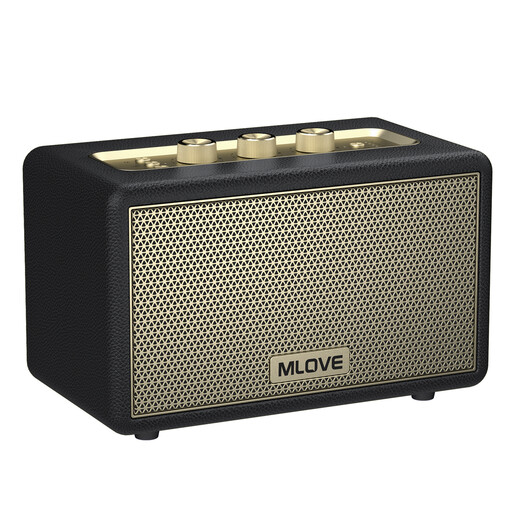
mlove A200 portable Bluetooth speaker – black
A portable Bluetooth speaker to consider if you want to play music directly from a device and sometimes move the speaker around.
The product name lists Bluetooth 5.3 and a stated playtime of 24 hours; check the conditions that apply to this playtime.
View at Joybuy
 No image available
Edifier ES300 Wi-Fi and Bluetooth speaker
According to the product name, this option combines home connectivity with a battery; check that its playback features and portability suit your setup.
Listed specifications: Wi-Fi, Bluetooth, AirPlay 2 and 60W. The product name states a battery life of up to 12 hours.
View at Joybuy
 No image available
Edifier G1500 Hecate computer speakers – black
These computer speakers could suit your setup if you use them with a computer and have USB power available; check that the location and connection work for your living room.
The product name lists Bluetooth 5.3, USB and a 3.5mm AUX input. The product description says the speakers are powered via USB.
View at Joybuy
Frequently asked questions
Do I need Wi-Fi for background music at home?
No. Wi-Fi isn’t essential if you choose a speaker that plays audio directly over Bluetooth. The Dutch Consumers’ Association highlights Wi-Fi as an option for streaming at home and combining speakers across multiple rooms. Check which services and devices the exact model supports.
Can I connect any speaker to a record player or another analogue source?
No. Check both the speaker’s input and the requirements of your source. Sonos says the Era 100 SL requires a separately available line-in adapter; Marshall lists a 3.5mm aux input for the Acton III, but doesn’t include an audio cable.
How should I position a Sonos Era 100 SL on a shelf?
Follow Sonos’ instructions for this specific model. For placement beside a wall or on a shelf, Sonos recommends leaving at least 2.5 cm of space behind the Era 100 SL. Don’t treat this distance as a general rule for other speakers.
Does a wireless speaker need a CE marking in the Netherlands?
Yes. The Dutch Digital Infrastructure Inspectorate says that wireless speakers offered for sale on the Dutch market must have the correct CE marking. Check the marking on the specific item; general product information doesn’t automatically confirm that every individual listing has it.
Is the legal guarantee in the Netherlands always exactly two years?
No. The Dutch consumer information service ACM ConsuWijzer explains that the legal guarantee doesn’t have a fixed duration of exactly two years. It depends on the product lifespan you can reasonably expect with normal use. The cooling-off period for distance selling is a separate right; according to the Dutch Government, it is usually 14 days.


