If desk space is limited, a compact Full HD screen of around 24 inches is a sensible starting point. Choose a 27-inch QHD model if extra detail for maps and instruments matters more, and your desk and computer can handle it. Stand depth varies by model: ASUS Netherlands lists 17,40 cm for the VG249Q3A, compared with 25,37 cm for the LG 27GS85Q-B, according to LG Netherlands. Only choose an ultrawide if you have room for the extra width and have checked that your simulator supports the display format you want.
Who is this advice for?
Gamer with a narrow desk
You want to practise manoeuvres without the screen and stand taking over your work surface. So compare the dimensions with the stand included, not just the screen size. ASUS Netherlands and LG Netherlands publish these measurements for the VG249Q3A and 27GS85Q-B respectively.
Reader of maps and instruments
You want to see more detail on maps and instruments while you play, and have space for a larger screen. Compare the resolution with the space available on your desk: ASUS Netherlands lists 1920 × 1080 pixels for the VG249Q3A, while LG Netherlands lists 2560 × 1440 for the 27GS85Q-B.
Player who prioritises contrast
You play lots of dark scenes and are considering OLED, but also want to weigh up the care and warranty terms. AOC Netherlands makes the stated OLED burn-in cover for the AG276QZD2 conditional on following AOC's care instructions.
What should you look for when choosing?
First, measure the available desk width and depth, including the stand. Then compare the resolution and connections with your computer and simulator; consider the panel type and care requirements separately.
| What to consider |
What should you check? |
Who is this relevant for? |
| Space required |
Measure the available width and depth, then compare them with the screen's dimensions, including the stand. If you're using a monitor arm, also check the VESA size and that the arm is suitable. |
If my desk isn't very deep, I want to know how much space the screen and stand will take up. Around 36% of consumers prioritise the space needed for positioning. The examples vary by model: ASUS Netherlands lists a stand depth of 17,40 cm for the VG249Q3A, while LG Netherlands lists 25,37 cm for the 27GS85Q-B. |
| Instruments and maps |
Compare the resolution and screen size, and check that your computer can handle the resolution you choose. Also consider your simulator's scaling settings. |
I want to make out map and instrument details clearly, and have room for a larger screen. Around 29% of consumers prioritise readability. According to ASUS Netherlands, the models mentioned offer 1920 × 1080 pixels; LG Netherlands lists 2560 × 1440 pixels. |
| Refresh rate and connection |
Check which resolution and refresh rate combination is available through the port you use and your computer's output. |
I want my computer and connection to support the refresh mode I've chosen. Smooth motion is the top priority for around 21% of consumers. For the AW3423DWF at 3440 × 1440 pixels, Dell lists up to 165 Hz via DisplayPort and 100 Hz via HDMI. |
| Contrast and OLED care |
Read the care instructions and warranty terms for OLED burn-in for the exact model. |
For dark scenes, I want to weigh up the panel type and its terms. Around 14% of consumers prioritise contrast and OLED care. AOC Netherlands lists three years of OLED burn-in cover for the AG276QZD2, provided the screen is cared for according to the instructions. |
Common buying mistakes
-
Comparing screen size alone
The stand can take up a significant part of your available work surface. Stated dimensions vary by model: ASUS Netherlands lists a stand depth of 17,40 cm for the VG249Q3A; LG Netherlands lists 25,37 cm for the 27GS85Q-B.
Measure your desk and compare the dimensions of the exact model with the stand included before planning to use a monitor arm as a solution.
-
Assuming every port delivers the highest refresh rate
The maximum stated refresh rate can vary by connection. For the AW3423DWF at 3440 × 1440 pixels, Dell lists 165 Hz via DisplayPort and 100 Hz via HDMI.
Check the screen's resolution, port and refresh rate, and compare them with your computer's output.
-
Assuming OLED burn-in cover has no conditions
AOC makes the stated OLED burn-in cover for the AG276QZD2 conditional on caring for the screen according to AOC's instructions.
Read the instructions and warranty terms for the exact OLED model before you decide.
-
Confusing an extended warranty with your statutory rights
According to the Dutch government, manufacturer, retailer and extended warranties are in addition to your statutory rights.
Check what extra cover is offered. If a product is faulty, the retailer is your point of contact, according to the Dutch government.
Brands and models for reference
ASUS
The TUF Gaming VG249Q3A is an example of a compact 23,8-inch Full HD model.
- ASUS Netherlands lists 180 Hz, a stand depth of 17,40 cm and VESA 100 × 100 mm for this model.
- The supplied stand is not height-adjustable; these specifications do not automatically apply to other ASUS monitors.
LG
The UltraGear 27GS85Q-B is an example of a 27-inch QHD IPS model with an adjustable stand.
- LG Netherlands lists QHD, a standard stated refresh rate of 180 Hz, and tilt, height adjustment and pivot.
- According to LG, the stand is 25,37 cm deep. LG Netherlands marks this specific model as discontinued.
AOC
The AGON PRO AG276QZD2 is an example of a 27-inch QHD QD-OLED model.
- AOC Netherlands lists 280 Hz and three years of OLED burn-in cover, provided the recommended screen care is followed.
- A Joybuy listing for the same model name states 240 Hz via DisplayPort. Check the exact version and port mode of the product you're viewing.
Dell Alienware
The AW3423DWF shows what a 34-inch ultrawide setup means when choosing a screen size.
- Dell Netherlands lists 3440 × 1440 pixels and a 21:9 aspect ratio.
- At that resolution, Dell lists up to 165 Hz via DisplayPort and 100 Hz via HDMI. Also check that the size and display format suit your desk and simulator.
BenQ
The MOBIUZ EX240N is another 23,8-inch Full HD option, with built-in speakers according to BenQ.
- BenQ lists 165 Hz and built-in speakers for this model.
- BenQ's claims about HDRi, sound and comfort are product claims, not independent real-world test results.
Joybuy products
This selection focuses on compact gaming monitors of around 24 inches for desks with limited space. For each model, check the dimensions including the stand, and whether the stated resolution and connections work with your simulator and computer.
 No image available
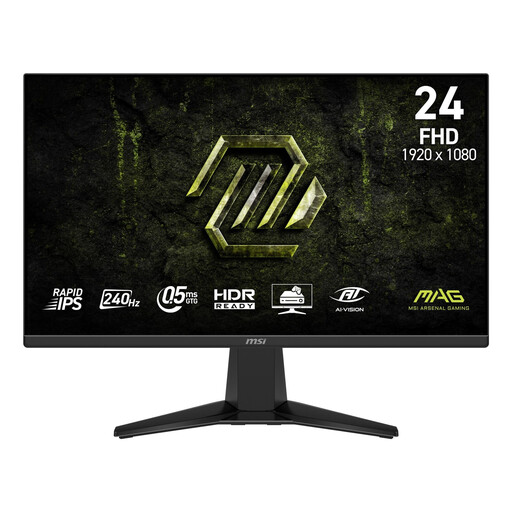
MSI MAG 245F X24 23,8-inch Full HD
A compact Full HD option for a space-conscious setup; Full HD has fewer pixels than QHD for displaying instruments and map details at the same time.
The product name lists Rapid IPS, 240 Hz and Adaptive-Sync.
View at Joybuy
 No image available
LG UltraGear 24G414B-B 24-inch Full HD
A 24-inch Full HD option if you're looking for a compact screen; check the dimensions including the stand to see how much desk space will be left.
The product name describes a 24-inch Full HD gaming monitor.
View at Joybuy
 No image available
KTC H24B9S 24-inch gaming monitor
A compact screen option for a small desk; check whether Full HD resolution suits the amount of instrument and map detail you want to see at once.
The product name lists 24 inches, 144 Hz, 1080p Full HD and an IPS panel.
View at Joybuy
 No image available
GIGABYTE GS24F14A gaming monitor
A gaming monitor for a compact setup; compare the size and stand depth of the exact version with the space available on your desk.
The product name lists 60,4 cm.
View at Joybuy
 No image available
ASUS TUF Gaming VG249Q3A 23,8-inch Full HD
A compact Full HD option when desk space is a priority; bear in mind that Full HD has fewer pixels than QHD for instrument and map details.
ASUS Netherlands lists 1920 × 1080 pixels, 180 Hz and a stand depth of 17,40 cm. The stand is not height-adjustable; VESA 100 × 100 mm is specified for this model.
View at Joybuy
Frequently asked questions
Can I mount any monitor on a monitor arm?
No. Check the mounting size and weight of the exact screen without its stand, and make sure the arm and desk are suitable. ASUS lists VESA 100 × 100 mm and a weight of 2,9 kg without the stand for the VG249Q3A; that doesn't mean every arm or desk mount will be suitable.
Does HDMI always deliver the maximum refresh rate?
No, the available refresh rate can vary by connection. For the AW3423DWF at 3440 × 1440 pixels, Dell lists up to 165 Hz via DisplayPort and 100 Hz via HDMI. Compare the port mode of your chosen model with your computer's output.
What should I bear in mind when caring for an OLED monitor?
Follow the manufacturer's care instructions for the exact model. AOC states that cover for OLED burn-in on the AG276QZD2 only applies if the screen is cared for according to the instructions.
What are my rights if I buy a monitor online or receive a faulty product?
According to the Dutch government, when buying at a distance you often have a 14-day cooling-off period; check whether your purchase is covered by the rules. You also have a statutory right to a product that works properly. The Netherlands has no fixed statutory time limit for this, and the retailer is your point of contact if a product is faulty. A manufacturer's warranty or extended warranty does not replace this right.


