If you play from the sofa, only choose a wireless keyboard if you also have a stable surface for your mouse and the connection works reliably from where you sit. At a desk close to your PC, a wired model may be simpler. Before choosing a compact size, check your game’s key bindings: RTINGS.com points out that compact layouts may leave out keys such as the number pad or function row.
Who is this choice for?
PC gamer on the sofa
If you play at a distance from a big screen, consider more than just the keyboard connection: you’ll also need a stable surface for your mouse. Corsair says the Corsair K63 Wireless Lapboard is specifically designed for the K63 Wireless.
Gamer with lots of commands
If you want to keep using your existing commands, first check which keys your space game uses. Roberts Space Industries explains how to customise key bindings for Star Citizen.
Desk gamer with a big screen
If you sit close to your PC, weigh up the cable against the freedom of wireless play. Also check whether a compact layout leaves you with enough keys and space for your mouse. RTINGS.com describes which keys may be missing from compact models.
Which buying concerns matter?
Start with where you sit and how you connect. Then check which keys you need, and only after that compare extra features such as adjustable actuation.
| What to consider |
What should you check? |
Who should consider this? |
| Connection and positioning |
Compare a cable with a 2.4 GHz receiver, and check that you can position the keyboard, receiver and mouse conveniently from where you sit. |
If you play from the sofa, you’ll want freedom of movement and a usable surface for your mouse. Around 33% of consumers considering this choice give positioning and connection the highest priority. |
| Keyboard layout |
Check whether your game needs a number pad, function row or arrow keys. |
If you want to keep using your regular game commands straight away, first check which physical keys you need. Around 25% of consumers prioritise access to their essential key bindings. |
| Comfort and sound while gaming |
Compare the switch type and dimensions; don’t assume a keyboard is quiet or comfortable based on product descriptions alone. |
If you play for long sessions or in a shared space, key feel, sound and a stable setup all matter. Around 25% of consumers prioritise comfort and sound while gaming. |
| Adjustable input |
Before considering this feature, check whether adjustable actuation would benefit your game and play style. |
If fast, repeated input matters to you, also compare how the keyboard connects and which layout you need. Around 17% of consumers give fast, customisable input the highest priority. |
Common buying pitfalls
-
Choosing a compact keyboard without checking your key bindings
A TKL or 75% layout may leave out keys you use for commands. The impact depends on the layout and your game settings.
Before buying, check whether you need direct access to the number pad, function row and arrow keys.
Reassigning commands can take extra time.
-
Assuming a wireless keyboard is a complete sofa setup
A wireless connection won’t solve the problem of finding a stable place for your keyboard and mouse. Corsair says the K63 Wireless Lapboard is specifically designed for the K63 Wireless.
Decide in advance where your keyboard and mouse will go, and check that any lapboard you’re considering is compatible with your exact keyboard.
-
Choosing based on the product range name alone
The Corsair K65 PLUS is available with different switch options, so the product range name alone won’t tell you which version you’re selecting.
Check the variant, switch and keyboard layout you’ve selected before ordering.
Brands worth comparing
Logitech G
The G915 X LIGHTSPEED TKL is a wireless TKL keyboard without a number pad. Logitech G Netherlands lists 2.4 GHz LIGHTSPEED, Bluetooth and wired modes.
- The three connection modes listed give you different ways to connect.
- A TKL layout has no number pad, so check whether you need those keys.
Corsair
Corsair describes the K65 PLUS WIRELESS TACTILE as a wireless 75% model with hot-swappable switches.
- The layout includes arrow keys, among other keys.
- Check which switch variant you’re choosing. Corsair’s K63 Wireless Lapboard is designed for the K63 Wireless, not every keyboard.
Razer
The BlackWidow V4 Tenkeyless HyperSpeed is a wireless TKL model.
- Razer lists 2.4 GHz, Bluetooth and support for hot-swappable 3- or 5-pin switches.
- The stated maximum battery life depends on how you use the keyboard; don’t assume it applies when using the lighting.
SteelSeries
According to SteelSeries, the Apex Pro TKL Wireless Gen 3 combines a compact design with adjustable magnetic switches.
- SteelSeries lists 2.4 GHz and Bluetooth as connection options.
- The version described has a US layout; check that it suits your preferences and how you plan to use it.
Wooting
The Wooting 80HE is a wired keyboard with magnetic switches. RTINGS.com reports low and consistent latency in its own test setup.
- Adjustable actuation could be a factor in your decision if you intend to use those settings.
- The cable limits where you can position it, so it’s not an obvious choice for gaming from the sofa.
Keyboards on Joybuy
This selection features wireless keyboards with a 2.4GHz mode, offering different layouts and connection options. Above all, check which keys your game uses and whether the US QWERTY layout listed suits you.
 No image available
AULA F75 MAX 75% wireless mechanical keyboard, US QWERTY, Reaper switch
The 75% layout may suit you if you’re considering a smaller keyboard and don’t need the keys it leaves out.
The product title lists a US QWERTY layout and Reaper switch.
The listed modes are wired, Bluetooth and 2.4 GHz.
View on Joybuy
 No image available
AJAZZ AK980 V2 wireless mechanical keyboard, 98% layout
The 98% layout may suit you if you want to keep more physical keys than a more compact layout offers.
The product title lists hot-swap, a TFT display and a 10,000 mAh battery.
The listed modes are wired, Bluetooth and 2.4 GHz; the title also specifies the Gift Switch V2 version.
View on Joybuy
 No image available
Ajazz AK820 Pro 75%, US QWERTY
The 75% layout may suit you if you want to save space for your mouse and can manage without the keys it leaves out.
The product title lists a TFT display and hot-swappable switches.
The listed modes are wired, Bluetooth and 2.4 GHz. The title also lists a Purple Flying Fish switch.
View on Joybuy
 No image available
RK ROYAL KLUDGE S98, 96% layout, Snow Emperor switch
The listed 96% layout with 98 keys may suit you if you want to keep more keys than a smaller keyboard offers.
The product title lists a display, rotary knob and hot-swappable switches.
The listed connections are Bluetooth, 2.4 GHz and USB-C.
View on Joybuy
 No image available
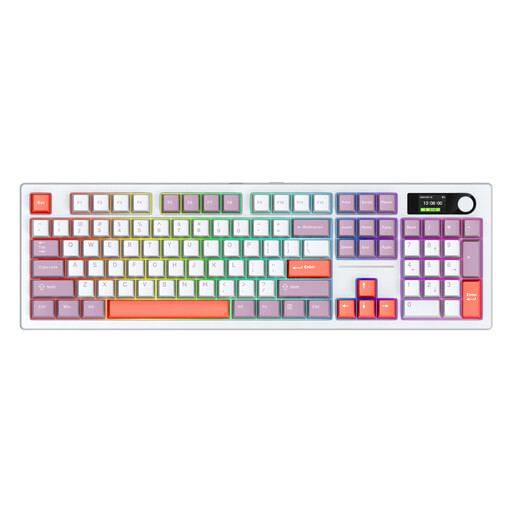
Siukie ACH105, 104 keys, colour display
With 104 keys, this model may suit you if you want to keep a full-size layout and plenty of physical keys.
The product title lists a colour display and hot-swappable switches.
The product information lists three connection modes: 2.4 GHz, Bluetooth and wired.
View on Joybuy
Frequently asked questions
Is Bluetooth enough for gaming from the sofa?
That depends on the game and the connection where you play. RTINGS.com says a cable or wireless receiver is better suited to games where latency matters a lot. Also check that the connection works from where you sit.
Can you play any space game on an Xbox or PS5 with a gaming keyboard?
No, it isn’t a given that every game and keyboard will work. Xbox says the publisher must enable keyboard and mouse support for each game. PlayStation says that not all devices work with PS5. So check support for both the specific game and the keyboard.
How can you avoid missing commands on a compact keyboard?
Before buying, check your game’s key bindings and note whether you need direct access to the number pad, function row or arrow keys. Roberts Space Industries describes customisable key bindings for Star Citizen; don’t assume other games offer the same options.
What can you do in the Netherlands if an online keyboard doesn’t suit you or breaks too soon?
For a standard online consumer purchase, you generally have a statutory cooling-off period of up to 14 days after delivery, with some exceptions. You’re also covered by the legal guarantee if a product doesn’t meet what you could reasonably expect under normal use. In that case, contact the seller. ACM ConsuWijzer explains these consumer rights.


