Start with the shot you want to take most often. To capture the whole bowl from above, you’ll need a lens with a suitable field of view; for small garnishes, you’ll want a lens that can focus close up. A mirrorless camera gives you the flexibility to change lenses, but for a home set-up, a lens you already own, controlled lighting and a sturdy tripod may matter more than a more expensive camera body. Always check which lens is actually included with the camera.
Who is this buying guide for?
Photographers capturing the whole soup scene
You photograph the bowl alongside cutlery, ingredients or the surface it’s sitting on. Your lens needs to fit the scene you want into the available space. Canon Netherlands discusses both wide shots of food and close-ups.
Photographers focusing on soup details
You want to bring out small garnishes and textures. Pay attention to the lens’s focusing distance, magnification and compatibility; a macro lens is a separate lens choice.
Beginners setting up a home studio
You want to get started with a practical, repeatable set-up without mistaking a kit lens for a macro lens. First, check whether the camera and lens you already own can take the shot you want.
What should you look for in a camera and lens?
First decide whether the whole bowl or a small detail is your main subject. Then choose a camera and lens combination to suit your shooting distance and available space. Canon Netherlands describes these different needs in food photography.
| What to consider |
What to look for |
Who is this important for? |
| Framing the whole bowl |
Check whether the lens’s field of view, from your shooting height, also includes the props you want. |
If I want to photograph the bowl from above with cutlery or ingredients, the whole scene needs to fit in my frame. Around 30% of consumers make framing the whole bowl their top priority. |
| Capturing small details |
Compare the exact lens’s maximum magnification, minimum focusing distance and mount. |
If I want to show garnishes or textures close up, I look at what the lens can do and how far away I’ll be from my subject. Around 30% of consumers make close-up details their top priority. |
| Keeping colour and exposure consistent |
Check the camera’s white balance and exposure settings, and keep your lighting set-up manageable. |
If I want to take several photos of the same soup, I want to be able to control the lighting and colour settings. Around 20% of consumers make consistent colour and exposure their top priority. |
| Keeping start-up costs down |
Compare body-only options with the exact kit contents, and check whether a tripod will work with your set-up. |
When I’m starting out at home, I want to know whether my existing camera and lens will do the job before choosing any extra equipment. Around 20% of consumers make keeping start-up costs low their top priority. |
Common buying mistakes
-
Comparing camera bodies alone
Your field of view and focusing options also depend on the lens. A camera deal on its own won’t tell you which lens you need for a top-down shot or close-up.
Read the kit contents and check the included lens specifications against the photos you want to take.
If the included lens isn’t right for the shot you want, you may need to buy a separate lens.
-
Assuming every close-up feature is macro
A short focusing distance doesn’t automatically mean a lens offers 1:1 magnification. That magnification is a feature of the specific lens.
Compare the lens’s stated maximum magnification and focusing distance with the size of the detail you want to photograph.
-
Expecting a more expensive body to solve lighting problems
Your viewpoint, lighting and white balance are separate considerations in food photography. A different camera body won’t automatically prevent changes in your lighting set-up.
Start with a fixed set-up, controlled lighting and carefully managed white balance. Then work out what camera issue, if any, remains.
Camera brands and lens combinations to compare
Canon
Canon describes the EOS R50 as an APS-C mirrorless camera for beginners, and discusses separate RF lenses for wide shots and close-ups of food.
- Canon lists a 24.2-megapixel sensor for the EOS R50.
- Canon suggests a 35mm lens as an option for flat-lay shots with cutlery and ingredients; that doesn’t mean it comes with every R50 kit. The camera body itself doesn’t provide macro magnification.
Nikon
The Nikon Z50II and the separately available NIKKOR Z MC 50mm f/2.8 are worth looking into if you want to combine control over your shots with close-up photography.
- Nikon describes the Z50II as having a tilting touchscreen, and the Z MC 50mm f/2.8 as offering 1:1 magnification.
- The macro lens isn’t automatically included with a Z50II kit. Also check whether the combination’s field of view will work in your available space.
Fujifilm
The Fujifilm X-S20 and the separate XF30mmF2.8 R LM WR Macro are options to consider for both full-scene shots and close-ups.
- Fujifilm specifies a 26.1 MP sensor for the X-S20 and 1:1 magnification for the XF30mmF2.8 R LM WR Macro.
- Film simulations are creative settings, not independent proof that soup colours will look true to life without adjustment. The macro lens isn’t automatically included in every kit.
Sony
The APS-C Sony α6700 camera uses an E-mount. Sony says its separate FE 50 mm F2.8 Macro is compatible with E-mount cameras with an APS-C or full-frame sensor.
- Sony specifies a 26 MP APS-C sensor for the α6700 and 1:1 magnification for the FE 50 mm F2.8 Macro.
- The macro lens is sold separately and isn’t automatically part of the camera bundle. Check the mount and the contents of the kit you choose.
Cameras on Joybuy
A selection of Joybuy products for photographing soup bowls at home. For each model, check whether the lens and focusing options mentioned suit your shooting distance and the level of detail you want.
 No image available
DJI Osmo Pocket 4 Standard Combo
The rotating screen can help you check the frame as you set up. Make sure the fixed camera set-up works for the soup bowl shot you want.
1-inch CMOS sensor; 4K/240 fps; 3-axis stabilisation; 2× lossless zoom; 107 GB built-in storage; 2-inch rotating screen.
View at Joybuy
 No image available
Komery W6
The stated optical zoom gives you flexibility when framing your shot. Check whether the camera can also focus at the distance you need for small garnishes.
12× optical zoom; 4K; 64 MP; Wi-Fi.
View at Joybuy
 No image available
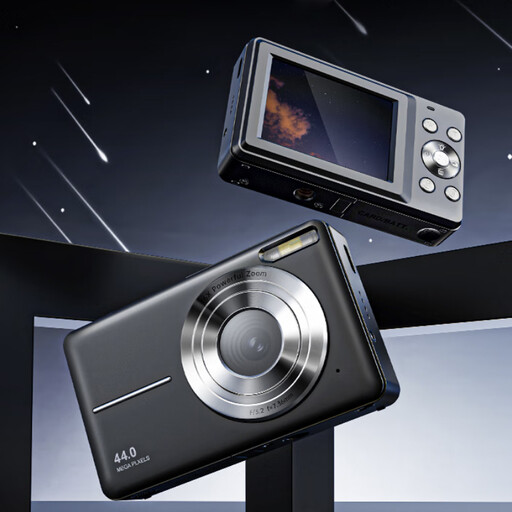
Songdian Pocket Camera, black
This pocket camera is described as suitable for photography. For close-ups, check that its focusing options suit the details you want to capture.
4K; 44 MP; 16× zoom.
View at Joybuy
 No image available
Sony ZV-E10 + 16-50mm Zoom, black
The included zoom lens gives you different framing options for the bowl and the table setting. Check that it suits your preferred shooting distance and that the kit contents match the option you’ve chosen.
16-50 mm zoom lens.
View at Joybuy
 No image available
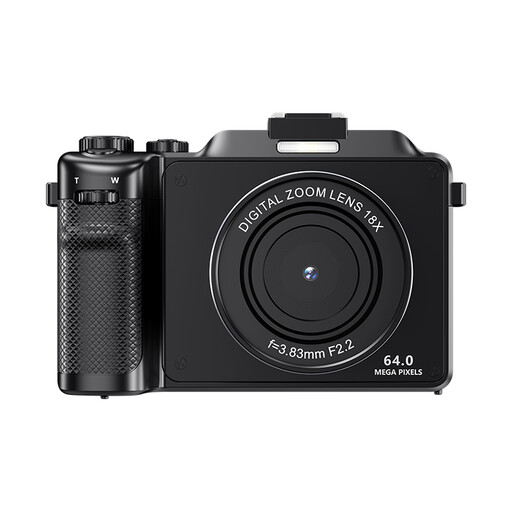
Komery X9, black
The camera is listed as having autofocus. Check that its focusing options suit the distance you’ll be shooting soup details from.
4K; 64 MP; autofocus; 18× digital zoom. The product information warns that digital zoom can reduce image quality.
View at Joybuy
Frequently asked questions
Do you need a 1:1 macro lens to photograph a whole soup bowl?
No, not just to capture the whole bowl. First check whether your existing or included lens can frame the composition you want. 1:1 magnification is mainly useful if you want to show small garnishes or textures close up.
What can help when taking a photo straight down onto the table?
A sturdy tripod can keep the camera in position while you adjust the styling or lighting. Before you start, check that you can position the camera securely above the spot you want to photograph.
How can you keep the colours consistent across a series of soup photos?
Keep your lighting set-up as consistent as possible and check the white balance. Also check which white balance settings and file formats your exact camera model supports.
Who can help if a camera you bought in the Netherlands is faulty?
When you buy as a consumer, you’re entitled to a product that works as it should. According to the Dutch government, you should contact the seller to resolve the issue, not the manufacturer. A separate manufacturer’s warranty doesn’t take away this legal right.
Can you always return a camera bought online within 14 days?
Not always. The Dutch government states that a 14-day cooling-off period applies in many cases when you buy at a distance, but some purchases, such as buying online from a private seller, aren’t covered. Check the terms that apply to your specific purchase.


