First, check that the controller works with your console and the game’s local co-op mode. For compatible Switch games, one Joy-Con per player may be enough, while a full-size controller offers a different button layout. If you play from the sofa, test the wireless connection from your usual seat, then check the power source and any charging accessories you’ll need. A Bluetooth connection or stated battery life alone is no guarantee of a reliable connection or playing time in your living room.
Who is this buying guide for?
Switch players sharing controllers
First, check whether each player can use a single Joy-Con or needs their own full-size controller. This depends on the game and your system generation. Nintendo UK explains that a Joy-Con 2 can be held horizontally and used as a controller for one player in supported games.
Co-op players sitting further from the console
If you play from the sofa, you’ll want to play wirelessly without running a cable across the room. The position of your console, PC or receiver, as well as any obstacles, can make a difference. Xbox Support explains how obstacles can weaken a wireless signal.
Players who enjoy longer sessions
If you value a full-size controller and fewer interruptions, you can factor in power and charging once you’ve checked compatibility with your system and game. Manufacturers provide model-specific information on batteries and battery life, but this doesn’t guarantee how long a controller will last in every setup.
What should you look for when choosing?
Start with your console and the controller layout supported by the game. Then test the wireless connection from where you usually sit, and only after that consider the button layout, grip and power source.
| What to consider |
What should you check? |
Who is this important for? |
| System and game |
Check the exact console or PC, the local co-op mode and how many controllers the game requires per player. |
I want to make sure everyone can join in with the chosen setup. Around 36% of consumers prioritise compatibility with their system and game. |
| Wireless connection |
Check the connection type and any receiver, then try the controller from your usual seat. |
If I play from the sofa, I want to test whether the connection works with the console or receiver in its usual position. Around 29% of consumers prioritise reliable control from their seat. |
| Buttons and grip |
Check which buttons the game uses and whether every player finds the layout comfortable. |
If I need to use directional inputs a lot, I want a layout that suits the game and my hands. Around 21% of consumers give the most weight to button layout and grip. |
| Power and charging |
Check the power type, how to charge the controller and which charging accessories you’ll need. |
I want to know how to get my controllers ready to use again between longer gaming sessions. Around 14% of consumers focus mainly on power and playing time. |
Common buying mistakes
-
Assuming all Switch controllers are interchangeable
Joy-Con 2 doesn’t work with the original Nintendo Switch. Original Joy-Cons can be used wirelessly with Switch 2, but you may need a suitable accessory to charge them.
Before choosing a controller, check your exact Switch generation, the game’s requirements and the charging method.
You may need a suitable, separately sold charging accessory to charge original Joy-Cons on Switch 2.
-
Assuming a full-size controller can replace any Joy-Con
According to PowerA, the Advantage Wireless Controller for Switch 2 isn’t designed for games that require Joy-Cons. In supported games, a single Joy-Con can be used as a controller for one player.
Check the requirements for the specific game before choosing between Joy-Cons and a full-size controller.
-
Assuming a wireless connection guarantees a certain range
Reception can depend on the distance, obstacles and the position of your console or receiver. A USB receiver’s product description doesn’t measure its range in your living room.
Check how the controller connects and test it from where you usually sit.
-
Confusing an extra warranty package with your existing rights
According to the Dutch government, the seller must offer a solution if a product is faulty. An extra warranty may provide additional rights, but it doesn’t replace your statutory rights.
Compare the terms of an extra warranty with your statutory rights before deciding whether to buy it.
Brands to consider
Nintendo
Joy-Con 2 and the Switch 2 Pro Controller are designed for different ways of playing on Switch 2.
- Nintendo explains that a single Joy-Con 2 can control one player in supported games. The Switch 2 Pro Controller includes features such as a directional button and motion controls, according to Nintendo.
- Joy-Con 2 doesn’t work with the original Switch, while the Switch 2 Pro Controller is for Switch 2 only. Nintendo estimates the Pro Controller’s battery life at around 40 hours.
Microsoft Xbox
The Xbox Wireless Controller is an option for the Xbox systems and Windows PCs listed by Microsoft.
- Microsoft lists a hybrid directional pad and up to 40 hours of battery life.
- Check the connection and battery options for your system. The stated battery life doesn’t tell you how long the controller will last in your setup or how well it will connect from your sofa.
Sony PlayStation
DualSense is designed for PS5 and can also be used with other compatible devices and games.
- Sony describes Bluetooth and USB connections for compatible PC systems.
- Support for controller features depends on the game. The Dutch product listing states that this model doesn’t work with PS4.
8BitDo
According to 8BitDo, the Ultimate 2 Wireless is an option for Windows players looking for a USB receiver and charging dock.
- 8BitDo explains that the receiver can be plugged into the charging dock, which connects to a Windows PC via USB.
- This manufacturer description doesn’t prove that the controller will work from a particular distance in every living room. Don’t confuse this model with other Ultimate variants or a controller for Switch.
PowerA
The Advantage Wireless Controller for Nintendo Switch 2 is a full-size controller for the Switch systems listed by PowerA.
- PowerA lists motion controls, programmable buttons and estimated battery life of up to 30 hours.
- According to PowerA, it doesn’t have HD rumble, an IR camera or amiibo NFC. This model isn’t designed for games that require Joy-Cons.
Controllers at Joybuy
These controllers suit a range of console and PC setups for playing together from the sofa. Before choosing, check that your game and system support the controller you’re considering.
 No image available
PlayStation DualSense Wireless Controller – Grand Theft Auto VI White Limited Edition
A wireless controller for PS5; the product name also mentions PC, Mac and mobile. Check that your game and device are supported.
Joybuy
 No image available
Xbox Wireless Controller Robot White
A wireless Xbox controller. Microsoft lists Xbox systems and Windows PCs as compatible with the Xbox Wireless Controller. Check which connection your system and game require.
Joybuy
 No image available
Nintendo Switch Pro Controller Black
For a Nintendo Switch setup. Check your exact system generation and whether your game’s local co-op mode supports this controller.
Joybuy
 No image available
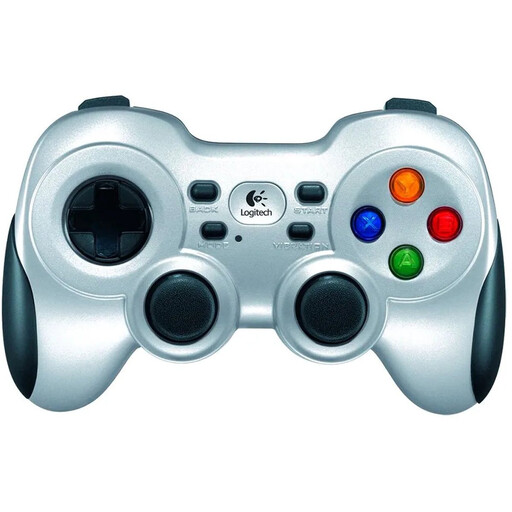
Logitech F710 Wireless Gaming Controller for PC Silver
The product name mentions wireless use and PC. Check that your PC game supports the connection and controller layout.
Joybuy
 No image available
Nintendo Switch 2 Official Pro Controller Black
For Switch 2 games that support a Pro Controller. Nintendo lists a directional button, motion controls and estimated battery life of around 40 hours; this model works with Switch 2 only.
Joybuy
Frequently asked questions
Can two players each use one Joy-Con 2?
Yes, if the game supports that play style. Nintendo UK explains that each player can use a Joy-Con 2 held horizontally on its own. Check the instructions for the game you want to play.
Does Bluetooth automatically work from your sofa?
No. Bluetooth doesn’t guarantee a particular range in your living room. Obstacles can weaken a wireless signal, so test the controller from where you usually sit, with the console or receiver in its usual position.
How do I charge an extra Switch controller?
It depends on the model. Nintendo lists the supplied USB charging cable for the Switch 2 Pro Controller. Original Joy-Cons used wirelessly with Switch 2 need a suitable charging accessory. Check your controller’s charging requirements.
What are my rights if I’m unhappy with an online purchase or my controller is faulty?
In the Netherlands, online purchases usually come with a statutory 14-day cooling-off period, subject to exceptions and conditions. If a product is faulty, contact the seller for a solution. A manufacturer’s warranty is in addition to your statutory rights and doesn’t replace them.


