Which setup is right for you?

Switch players sharing controllers

If you want to play together with minimal extra kit, check whether each game supports one Joy-Con per player. Nintendo describes this option for Super Mario Bros. Wonder, but the available play styles vary from game to game.

PC players with their computer by the TV

Your controller needs to work with your PC, the connections available and the local multiplayer game. Microsoft and 8BitDo list different platforms for each model and connection type, so check the exact controller and connection mode.

Console players looking for an extra gamepad

If you already have a PS5, Xbox or Switch, choose an extra controller that works with both your console and the game. A shared brand name or wireless feature doesn’t, on its own, confirm compatibility.

What should you look for when choosing?

Separate Joy-Con or Joy-Con 2

A good fit when: the Switch game supports each player using one Joy-Con held horizontally.

Bear in mind: there’s less room for your hands and fewer buttons than on a full-size controller; older Joy-Con can’t be attached to a Switch 2.

Full-size wireless controller

A good fit when: each player needs a full-size controller for a supported console or PC.

Bear in mind: compatibility varies by model; the Xbox Wireless Controller uses AA batteries.

Wired or 2.4 GHz for PC

A good fit when: you’re playing on a PC and can use a cable or a USB port for a receiver.

Bear in mind: cable reach and available ports; on Windows, the 8BitDo Ultimate 2C Wireless uses a cable or 2.4GHz receiver, not Bluetooth.

Wired Switch 2 controller

A good fit when: you want an extra full-size controller and can run a cable to your seat.

Bear in mind: the cable takes up space and needs to reach your seat.

What to consider What to check before buying Who is this important to?
Compatibility Check the exact controller model, your device and the controller layout supported by the game. If my console or game doesn’t recognise the controller, I can’t join in. Around 33% of consumers give compatibility with their device and game top priority.
Number of players Check the maximum number of local players and how many controllers the game needs per player. If we want to play together, I need to know whether the Joy-Con I already have will be enough. Around 27% of consumers prioritise the number of players they need to support.
Connection and power Check the cable reach, available USB ports and battery type for the version you’re buying. For a compact TV setup, I’d rather not have cables or receivers in the way, and charging or batteries need to suit my setup. Around 20% of consumers prioritise these practical connection and power considerations.
Controls and grip Compare how easy it is to reach the directional and action buttons, and how much room there is for your hands. When I play platform games, I want buttons and a grip that suit the way I play. Around 20% of consumers put platform-game controls first.

Common buying mistakes

  • Assuming every Bluetooth controller works with every console

    Support depends on the exact model and device. For example, 8BitDo lists different connection options for Windows and Android for the Ultimate 2C Wireless.

    Compare the model name with the manufacturer’s compatibility information and your game’s requirements.

  • Buying extra controllers without counting the Joy-Con you already have

    Some Switch games support one separate Joy-Con per player, but not every game supports the same play style.

    First, check the game’s maximum number of local players and its controller layout.

  • Assuming USB-C means the controller has a built-in battery

    The connection type alone doesn’t tell you what kind of battery the controller uses. The Xbox Wireless Controller runs on AA batteries.

    Check the power specifications for the exact version and factor in any batteries or separate charging solution you’ll need.

Brands to consider

Nintendo

Joy-Con, Joy-Con 2 and Pro Controllers are designed for their respective Switch systems. The choice between shared Joy-Con and a full-size controller also depends on the game.

  • For Super Mario Bros. Wonder, Nintendo lists both separate Joy-Con and Pro Controllers as options.
  • Older Joy-Con can be paired wirelessly with Switch 2, but can’t be attached to the system. Check how to charge them, too.

Microsoft Xbox

The Xbox Wireless Controller is an option for supported Xbox consoles, Windows PCs and mobile devices listed by Microsoft.

  • Microsoft lists Bluetooth and a hybrid D-pad.
  • The controller uses AA batteries. For other consoles, check compatibility for the exact model.

Sony PlayStation

DualSense is designed for PS5 and can also be used with supported PCs, Macs and mobile devices.

  • Sony describes pairing via USB and Bluetooth.
  • According to Sony, haptic feedback on PC requires a game that supports it and a USB connection; features don’t work on every device.

8BitDo

Compatibility varies by controller, so choose based on the exact model, not just the brand name.

  • For the Ultimate 2C Wireless, 8BitDo lists a D-pad, Hall Effect sticks and different connection options for each platform.
  • The Ultimate 2C Wireless and Pro 2 have different platform lists; the Ultimate 2C Wireless isn’t a Switch controller.

PowerA

The licensed Advantage Wired range is a wired option for Nintendo Switch 2.

  • PowerA lists Hall Effect sticks and an included 10-foot USB-C cable for this range.
  • A wired controller needs room for its cable; the features listed don’t, on their own, confirm that every game is supported.

Controllers at Joybuy

This selection includes controllers for Nintendo Switch systems, including Switch 2, and PS5. Before buying, check that the exact model works with your device and your game’s multiplayer setup.

Nintendo Switch Joy-Con pair in neon red and neon blue

Nintendo Switch Joy-Con pair, neon red and neon blue

Suitable for a Switch setup where two players can use separate Joy-Con; check that the game supports this play style.

The product description lists wireless use, HD Rumble and up to 20 hours of play time per charge.

View at Joybuy

Turtle Beach Afterglow Wave wireless controller, transparent edition

Turtle Beach Afterglow Wave Wireless Controller, transparent

A full-size wireless controller for the Switch systems listed for this version; check that it works with your game and console version.

Turtle Beach lists Bluetooth, TMR sticks and up to 40 hours of battery life. The controller has four RGB modes and two programmable buttons.

View at Joybuy
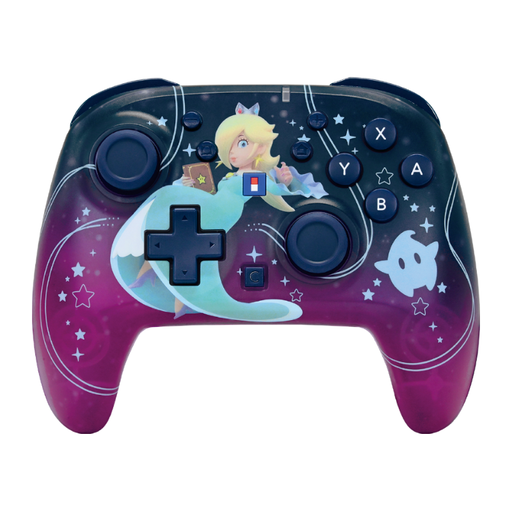
HORI Super Mario Galaxy Horipad Turbo wireless controller

HORI Super Mario Galaxy Horipad Turbo

A wireless controller for the listed Nintendo Switch systems, including Switch 2; check that your game supports it.

The product description lists Bluetooth, motion controls, button mapping, a C button and up to 10 hours of battery life.

View at Joybuy

PlayStation DualSense Wireless Controller Grand Theft Auto VI White Limited Edition

PlayStation DualSense Wireless Controller, Grand Theft Auto VI White Limited Edition

Suitable for a PS5 setup; the product title also mentions PC, Mac and mobile devices, but check which features your game and device support.

The product description lists haptic feedback, adaptive triggers and USB-C or Bluetooth connectivity.

View at Joybuy

Nintendo Switch 2 Pro Controller in black

Nintendo Switch 2 Pro Controller, black

A full-size controller for a Switch 2 setup; check that the controller type suits the game’s local multiplayer options.

The product description lists Bluetooth, a rechargeable battery and motion controls.

View at Joybuy

Frequently asked questions

Are two Joy-Con always enough for two players?

No, it depends on the game. Nintendo describes using one Joy-Con held horizontally per player for Super Mario Bros. Wonder, but the supported play style varies from game to game. Check before buying extra controllers.

Can I use an existing Switch Joy-Con with Switch 2?

According to Nintendo, you can pair older Joy-Con wirelessly with Switch 2, but you can’t attach them to the system. You’ll need a Switch system or a suitable licensed accessory to charge them.

What should I connect before we start playing?

Pair the controllers following your system’s instructions, then choose a supported controller type for each player in the game. If you’re using a 2.4GHz PC controller, check that the receiver fits into an available USB port. For a wired model, make sure the cable reaches your seat.

Do I always have to pay for a faulty controller after two years?

No. ACM ConsuWijzer explains that Dutch statutory warranty doesn’t have a fixed two-year limit: the lifespan you can reasonably expect depends on factors including the product and normal use. The retailer is your point of contact; a commercial warranty doesn’t replace your statutory rights.

What safety information is relevant for a wireless controller?

The Dutch Authority for Digital Infrastructure describes requirements for radio equipment sold in the EU, including CE marking when the relevant requirements have been met. For a specific model, check the product marking and accompanying information; a statement on a webpage alone doesn’t prove that the individual product meets all the requirements.
