Choose a controller that works with both your console or PC and the platform game you want to play. The right choice will therefore depend on your system and the game. Then count how many players need their own controls at the same time, and weigh up the freedom of wireless play against battery management or the practical reach of a cable.
Who are these controllers for?
Playing together on Switch
You want to make sure every player has a controller, and check whether your platform game supports a single Joy-Con or requires a full controller. Nintendo explains that the controller options available can vary from game to game.
Playing from the sofa on PS5 or Xbox
You’re looking for an extra controller that works with your console, and want to know how many players can join in at once and how to connect or power the controllers. PlayStation supports up to four controllers at the same time on PS5; also check the game’s player limit.
Platform games on a PC connected to the TV
You connect a PC to a large screen and check which controller, connection and features each game supports. The features available may depend on the game and the connection.
What should you look for when choosing?
First check compatibility with your system and game. Then count how many controllers you need and decide whether wireless or wired play suits the distance from your seat.
| What to consider |
What should you check? |
Who is this important for? |
| System and game |
Check the console generation, PC support and the controller options for the specific game. |
If I play on a PC or console, I want to be sure the controller works with both my system and the game. Around 36% of consumers put compatibility first. |
| Controls for each player |
Check the local player limit and whether the game supports a single Joy-Con as a controller. |
When several players are playing together, I want to know whether everyone can join in with a single Joy-Con or needs a full gamepad. Around 29% of consumers prioritise having enough suitable controllers for every player. |
| Playing from the sofa |
Check which wireless connection is supported, or the cable length and route for the exact model. |
If the screen is further from where I sit, I want to be able to move freely or know in advance whether a cable will reach. Around 21% of consumers prioritise controls that suit their seating position. |
| Power and usage |
Check whether the controller is rechargeable, uses batteries or is wired, and whether any required cables are included. |
For longer gaming sessions, I want to know whether I’ll need to recharge it, have batteries ready or play with a cable. Around 14% of consumers prioritise power and ease of use after purchase. |
Things to watch out for when buying
-
Don’t assume every Switch controller works with every generation
Nintendo states that Joy-Con 2 and the Switch 2 Pro Controller do not work with the original Nintendo Switch. Older Switch controllers may have limitations on Switch 2, including when charging or attaching them.
Before buying, check the full model name and console generation. For older controllers, also check their limitations when used with Switch 2.
-
Don’t confuse the number of controllers with the game’s player limit
The number of controllers connected doesn’t determine how many players a particular game supports. Nintendo lists a maximum of four local players on one Switch or Switch 2 system for Super Mario Bros. Wonder.
Check your game’s local play mode and controller options before counting how many extra controllers you need.
-
Don’t judge a wired controller on compatibility alone
For the PowerA Enhanced Wired Controller – Heroic Link reviewed here, PowerA specifies a detachable 3 m cable. According to PowerA, this model works with Switch 2 when the console is docked, and does not have motion controls.
Measure the route to your seat and check the features of the exact model and game. Don’t assume other models have the same cable length or features.
-
A manufacturer’s warranty doesn’t replace your statutory rights
ACM ConsuWijzer distinguishes between an additional manufacturer’s or seller’s warranty and your right to a product that meets what you can reasonably expect.
Keep your proof of purchase and contact the seller if a product develops a fault too soon during normal use.
Relevant brands and controller ranges
Nintendo
Joy-Con, Joy-Con 2 and Pro controllers are designed for different Switch generations and ways of playing.
- Nintendo explains that a single Joy-Con can be used as a controller in games that support this option.
- Joy-Con 2 and the Switch 2 Pro Controller do not work with the original Switch; older Switch controllers have limitations on Switch 2.
PlayStation
DualSense is designed for PS5 and compatible games on supported PCs.
- PlayStation supports up to four controllers at the same time on PS5.
- On PC, features depend on the game and connection; USB is required for supported haptic feedback.
Xbox
The Xbox Wireless Controller is designed for supported Xbox consoles and Windows PCs.
- The official product information lists Bluetooth, a hybrid D-pad and button mapping.
- Xbox warns that Bluetooth reliability partly depends on the PC’s Bluetooth card. Remember to factor in the batteries you’ll need, too.
8BitDo
Compatibility varies by model, so check the exact model and firmware requirements.
- According to 8BitDo, the Pro 2 works with Switch and Windows; Switch 2 support is available after a firmware update.
- According to 8BitDo, the Ultimate 2C Wireless is designed for Windows via 2.4 GHz or cable, and for Android via Bluetooth. This does not confirm support for Switch.
PowerA
The range includes wired Switch controllers, among other options; features vary by model.
- For the Enhanced Wired Controller – Heroic Link, PowerA specifies a detachable 3 m cable and use with Switch 2 when the console is docked.
- PowerA states that this model does not have motion controls or HD rumble; don’t assume other models share these features.
Controllers at Joybuy
These controllers suit different Switch, PS5, Xbox and Windows PC gaming scenarios for playing together; check how many controllers each game requires.
 No image available
Nintendo Switch Joy-Con Controller Pair – Neon Red/Neon Blue
A pair for supported Switch games where each Joy-Con can be used as a controller on its own.
Wireless; the product description lists up to 20 hours of play per charge, HD Rumble and motion sensors. Whether each Joy-Con can be used independently depends on the game.
View at Joybuy
 No image available
Nintendo Switch 2 Joy-Con 2 Pair – Light Blue/Light Red
For Switch 2 games that support single Joy-Con controls; Nintendo states that Joy-Con 2 does not work with the original Switch.
The product information lists wireless use, wrist straps, HD Rumble 2 and motion controls. The description gives up to 20 hours of play; how each player uses the controllers depends on the game.
View at Joybuy
 No image available
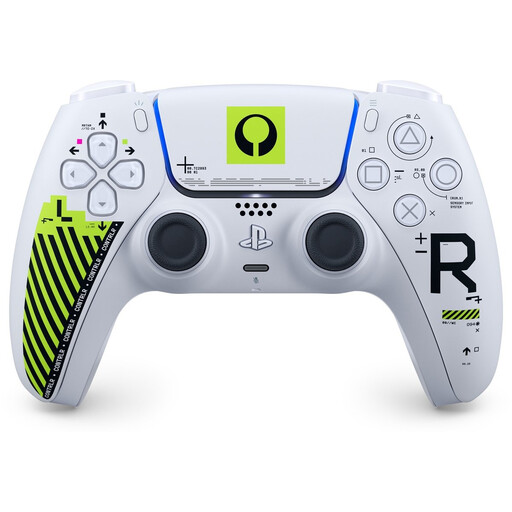
Sony PS5 DualSense Wireless Controller – Marathon Limited Edition
For an extra player on PS5 or for a PC game that supports this controller.
The product information lists Bluetooth and USB-C. PlayStation says that available PC features depend on the game, and that a USB connection is required for supported haptic feedback.
View at Joybuy
 No image available
Xbox Wireless Controller – Robot White
For an extra player on a supported Xbox console or Windows PC; check that your game supports it.
The product information lists Bluetooth and USB-C. Wireless use requires AA batteries; the description gives up to 40 hours of battery life.
View at Joybuy
 No image available
Nintendo Switch Pro Controller – Black
A full wireless gamepad for one player in a supported Switch game. Nintendo lists limitations for older Switch controllers when used with Switch 2.
The product information lists a built-in battery, motion controls, HD Rumble and amiibo functionality.
View at Joybuy
Frequently asked questions
Can two players each use one Joy-Con?
Yes, if the game supports this way of playing. Nintendo lists Joy-Con and Joy-Con 2 held individually and horizontally as options for Super Mario Bros. Wonder; up to four players can play locally on one Switch or Switch 2 system. Check other games individually.
How do I connect extra controllers before everyone sits down?
Connect them to your chosen system in advance, then check in the game which controller each player is using. Nintendo describes pairing the Switch 2 Pro Controller using the SYNC button or USB; PlayStation recommends using a USB cable for the initial PS5 pairing.
Do all DualSense features work wirelessly on a PC?
No, don’t assume they do. According to PlayStation, PC features depend on the game and device; a USB connection to the PC is required for supported haptic feedback.
What if I’m not happy with a controller I bought online, or it breaks too soon?
For an online purchase in the Netherlands, ACM ConsuWijzer says you usually have up to 14 days after delivery to change your mind, subject to statutory exceptions. Separately, you’re entitled to a product that does what you could reasonably expect; if it develops a fault too soon during normal use, the seller must provide a solution according to ACM.


