Who is this guide for?

Snowboard gamer with limited connections

You want to play without constantly needing another socket or USB port. So compare the connection type, power source and charging options. For example, you can charge the Nintendo Switch Pro Controller using a powered dock with a spare USB port.

Console player looking for compatibility

You want your controller to work with your Xbox, PS5 or Switch, as well as the snowboard game you’re playing. A wireless connection alone doesn’t tell you whether a specific combination is supported.

Player weighing up the controls

You’re considering sticks, triggers and other controls, but you’ll also want to check whether your chosen game supports those features. For example, PlayStation requires both the game and connection to meet certain criteria for haptic feedback on PC.

What should you look for?

Xbox Wireless Controller

Choose this if: you play on an Xbox or a Windows PC with Bluetooth, and your game supports the controller.

The trade-off: AA batteries can let you play without connecting a charging cable to the controller. According to Xbox, rechargeable AA batteries can’t be charged in the controller.

Nintendo Switch Pro Controller

Choose this if: your snowboard game runs on a supported Switch system and you can charge the controller between gaming sessions.

The trade-off: Nintendo quotes around 40 hours of battery life, depending on use, and around six hours for a full charge. Charging via the dock requires a powered dock and a spare USB port.

PlayStation DualSense

Choose this if: you play a supported PS5 game or a compatible game on PC.

The trade-off: according to PlayStation, haptic feedback on PC requires both game support and a USB connection. So don’t count on this feature if you specifically want to play wirelessly.

8BitDo Ultimate 2C

Choose this if: you’re considering the Bluetooth version for a supported Switch system, or the Wireless version for Windows and have a spare USB-A port.

The trade-off: the models differ in platform compatibility and connection type. According to 8BitDo, the Wireless version uses a 2.4 GHz receiver on Windows; with the Bluetooth version, check the system version required too.

What to consider What to check before buying Who is this important for?
Compatibility Check the full model name, the supported system and whether your snowboard game supports the controller. I want to be sure both my console and the specific snowboard game I play support the controller; around 36% of consumers put compatibility first.
Connections Work out whether you’re short of a socket, a USB port or both. Check whether the connection needs a dongle and where you can charge the controller. If I can’t spare another connection, I want to know how I can play wirelessly and when charging will be needed; around 29% of consumers prioritise keeping connections free.
Controls Compare the buttons and sticks with your game’s controls. Check whether both the game and your chosen connection support any special features. I want a controller with controls that suit my game, without paying extra for features that won’t work with it; around 21% of consumers prioritise in-game controls.
Batteries and charging Check what’s included in the box and whether you’ll need to replace batteries, charge them separately or charge the controller between gaming sessions. If I want to avoid extra steps or purchases, I’ll compare the power source and charging options first; around 14% of consumers give battery maintenance and ongoing costs top priority.

Common buying mistakes

  • Assuming ‘wireless’ means ‘no USB port needed’

    According to 8BitDo, the 8BitDo Ultimate 2C Wireless uses a USB-A receiver on Windows; the Bluetooth mode mentioned is for Android. So a wireless connection can still take up a port.

    Check the connection mode for your platform, not just whether the product name or description says ‘wireless’.

    Keep a USB-A port free for the receiver while you play.

  • Assuming every Xbox controller has a built-in rechargeable battery

    Xbox describes AA power and a separate rechargeable battery option. So check the exact version and what’s included before relying on a particular way to charge it.

    Check which power source comes with the product you choose. According to Xbox, rechargeable AA batteries can’t be charged in the controller.

    Depending on what you choose, you may need replacement AA batteries, an external charger or a separate battery pack.

  • Confusing controller features with game features

    PlayStation says haptic feedback on PC only works if the game supports it and the DualSense is connected via USB.

    Before choosing a controller for haptic feedback, check your snowboard game’s features and the connection required.

Relevant brands

Xbox

The Xbox Wireless Controller is suitable for supported Xbox consoles and Windows PCs, depending on the connection you choose.

  • Xbox describes Xbox Wireless for consoles and Bluetooth for Windows.
  • AA batteries can’t be charged in the controller; rechargeable AA batteries need an external charger.

Nintendo

The Switch Pro Controller is for players with a supported Switch system who can charge it between gaming sessions.

  • Nintendo quotes around 40 hours of battery life, depending on use.
  • Charging via the dock requires a powered dock and a spare USB port; Nintendo quotes around six hours for a full charge.

PlayStation

The DualSense is an option for PS5 and compatible games on PC, but consider which connection you want to use.

  • PlayStation documents Bluetooth and USB connections with PC.
  • Haptic feedback on PC requires game support and a USB connection.

8BitDo

The Ultimate 2C Bluetooth and Ultimate 2C Wireless are different options for different platforms and connections.

  • 8BitDo lists the Bluetooth version for supported Switch systems.
  • The Wireless version uses a 2.4 GHz receiver on Windows, which takes up a USB-A port.

Controllers at Joybuy

This selection at Joybuy includes controllers for a range of console and PC setups. Check that your snowboard game is supported by each model, and find out how the controller connects and charges.

Xbox Wireless Controller for Xbox Series/PC - Ice Breaker Special Edition

Xbox Wireless Controller for Xbox Series/PC - Ice Breaker Special Edition

An option to compare for Xbox Series or PC; check that the connection and your snowboard game suit your setup.

Xbox describes AA power for Xbox Wireless Controllers. According to Xbox, rechargeable AA batteries can’t be charged in the controller.

View at Joybuy
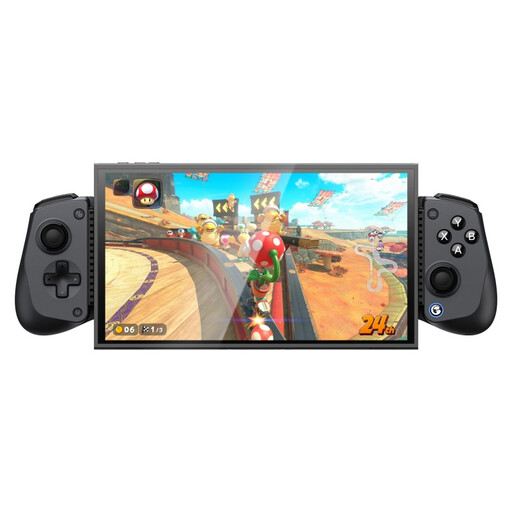
GameSir X5s Bluetooth controller for Switch 2, Android, iOS and PC

GameSir X5s Bluetooth controller for Switch 2, Android, iOS and PC

The product name mentions Bluetooth and support for Switch 2, Android, iOS and PC; check that your snowboard game works on your chosen device.

The product name mentions a Hall Effect joystick. Check the model and game compatibility before basing your choice on this feature.

View at Joybuy

PlayStation DualSense wireless controller, Marvel’s Wolverine Battle Yellow Limited Edition

PlayStation DualSense - Marvel's Wolverine Battle Yellow Limited Edition

A DualSense edition for a supported PS5 game; check that your snowboard game supports the controller.

For haptic feedback on PC, PlayStation lists both game support and a USB connection as requirements.

View at Joybuy

Nintendo Switch Pro Controller, black

Nintendo Switch Pro Controller - Black

An option for a snowboard game on a supported Switch system. Nintendo quotes around 40 hours of battery life for the Switch Pro Controller, depending on use.

Nintendo quotes around six hours for a full charge. Charging via the dock requires a powered dock and a spare USB port.

View at Joybuy

Nintendo Switch 2 Official Pro Controller, black

Nintendo Switch 2 Official Pro Controller - Black

The product name specifies Nintendo Switch 2. Check that your snowboard game and chosen controller combination are supported by your system.

Also check which charging option suits your version and gaming setup.

View at Joybuy

Frequently asked questions

Does wireless mean you don’t need a socket or USB port?

Not always. Battery power can let you play without a charging cable connected to the controller, but batteries may need replacing or charging separately. A wireless PC connection may also need a USB receiver, so check the power source and connection separately.

Can you charge rechargeable AA batteries in your Xbox controller?

No. According to Xbox, rechargeable AA batteries can’t be charged in the controller. A separate rechargeable battery pack is another option; check what’s included with the version you choose.

How can you charge and pair a Switch Pro Controller without a separate wall charger?

Nintendo explains that you can charge it using the supplied cable and a spare USB port on a powered Switch dock. You can pair it via USB or, when the system is switched on, using the synchronisation button. Check the instructions for your Switch model.

Do DualSense features work wirelessly in your PC snowboard game?

Not necessarily. According to PlayStation, haptic feedback on PC requires support from the game and a USB connection.

What warranty and cooling-off period apply to an online purchase in the Netherlands?

According to the Dutch government, there is no fixed statutory period for the legal guarantee in the Netherlands; if a product is faulty, contact the seller. Many online distance purchases come with a 14-day cooling-off period. The cooling-off period and your rights if a product is faulty are separate matters, so check whether the cooling-off period applies to your purchase.
