
Vandaag of morgen in huis

Kwaliteit gegarandeerd

Welkomstaanbiedingen ontgrendelen: GRATIS bezorging | Tot 80% korting | Gratis 30 dagen JoyPlus-proefperiode
Download de app
A smartphone gimbal can reduce shaky footage, track your subject and also double as a selfie stick tripod. However, not every model is suitable for every phone or filming style. A compact phone stabiliser for holiday videos has different requirements from an AI gimbal for a phone used daily for livestreams.
The biggest pitfalls are often not the eye-catching features, but the details.
A gimbal with tracking can be useful for vlogs, presentations and video calls. However, brands sometimes list a large number of compatible apps, while certain functions depend on iOS, Android, the app you use and the firmware. Before buying, check that tracking works in the app you actually use.
The Insta360 Flow 2 Pro Bundle is described as offering native tracking via Apple DockKit in more than 200 compatible iOS apps. This does not automatically mean that every function is available on every Android device.
A MagSafe-compatible mount is practical for compatible iPhones and cases. Android phones often require a magnetic ring or phone clip. Also consider the combination of phone case, weight and magnetic mount. A case that is too smooth or heavy can affect stability.
Strong magnets should be kept away from pacemakers and other implanted medical devices. This is included as a safety warning with various magnetic phone stands.
A foldable gimbal or mini phone tripod is easy to carry, but usually has a small footprint. On uneven ground or in windy conditions, an extended selfie stick can become top-heavy. For outdoor use, a low centre of gravity is more important than simply having a low weight.
A 2-axis smartphone stabiliser may be suitable for simple movements and everyday use. A 3-axis gimbal generally compensates for more directions of movement and is particularly useful for walking vlogs, travel videos and livestreams. Also look at the phone holder’s range of movement. A phone that touches the arm or holder limits usability, even when the motor is technically powerful enough.
Check:
The Ulanzi MA38 states that it supports iPhone 12 through to iPhone 17 with MagSafe, as well as Android phones with a ring. According to the product information, the stated maximum load is around 400 to 450 grams, depending on the phone. Never use a gimbal above its stated capacity.
For travelling and everyday carrying, foldable gimbals and lightweight phone stands are practical. According to the product specifications, the Ulanzi MA38 weighs approximately 108 grams. A more advanced model, on the other hand, may offer features such as a built-in phone tripod, selfie stick, power bank or remote control.
Pay attention to the conditions attached to battery claims. Tracking, lighting and Bluetooth can increase power consumption. According to the product description, the Insta360 Flow 2 Pro offers up to 10 hours of use, but actual battery life depends on the settings, phone and surroundings.
The recommendations below are based on verifiable features from the product descriptions, such as weight, mounting method, stabilisation, tracking, features and foldability.
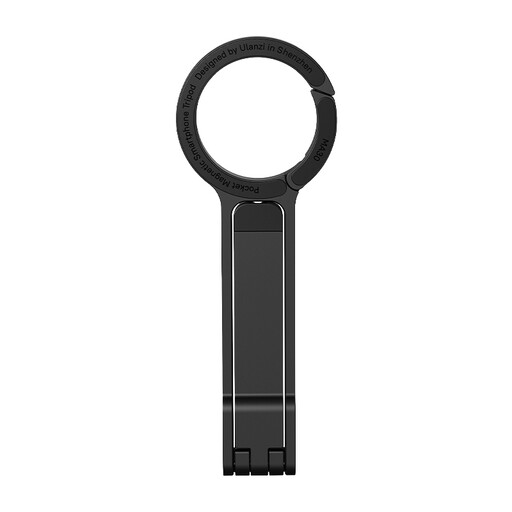
Why it suits this profile: A straightforward choice for anyone looking for a phone tripod, grip and mini selfie stick in one compact accessory for travel, video calls and spontaneous videos.
The product description mentions a foldable design, MagSafe mounting and support for portrait and landscape orientation. According to the information provided, Android devices require a MagSafe ring.
3-in-1 use, aluminium housing, compact size and a carabiner for attaching the accessory to a bag or belt.
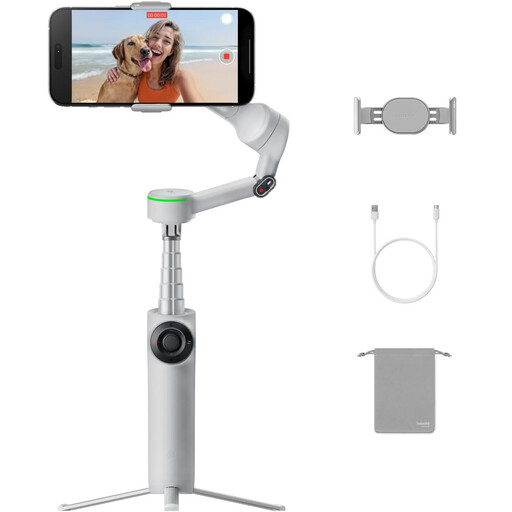
Why it suits this profile: Designed for vloggers, influencers and livestreamers who need tracking, a built-in tripod and more control over framing.
The product information lists 3-axis stabilisation, multi-person tracking and Apple DockKit support. However, check compatibility with your phone and apps beforehand.
AI tracker with spotlight, 360° pan tracking, built-in selfie stick and phone tripod, plus a stated battery life of up to 10 hours.
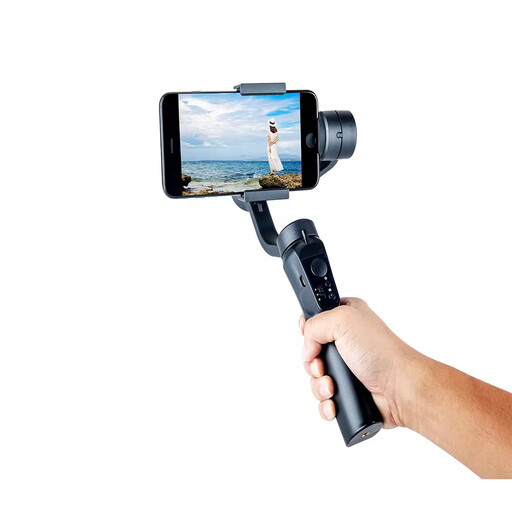
Why it suits this profile: An appealing option for creators looking for a foldable gimbal for vlogging, travel and livestreams, with physical buttons and tracking features.
The product specification states a phone width range of 67 to 84 mm, 2-axis stabilisation and a stated battery life of up to 8 hours. Measure your phone with its case attached.
Foldable design, USB-C charging, joystick control and listed modes such as ActiveTrack, gesture control, panorama and time-lapse.
We have put together a complete, up-to-date list of products that fully meet these strict selection criteria and the applicable European safety regulations.
No. Check the phone width, weight, operating system and app support. MagSafe models are mainly suitable for compatible iPhones and cases straight out of the box. Android phones may require a ring or clamp.
It can be, but the tracking function must be supported by the app you use. A built-in phone tripod and remote control are particularly useful when you want to operate the phone from a distance. Also check that the phone has enough battery remaining during the call.
Its lifespan depends on charging habits, hinges, motor load and storage. Carry a foldable gimbal in a bag, avoid dropping it and do not exceed the maximum load capacity. With magnetic models, a secure attachment is at least as important as the theoretical battery life.
